Automate Social Media Posting with n8n (Multi-Platform)

This technical breakdown contains affiliate links. If you deploy this stack using my links, I earn a commission at no extra cost to you.
By Alfaz Mahmud Rizve | RevOps & Full Stack Automation Architect at whoisalfaz.me
If you have been executing the blueprints in this 30 Days of n8n & Automation sprint, your pipeline is currently processing serious data. You have built Facebook Lead Capture pipelines (Day 13), an Automated Rank Tracker (Day 16), and a Content Research Engine (Day 15).
When you test these workflows in the n8n editor, they work flawlessly. You click "Execute," the green checkmarks appear, and you feel like an engineering genius.
But if you are deploying these into a live agency environment, you have likely hit "The Wall."
It usually happens at 3:00 AM. A client launches a massive ad campaign. Fifty webhooks hit your server simultaneously. The OpenAI API experiences a minor timeout. Suddenly, the execution hangs. Your database locks. The server CPU spikes to 100%. You wake up not to a beautifully populated CRM, but to an angry Slack message from a client asking why their leads are missing.
This is what I call The Reliability Gap.
It is the dangerous, invisible distance between a "Toy Automation" built on a local machine and a true n8n production workflow. Most operators never cross this gap. They stay stuck on basic tiers, wondering why their automations feel fragile when subjected to real-world stress.
Today, we transition from building workflows to building infrastructure. We are going to stop building toys and architect Agency-Grade Systems.
Phase 1: The Anatomy of a Workflow Failure
When you start with n8n, you likely deploy on the Cloud Starter tier or a cheap shared hosting plan. It makes sense for testing. But when you attempt to push high-volume commercial data through it, you run into two strict engineering bottlenecks.
Enemy #1: The "Retry" Dilemma (The Cost of Resilience)
An agency-grade workflow must be defensive. If an external API (like HubSpot or Brevo) returns a 503 Service Unavailable error, your workflow should not crash. It should suspend itself, wait 5 seconds, and try again.
But here is the mathematical trap of "Execution-Based" pricing models:
- If you build a polling workflow that checks for data every 10 minutes, that is 4,320 executions per month.
- If you implement proper "Retry on Fail" loops to ensure data delivery, you are effectively doubling or tripling your execution count during unstable network periods.
- If your plan is hard-capped at 5,000 executions, you cannot afford to be reliable. You are financially forced to disable your error-handling loops to save credits. You end up paying for your cheap hosting with your agency's reputation.
Enemy #2: The "Single Lane" Traffic Jam (SQLite & Monolithic Mode)
By default, standard n8n instances run in "Monolithic Mode" using a default SQLite database. This means the Webhook Listener, the UI Editor, and the Execution Worker are all jammed into a single Node.js process.
Because Node.js is single-threaded, and SQLite locks the entire database when writing, you create a catastrophic traffic jam:
 Click to expand
- Your server receives a webhook to process a heavy 15MB PDF invoice.
- The single worker thread begins processing the PDF. The SQLite database locks.
- While it is processing, three new Facebook Lead Ads webhooks arrive.
- Because the worker is busy and the database is locked, the new webhooks are placed in a queue. If the PDF takes too long, those webhooks time out, and the leads are permanently lost.
You cannot build a scalable agency on a foundation of SQLite and single-threaded workers.
Phase 2: The Enterprise Architecture (Queue Mode)
To close the Reliability Gap, we do not add more nodes to the canvas. We change the underlying server architecture entirely. We must transition n8n into Queue Mode.
Queue Mode physically separates the components of n8n into distinct microservices, utilizing PostgreSQL (for parallel database writing) and Redis (as an in-memory message broker).
How it works in an agency environment:
n8n-webhook process catches it instantly. It does not process it. It simply wraps the payload into a "Job," tosses it into the Redis memory bank, and immediately goes back to listening.n8n-worker processes running in the background. They constantly monitor Redis. When a job appears, a worker grabs it and executes the workflow.If Worker 1 gets stuck processing a heavy PDF, Worker 2 and Worker 3 seamlessly pick up the slack to process the incoming Facebook leads. Your system becomes virtually un-crashable.
Phase 3: The Infrastructure Mandate (Hard Prerequisite)
You cannot run a multi-container Docker stack with Postgres, Redis, and multiple Node.js workers on a basic $5 shared host or a local laptop. It will run out of RAM instantly and crash.
To execute Queue Mode, you must deploy a Virtual Private Server (VPS) with high-speed NVMe storage. Automation is incredibly JSON-heavy; parsing thousands of nested JSON arrays requires fast CPU clock speeds and rapid disk read/write capabilities.
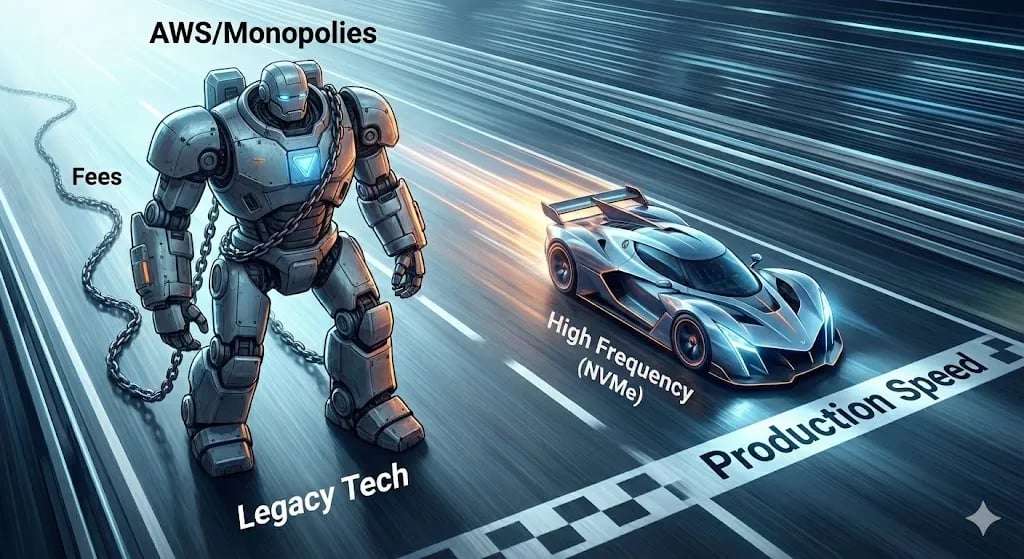
Many beginners instinctively run to AWS (Amazon) or Google Cloud. This is an operational mistake. AWS has hidden bandwidth fees, charges massive premiums for basic CPU bursts, and requires a degree in cloud architecture just to configure the VPC networking.
The Architect's Standard: Vultr High Frequency
At whoisalfaz.me, I standardize all client infrastructure on Vultr. Their High Frequency compute instances utilize 3.0 GHz+ processors and NVMe SSDs, meaning complex JavaScript arrays process roughly 30-40% faster than on a standard DigitalOcean droplet, for the exact same price.
You must provision your infrastructure before we can write the deployment code.
 Click to expand
To build this architecture without risking your own capital, use my partner link to provision a High Frequency instance. 👉 Click Here to Claim $300 Vultr Credits
(Note: You must select an instance with at least 4GB of RAM (roughly $24/mo, covered entirely by your credit) to handle the Redis and Postgres overhead safely. Choose Ubuntu 24.04 LTS as your operating system).
Phase 4: Deploying the Agency-Grade Stack (Docker Compose)
SSH into your new Vultr server. We are going to deploy the complete n8n production workflow architecture using Docker Compose.
Step 1: Install Dependencies
Run the following commands to update your server and install Docker:
apt update && apt upgrade -y
apt install docker.io docker-compose -y
Step 2: The Architecture File
Create a new directory for your n8n deployment and create the docker-compose.yml file.
mkdir n8n-production && cd n8n-production
nano docker-compose.yml
Paste the following architectural configuration. This script deploys Postgres, Redis, the n8n main instance, a dedicated webhook processor, and a background worker.
version: '3.8'

volumes:
  db_storage:
  n8n_storage:
  redis_storage:

services:
  postgres:
    image: postgres:11
    restart: always
    environment:
      - POSTGRES_USER=n8n_db_user
      - POSTGRES_PASSWORD=your_secure_password
      - POSTGRES_DB=n8n_database
    volumes:
      - db_storage:/var/lib/postgresql/data

  redis:
    image: redis:6-alpine
    restart: always
    volumes:
      - redis_storage:/data

  n8n:
    image: n8nio/n8n
    restart: always
    environment:
      - DB_TYPE=postgresdb
      - DB_POSTGRESDB_HOST=postgres
      - DB_POSTGRESDB_PORT=5432
      - DB_POSTGRESDB_DATABASE=n8n_database
      - DB_POSTGRESDB_USER=n8n_db_user
      - DB_POSTGRESDB_PASSWORD=your_secure_password
      - EXECUTIONS_MODE=queue
      - QUEUE_BULL_REDIS_HOST=redis
      - WEBHOOK_URL=https://n8n.yourdomain.com
    ports:
      - "5678:5678"
    volumes:
      - n8n_storage:/home/node/.n8n
    depends_on:
      - postgres
      - redis

  n8n-worker:
    image: n8nio/n8n
    restart: always
    command: worker
    environment:
      - DB_TYPE=postgresdb
      - DB_POSTGRESDB_HOST=postgres
      - DB_POSTGRESDB_PORT=5432
      - DB_POSTGRESDB_DATABASE=n8n_database
      - DB_POSTGRESDB_USER=n8n_db_user
      - DB_POSTGRESDB_PASSWORD=your_secure_password
      - EXECUTIONS_MODE=queue
      - QUEUE_BULL_REDIS_HOST=redis
    depends_on:
      - postgres
      - redis
Save the file and execute the deployment: docker-compose up -d.
You have just crossed the Reliability Gap. You now own a multi-container, horizontally scalable, enterprise-grade automation engine.
Phase 5: The Three Layers of Production Logic
Owning a Ferrari does not make you a professional driver. Now that you have the infrastructure, you must build your workflows using production logic.
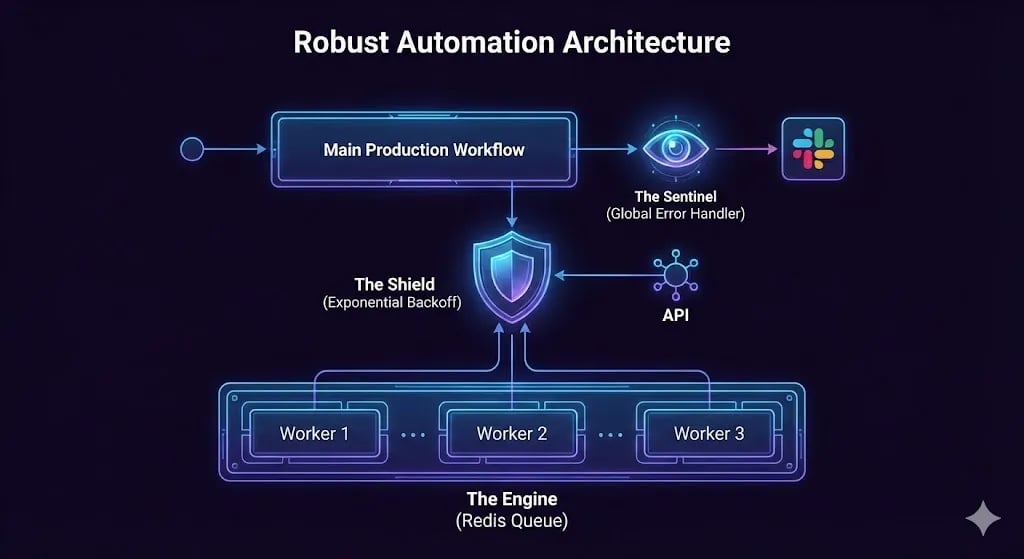
Layer 1: The Sentinel (Global Error Handling)
Never let a workflow fail silently in the dark.
- Build a dedicated workflow that catches errors. (We built the exact Slack Block Kit payload for this in Day 7 (Error Handling Basics)).
- In your newly hosted n8n instance, go to Settings > Error Workflow and assign this Sentinel workflow globally.
Layer 2: The Shield (Exponential Backoff)
APIs will fail. Rate limits will be exceeded. An n8n production workflow expects failure and defends against it mathematically. When configuring an HTTP Request node:
- Open the Node Settings.
- Toggle Retry On Fail to True.
- Max Retries: 3.
- Retry Wait Time: 5000 (5 seconds).
Because you are now self-hosting on Vultr, these retries cost you absolutely nothing.
Layer 3: The Engine (Parallel Processing)
Because your system is now running on Redis, you can safely utilize the Split In Batches node with zero fear of locking your database.
 Click to expand
The Day 17 Mandate: Stop Renting, Start Owning
The "Reliability Gap" is not just a technical limitation; it is a mindset problem.
As long as you are relying on the limitations of a SaaS free tier or the confusing billing metrics of a cloud monopoly, you are renting your business's stability. You are scared to use retries. You are scared to scale your ad spend because you are afraid the webhook listener will crash.
Self-hosting an enterprise stack changes that reality. It gives you the operational freedom to run 100,000 executions, to retry failed API calls 10 times, and to process massive JSON payloads without ever asking a vendor for permission.
That is how you build a resilient agency. That is how you build equity.
You now have the infrastructure. Tomorrow, in Day 18 of our 30 Days of n8n & Automation sprint, we will address the final corporate hurdle. I will show you how to lock down this server and execute Automated Data Privacy & GDPR Compliance Protocols, ensuring your new enterprise stack is legally bulletproof.
Subscribe to the newsletter, and I will see you on the canvas tomorrow.
Core Deployment Stack
To build this exact architecture in production, you will need the core infrastructure. I strictly use and recommend the following enterprise-grade platforms.
n8n Cloud
The most powerful fair-code automation platform. Get 20% off your first year on any paid plan.
Vultr High-Performance Cloud
Deploy self-hosted vector databases & AI infrastructure worldwide. Get $300 in free credit.
Complementary RevOps Toolchain
Brevo (formerly Sendinblue)
Enterprise-grade email API and marketing automation. Excellent SMTP for n8n.
Pinecone Vector Database
The vector database for building AI applications. Essential for RAG architectures.
Qdrant Cloud
Rust-native vector search engine for the next generation of AI. Fast, scalable, and memory-efficient.
In this Article
Ready to automate your agency?
Skip the manual grunt work. Let's build a custom system that runs your business on autopilot 24/7.