n8n AI Receptionist: Twilio Voice Setup [2026 Blueprint]

![n8n AI Receptionist: Twilio Voice Setup [2026 Blueprint]](https://cdn.sanity.io/images/gfd4n1nu/production/2661ca0c66fa7985d61a174596a81e1cdc8125aa-1024x703.webp)
This technical breakdown contains affiliate links. If you deploy this stack using my links, I earn a commission at no extra cost to you.
By Alfaz Mahmud Rizve | RevOps & Full Stack Automation Architect at whoisalfaz.me
TL;DR: Build an n8n AI Receptionist that costs under $0.02/minute to run using Twilio, OpenAI Whisper, and GPT-4o. The system answers inbound calls with a TwiML greeting, records the caller's message, downloads the audio file, transcribes it with Whisper, classifies the urgency with GPT-4o, and triggers a Twilio callback call to your phone if the lead is high-priority. No SaaS subscription needed, full data ownership.
Welcome back to Day 27 of the 30 Days of n8n & Automation series here on whoisalfaz.me.
We have given our AI Vision (Day 15), Hands (Day 25), and Memory (Day 26). But until now, our AI has been locked inside a text box. It cannot interact with the physical world.
Today, we break the silence. We are building an n8n AI Receptionist — a voice-enabled system that lives in your phone number.
The Problem: If you run an agency, consultancy, or service business, you miss calls. Every missed call is a missed revenue opportunity.
- Standard voicemail is a black hole — nobody listens to it.
- Hiring a human receptionist costs $2,500–$4,000/month in salary.
- Paying for commercial voice AI tools costs $0.10–$0.25 per minute.
The Solution we are building today: A custom n8n Voice Bot that answers calls, transcribes the message, evaluates urgency using GPT-4o, and calls you back immediately when a high-priority lead leaves a voicemail — all for approximately $0.015 per minute.
The Tech Stack: The Voice Pipeline
We are combining three battle-tested APIs to create this system:
Prerequisites: A Twilio account with a purchased phone number. Numbers start at $1/month in most countries.
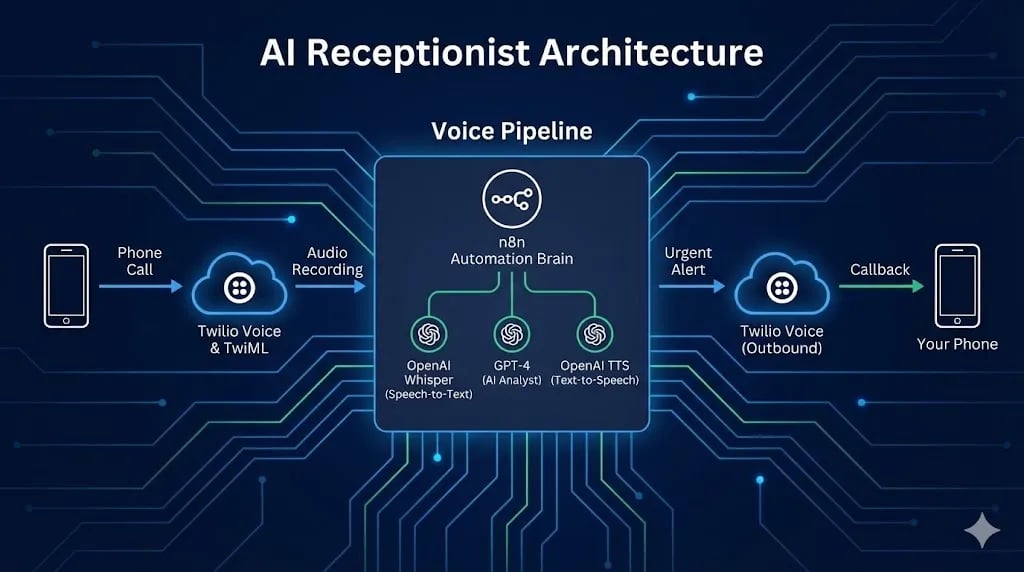 Click to expand
Step 1: The Listening Ear (Twilio Setup)
First, we need to tell Twilio what to do when someone calls your number. We use TwiML (Twilio Markup Language) — XML markup that controls phone behavior, like HTML controls a webpage.
Creating the Webhook
Create a new n8n workflow and add a Webhook node:
- HTTP Method:
POST - Path:
incoming-call - Authentication: None (Twilio will send a signed request, but for simplicity here we trust the path obscurity)
- Copy the Production URL
Configure Twilio
The Greeting (TwiML Response)
When Twilio hits n8n, n8n must immediately respond with TwiML instructions. Connect a Respond to Webhook node to your Webhook trigger:
- Respond With: Text
- Content-Type: Set to
text/xmlin the response headers
Paste this XML as the response body:
<?xml version="1.0" encoding="UTF-8"?>
<Response>
    <Say voice="alice" language="en-US">
        Hi, you have reached Alfaz's AI Assistant.
        He is currently building automation workflows.
        Please state your name and how he can help you after the beep.
        I will analyze your message and alert him immediately if it is urgent.
    </Say>
    <Record action="https://n8n.your-domain.com/webhook/handle-recording" maxLength="30" playBeep="true" />
</Response>
Critical Detail: The <Record action="..."> attribute tells Twilio: "After the caller finishes speaking, POST the recording metadata to this second n8n URL." Replace n8n.your-domain.com with your actual n8n instance domain.
Step 2: The Thinking Brain (Handling the Recording)
Now we build the second webhook workflow — the one that processes the audio.
Creating Webhook #2
Create a new separate workflow. Add a Webhook node:
- HTTP Method:
POST - Path:
handle-recording
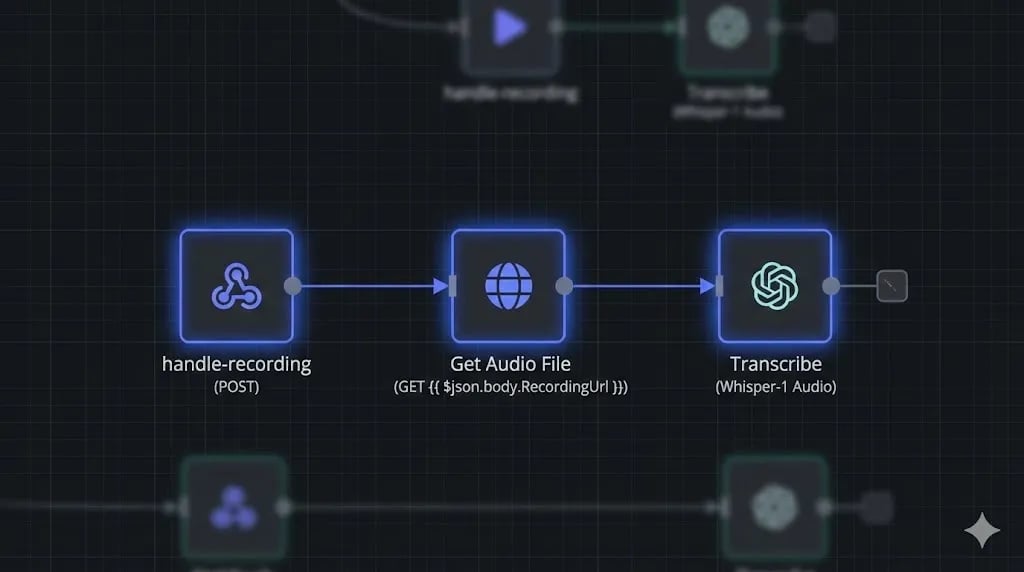
When Twilio finishes recording, it sends a POST request to this URL containing a field RecordingUrl with the MP3 audio file location.
Downloading the Audio
Twilio sends the location of the audio, not the audio itself. We need to download it:
- Node: HTTP Request
- Method: GET
- URL:
{{ $json.body.RecordingUrl }} - Response Format: File (Binary)
- Property Name:
data
Transcribing with Whisper
Now we convert the MP3 voice recording into text:
- Node: OpenAI
- Resource: Audio
- Operation: Transcribe
- Input Binary Field:
data - Model:
whisper-1
The output will be a clean text string like: "Hi this is John I need a website built for my restaurant by Friday I have a budget please call me back."
 Click to expand
Step 3: The Analyst (AI Classification)
Not all calls deserve a callback. You do not want to be interrupted for a car warranty spam call. We use GPT-4o to act as a business analyst that reads the transcript and classifies its value.
Add an OpenAI Chat Model node connected to the Whisper output:
- Model:
gpt-4o - System Prompt:
You are a business development classifier for an automation agency.
Read the voicemail transcript and return a JSON object with two fields:
- "intent": one of ["HOT_LEAD", "SUPPORT", "SPAM", "VENDOR", "GENERAL"]
- "summary": a one-sentence business summary of what the caller wants

HOT_LEAD = someone with a budget, timeline, or specific project request.
SUPPORT = existing client with an issue.
SPAM = automated or sales call with no value.
Return only the JSON object, no other text.
- User Message:
{{ $json.text }}(the Whisper transcript output)
A good lead like John's message above will return:
{
  "intent": "HOT_LEAD",
  "summary": "John needs a restaurant website built by Friday and mentions having a budget."
}
Step 4: The Speaking Mouth (The Urgent Alert)
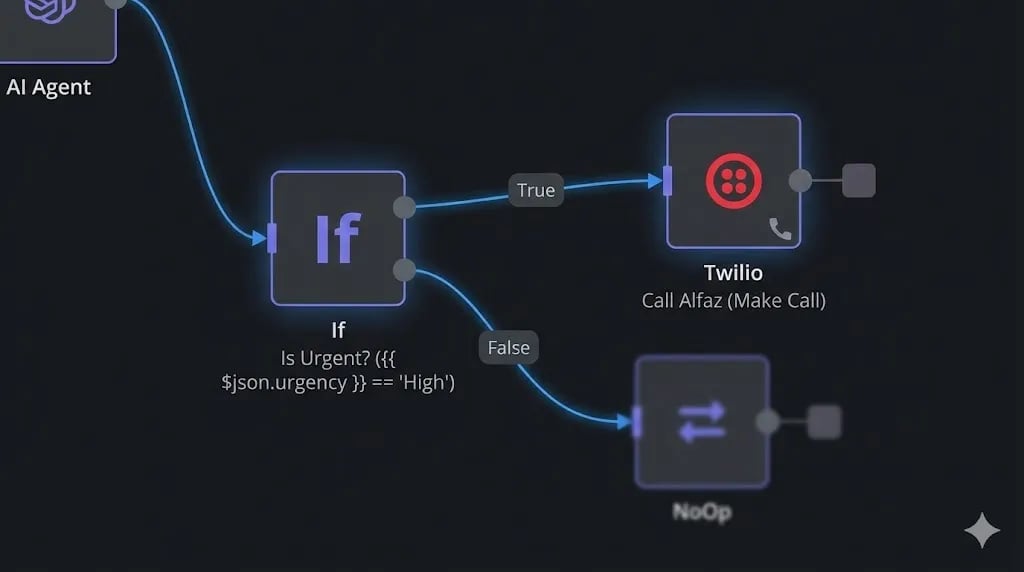
If the AI classifies the intent as HOT_LEAD, we want n8n to call us back immediately. Add an IF node:
- Condition:
{{ $json.intent }}equalsHOT_LEAD
For the True path, add a Twilio node:
- Operation: Make a Call
- To: Your personal mobile number
- From: Your Twilio phone number
- TwiML:
<Response><Say>Alert: New hot lead. {{ $json.summary }} Please call back immediately.</Say></Response>
The complete experience: You are at dinner. Your phone rings from your own Twilio number. It says: "Alert: New hot lead. John needs a restaurant website built by Friday and mentions having a budget. Please call back immediately." You excuse yourself, call John back within 5 minutes, and close the deal.
 Click to expand
Why Build Instead of Buy? (Bland AI vs. n8n)
| Factor | Bland AI / Air.ai | n8n + Twilio |
|---|---|---|
| Cost per minute | $0.10 – $0.25 | ~$0.015 |
| Data ownership | Vendor's servers | Your server |
| Customization | Limited | Full code control |
| CRM Integration | Native (locked) | Any API via n8n |
| Savings at scale | — | ~93% cheaper |
The cost savings compound dramatically at scale. If you handle 500 calls/month, Bland AI costs $50-125/month just for the calls. n8n + Twilio costs approximately $7.50 — and you can save every transcript to your CRM, Notion, or Airtable automatically as part of the same workflow.
[!TIP] Infrastructure: For mission-critical voice workflows, your n8n server needs stable uptime. I deploy production voice bots on Vultr High Frequency Compute — the low-latency CPU ensures your Twilio webhook responds in under 500ms, which is critical. If your webhook times out, Twilio will drop the call.
Voice AI Receptionist Architecture: Integration Pattern Comparison
| Architectural Metric | n8n Webhook + Twilio Voice TwiML | Custom WebSocket Audio Server (Python/Node) | Commercial Turnkey Voice Bot (Bland.ai / Vapi) | | --- | --- | --- | | Latency to First Audio (TTFB) | 800ms–1,500ms (chunked HTTP round-trip) | 350ms–600ms (streaming bi-directional audio) | 500ms–900ms (managed cloud routing) | | Implementation & Deployment Speed | Fast - visual workflow in <4 hours | Slow - 2–4 weeks building audio pipelines | Instant - setup in minutes via dashboard | | Custom CRM & Calendar Extensibility | Infinite - native access to 400+ nodes | High - requires custom API webhooks | Moderate - limited to supported integrations | | Operational Cost per 1,000 Minutes | ~$18–$28 (Twilio + Whisper + ElevenLabs) | ~$15–$24 (Raw API costs + VPS hosting) | ~$90–$140 (Significant commercial markup) | | Interruption Handling (Barge-in) | Basic - handled via Twilio Gather detection | Advanced - full-duplex stream cancellation | Built-in native speech detection |
Conclusion: Your AI Is Now Answering Phones
You have bridged the gap between the digital and physical worlds. Your n8n AI Receptionist now lives in the real telephone network — filtering noise, identifying value, and routing high-priority leads to your attention in real time.
Your system can now: Listen (Whisper), Think (GPT-4o), and Speak (Twilio).
What is Next? We have covered text, images, PDFs, voice — nearly every modality. But we have not touched Video. Tomorrow, on Day 28, we conquer the highest-engagement medium on the internet: we build an Automated YouTube Shorts Generator that scripts, illustrates, voices, and renders a complete short-form video from a single text topic.
See you in the workflow editor.
Follow the full series: 30 Days of n8n & Automation
Frequently Asked Questions
How do I minimize latency in an n8n and Twilio voice receptionist pipeline?
To keep speech response latency under 1.2 seconds, utilize fast transcription (such as Groq Whisper or Deepgram Nova-2) paired with a high-throughput reasoning model like GPT-4o-mini or Claude 3.5 Haiku. Route text-to-speech through ElevenLabs Turbo v2 or Cartesia Sonic, and ensure your n8n instance is geographically colocated in the same cloud region as Twilio's primary media gateways (e.g. US-East).
How does the AI receptionist handle real-time appointment bookings without calendar conflicts?
When the caller requests a meeting time, n8n invokes a tool-calling node that queries the Google Calendar or Cal.com API with a 30-minute availability window. The model formats the confirmation payload, reserves the calendar slot with an optimistic lock, and sends an immediate SMS confirmation via Twilio before releasing the audio response.
How do I handle background noise or silent callers gracefully?
Configure Twilio's <Gather> verb with speechTimeout="auto", timeout="4", and actionOnEmptyResult="true". In your n8n router node, check if the transcribed text is empty; if so, trigger a polite re-prompt ("I didn't quite catch that, could you please repeat?") and increment a retry counter. If 3 consecutive empty inputs occur, gracefully transfer the call to a human operator or voicemail.
About the Author
Alfaz Mahmud Rizve is a RevOps Engineer and Automation Architect helping SaaS founders and scaling agencies build self-healing, autonomous revenue infrastructure. Explore his work at whoisalfaz.me.
Deploy this Workflow
Skip building from scratch. Download the production-ready n8n template JSON and start running it in 5 minutes.
Core Deployment Stack
To build this exact architecture in production, you will need the core infrastructure. I strictly use and recommend the following enterprise-grade platforms.
n8n Cloud
The most powerful fair-code automation platform. Get 20% off your first year on any paid plan.
Vultr High-Performance Cloud
Deploy self-hosted vector databases & AI infrastructure worldwide. Get $300 in free credit.
ElevenLabs
The most realistic text-to-speech and voice cloning software.
Complementary RevOps Toolchain
Brevo (formerly Sendinblue)
Enterprise-grade email API and marketing automation. Excellent SMTP for n8n.
Pinecone Vector Database
The vector database for building AI applications. Essential for RAG architectures.
Qdrant Cloud
Rust-native vector search engine for the next generation of AI. Fast, scalable, and memory-efficient.
Ready to automate your agency?
Skip the manual grunt work. Let's build a custom system that runs your business on autopilot 24/7.