n8n + OpenAI: Build an AI Content Summarizer


This technical breakdown contains affiliate links. If you deploy this stack using my links, I earn a commission at no extra cost to you.
By Alfaz Mahmud Rizve | RevOps & Full Stack Automation Architect at whoisalfaz.me
Every Monday morning, SEO professionals, agency owners, and SaaS founders participate in the exact same ritual. You log into Ahrefs, Semrush, or Moz, hold your breath, and click refresh to see if your "money keywords" went up or down.
These platforms are engineering marvels for deep backlink analysis, but if you are primarily using them just to track daily keyword positions, you are paying a massive "lazy tax." Paying $99 to $199 per month just to track a few hundred keywords is a severe operational overhead for a lean startup or a boutique marketing agency. You are essentially paying a premium for a pretty dashboard when the raw data underneath it actually costs pennies.
Here is the dirty secret of the SEO software industry: Most rank tracking tools are just UI wrappers around the exact same SERP (Search Engine Results Page) APIs that you can access yourself.
What if you could sever that dependency? What if you could build your own automated rank tracker tool that runs on autopilot, costs roughly $1 a month, and pushes the data exactly where your team and your clients actually look?
Welcome to Day 16 of our 30 Days of n8n & Automation sprint. In our Day 15 guide, we built an automated content research engine to extract high-value topics from the web. Today, we are building the scoreboard. We are going to architect a fully custom automated rank tracker tool using n8n and a direct SERP API to bypass expensive SaaS competitors entirely.
Phase 1: The Economics of "Build vs. Buy"
Before we open the n8n canvas, let us analyze the RevOps math. Why bother building an infrastructure when you can just buy a subscription?
Most commercial rank trackers monetize by restricting "keyword credits." If your agency scales and you need to track 1,000 keywords daily across 10 different client domains, traditional SaaS platforms will force you into their Enterprise tiers, easily costing over $400/mo.
But if you purchase that SERP data directly from a provider, the cost scaling is practically invisible.
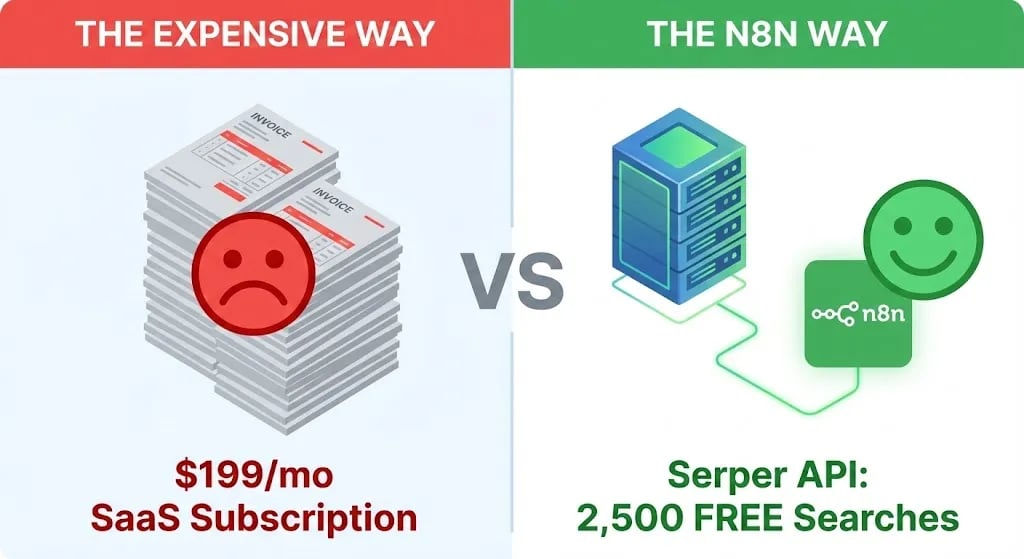
The Cost Comparison (Per 1,000 Searches)
- Ahrefs / Semrush: ~$99 – $199/mo (Gated by strict tracking limits).
- Nightwatch / AccuRanker: ~$49 – $100/mo (Cheaper, but still a monthly recurring drain on agency margins).
- Serper.dev (Direct API): $1.00 per 1,000 searches. (The first 2,500 are entirely free).
By engineering this automated rank tracker tool yourself, you unlock three enterprise advantages:
Zero Markup: You only pay for the raw computational data you consume.
Absolute Data Ownership: Your historical rankings are securely stored in your own database, not locked behind a vendor's proprietary export limits. If you cancel Ahrefs, you lose your history. If you build this, you own it forever.
Custom Triage Alerts: You can build logic gates to trigger Slack Block Kit notifications (like we built in Day 10) only if a high-value keyword drops off Page 1, eliminating dashboard fatigue.
 Click to expand
Phase 2: Infrastructure Prerequisites (The Hard Requirements)
We are not just connecting two consumer apps; we are building a programmatic data scraper. You cannot execute this pipeline without the proper infrastructure keys.
1. The Execution Server
Because rank tracking requires exact timing to ensure data consistency, you cannot run this on a local laptop that goes to sleep. The cron job must fire reliably. You must deploy this workflow on a permanent, public-facing server like n8n Cloud or a self-hosted Vultr VPS.
2. The Client Visualization Layer
Raw JSON data in a spreadsheet is completely useless to a paying agency client. To build the live, client-facing dashboard in Phase 6, you must generate a Push API token from a dedicated reporting engine. We use Databox for this. If you do not have an active agency account, pause this tutorial and open your free Databox partner account here to generate your inbound API token. You cannot build the final client deliverable without this key.
3. The Scraping Engine (Serper.dev)
We need the "Eyes" of the operation. Scraping Google directly will get your IP address permanently banned in minutes. We will use Serper.dev, an ultra-fast Google Search API built specifically for developers.
Visit Serper.dev and sign up. Copy your API Key from the dashboard. (Your first 2,500 API calls are free, meaning you can track 80 keywords a day for a month without entering a credit card).
4. The Database (Google Sheets)
Create a new Google Sheet to serve as our "Unbreakable Ledger." You need two specific tabs to separate the input from the output.
Tab 1 Name: Keywords (This is where you tell the server what to search for).
- Column A:
Keyword(e.g., "b2b automation consultant") - Column B:
Target URL(e.g., "whoisalfaz.me") - Column C:
Location(e.g., "us", "uk", "bd") - Column D:
Device(e.g., "desktop" or "mobile")
Tab 2 Name: History (This is where the server writes the results).
- Column A:
Date - Column B:
Keyword - Column C:
Rank - Column D:
URL Found
Phase 3: Architecting the Loop (n8n Workflow)
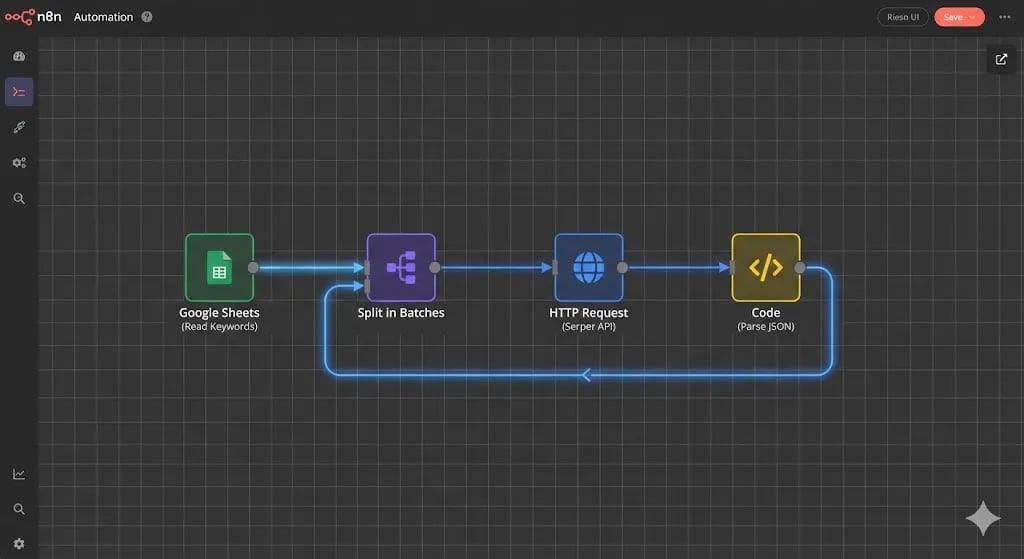
Open your n8n canvas. Let's build this extraction engine node by node.
 Click to expand
Step 1: The "Wake Up" Trigger
Rankings fluctuate daily, but for B2B reporting, a weekly check provides the most stable trendline.
- Add a Schedule Trigger node.
- Trigger Interval: Weeks.
- Time: Monday at 06:00 AM. (We run this before the Automated Marketing Report we built in Day 14 so the SEO data is fresh).
Step 2: Querying the Target List
The server needs to know what it is looking for.
- Add a Google Sheets node.
- Operation: Get Many.
- Select your Rank Tracker sheet and the Keywords tab. (If you have 50 keywords in your list, this node will output an array of 50 items).
Step 3: The "Split In Batches" Gatekeeper
This is a critical architectural concept. If you attempt to fire 50 simultaneous HTTP requests to the Serper API in a single millisecond, you will trigger a 429 Too Many Requests rate-limit error, and your pipeline will crash. We must process them sequentially.
- Attach a Split In Batches node (or the newer Loop node depending on your n8n version).
- Batch Size: 1. (This forces the workflow to take one keyword, process the entire SERP, save the data, and then loop back for the next one).
Phase 4: The API Engine and Extraction Logic
Inside the loop, we must configure the HTTP handshake and parse the chaotic Google search results.
Step 1: The Serper.dev API Call
Attach an HTTP Request node to the output of your Loop node.
- Method:
POST - URL:
https://google.serper.dev/search - Headers:
- Name:
X-API-KEY| Value:[YOUR_SERPER_API_KEY] - Name:
Content-Type| Value:application/json
- Name:
- Body Parameters: We need to map the variables from our Google Sheet directly into the API payload.
{
  "q": "{{ $json.Keyword }}",
  "gl": "{{ $json.Location }}",
  "num": 100
}
(Architect's Note: Notice the "num": 100 parameter. By default, Google only returns 10 results. Passing this parameter forces the API to scrape the top 100 results, allowing you to track keywords that are stuck on Page 4 or 5).
Step 2: Parsing the JSON (The Intelligence Layer)
When the HTTP node executes, Serper returns a massive JSON object detailing every single organic link, featured snippet, and ad on the page. We do not care about 99 of those links. We only care about our link.
We must use a Code Node to loop through the API response, find our target URL, and extract its mathematical position. Attach a Code Node and paste this exact logic:
// Automated Rank Tracker: Parsing & Extraction Logic
// Authored by Alfaz Mahmud Rizve

// 1. Isolate the organic search results array from the API response
const organicResults = $input.all()[0].json.organic;

// 2. Retrieve the Target URL we are looking for from the Loop node
const targetUrl = $('Split In Batches').item.json['Target URL'];

// 3. Set defensive defaults (Assume we are not ranking at all)
let rank = "100+";
let foundUrl = "Not Found";

// 4. Iterate through the top 100 Google results
if (organicResults) {
  for (let i = 0; i < organicResults.length; i++) {

    // If the Google link contains our target domain...
    if (organicResults[i].link.includes(targetUrl)) {

      // Capture the exact position and the specific URL that ranked
      rank = organicResults[i].position;
      foundUrl = organicResults[i].link;

      // Terminate the loop early to save server memory
      break;
    }
  }
}

// 5. Output the cleaned data payload for the database
return {
  json: {
    rank: rank,
    found_url: foundUrl,
    checked_at: new Date().toISOString(),
    keyword: $('Split In Batches').item.json['Keyword']
  }
};
Step 3: The Database Commit & Politeness Policy
We now have a clean payload stating exactly where we rank.
- Attach a Google Sheets node.
- Operation: Append Row.
- Sheet: Select the History tab.
- Map the JSON outputs (
rank,found_url,checked_at,keyword) to your respective columns.
Finally, attach a Wait node set to 1 Second. Connect the output of the Wait node back to the input of the Split In Batches loop. This "Politeness Policy" ensures we ping the Serper API gently, preventing IP bans.
Phase 5: The Databox Client Deliverable
Having 10,000 rows of historical rank data in a Google Sheet is an incredible engineering feat, but it is a terrible client experience. B2B clients do not pay retainers to look at spreadsheets; they pay for clarity.
This is why we generated the Databox API key in the prerequisites. We are going to push this data into a live, interactive visualization.
Once your loop finishes, attach an HTTP Request node to the "Done" branch of the Split In Batches node.
Configure it to POST the aggregated data payload directly to the Databox Push API endpoint.
Inside your Databox account, you can now drag-and-drop a beautiful "Line Chart" widget, set the metric to "Google Rank," and filter it by your specific keywords.
You can now send your client a single URL where they can watch their SEO rankings climb in real-time, 24/7. You have just replicated the exact value proposition of a $199/mo SaaS tool, built entirely on your own infrastructure.
 Click to expand
Defensive Engineering: Avoiding the Pitfalls
When dealing with programmatic SEO data, watch out for these strict architectural traps:
The Sub-Domain Trap: If your Google Sheet Target URL is https://whoisalfaz.me, but Google indexes your site as https://www.whoisalfaz.me, the JavaScript string match .includes() will fail, and your rank will always read 100+. Always use the root domain (e.g., whoisalfaz) as your target string.
Location Bias (Geo-Coordinates): Search results in London are vastly different than search results in New York. If your client is a local business in the UK, pinging the API from n8n's US-based servers will return useless data. Always pass the exact gl (Geo Location) parameter in the Serper JSON payload.
The Global Error Watchtower: If Serper.dev changes their API schema, the Code Node will fail. Ensure this workflow is connected to the Error Handling workflow we built in Day 7 so your engineering team gets a Slack ping the moment the rank tracker goes offline.
Your Day 16 Deployment Mandate
You now possess the blueprint to permanently fire your expensive SEO rank tracker.
By building this automated rank tracker tool, you are no longer renting your data; you own it. You have reduced a $1,200/year expense down to pennies, while simultaneously increasing the customization and reporting power for your clients.
Stop paying the lazy tax. Build the machine.
Tomorrow, in Day 17 of our 30 Days of n8n & Automation sprint, we will take client communication a step further. I will show you how to take this raw pipeline data and auto-generate beautiful, branded PDF strategy reports using Google Docs and n8n.
Subscribe to the newsletter, and I will see you on the canvas tomorrow.
Core Deployment Stack
To build this exact architecture in production, you will need the core infrastructure. I strictly use and recommend the following enterprise-grade platforms.
n8n Cloud
The most powerful fair-code automation platform. Get 20% off your first year on any paid plan.
Vultr High-Performance Cloud
Deploy self-hosted vector databases & AI infrastructure worldwide. Get $300 in free credit.
Complementary RevOps Toolchain
Brevo (formerly Sendinblue)
Enterprise-grade email API and marketing automation. Excellent SMTP for n8n.
Pinecone Vector Database
The vector database for building AI applications. Essential for RAG architectures.
Qdrant Cloud
Rust-native vector search engine for the next generation of AI. Fast, scalable, and memory-efficient.
In this Article
Ready to automate your agency?
Skip the manual grunt work. Let's build a custom system that runs your business on autopilot 24/7.