Build Personal AI Assistant with n8n [2026 Blueprint]

![Build Personal AI Assistant with n8n [2026 Blueprint]](https://cdn.sanity.io/images/gfd4n1nu/production/2661ca0c66fa7985d61a174596a81e1cdc8125aa-1024x703.webp)
This technical breakdown contains affiliate links. If you deploy this stack using my links, I earn a commission at no extra cost to you.
Direct Answer (Build Personal AI Assistant with n8n): Building an autonomous personal AI assistant requires decoupling user input from task execution. In n8n, a Telegram Trigger node captures incoming text or voice notes. An LLM "Central Cortex" node runs structured JSON intent classification (categorizing inputs into Calendar, Task, Search, or Memory), and a Switch node routes the payload to specialized sub-workflows. Long-term memory is persisted in a local Qdrant vector database or PostgreSQL instance, delivering a private, self-hosted executive assistant with sub-2-second latency.
TL;DR: Build a personal AI Operating System (AIOS) in n8n by combining a Telegram Trigger, GPT-4o intent classification (JSON Mode), and a Switch node that routes commands to specialized sub-agent workflows. The "Central Cortex" pattern lets you text natural language like "Research DeepSeek" or "Log $50 lunch expense" and have your entire automation stack respond correctly without managing multiple interfaces or dashboards.
Welcome back to Day 29 of the 30 Days of n8n & Automation series here on whoisalfaz.me.
We are at the finish line.
Over the last 28 days, we have built an arsenal of specialized automation tools. We created a Researcher that reads the internet (Day 15). We built a Video Factory that generates YouTube Shorts (Day 28). We deployed a Knowledge Base to answer document questions (Day 26) and an AI Receptionist to handle phone calls (Day 27).
But right now, we have a problem that plagues every automation engineer eventually: The Silo Problem.
To use your Researcher, you open the n8n editor and click "Execute." To generate a video, you trigger a different webhook. To log a finance transaction, you open yet another workflow. You are not an Automation Architect — you are a System Administrator manually toggling switches.
True automation is invisible. It should not require you to open a dashboard. It should just work.
Today, we are not building a new tool. We are building the Master Orchestrator — a single, unified Telegram interface that routes your natural language commands to the correct specialized agent automatically. We are building J.A.R.V.I.S.
The Architecture: The Router Pattern
In enterprise software engineering, this is the API Gateway Pattern or the Facade Pattern. In the world of AI Agents, we call it the Router Architecture.
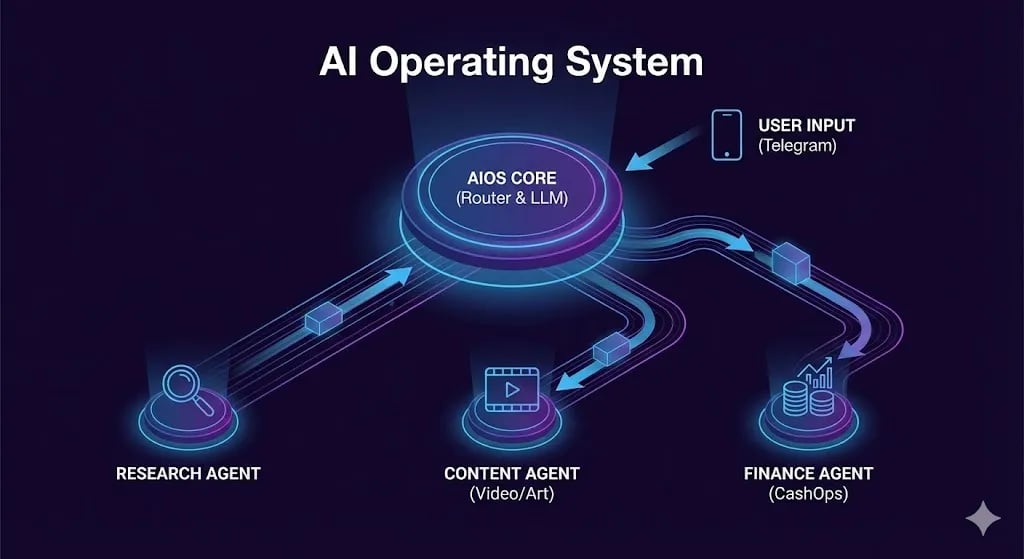
Your automations currently look like a messy desk — scattered tools with no central interface. The AIOS introduces a "Central Cortex" that sits between you and all your tools:
This is the difference between a "Script Collection" and an "Automation Agency." Scripts run linearly. Systems think, route, and execute.
 Click to expand
The Tech Stack: The Nervous System
- Telegram Bot — The unified interface. Available on every device, free, supports voice messages.
- OpenAI GPT-4o (JSON Mode) — The "Central Cortex" for intent classification.
- n8n Switch Node — The switchboard that routes processed intents to sub-workflows.
- Execute Workflow Node — The bridge that calls your existing Day 15-28 automations as modular functions.
Step 1: The Interface (Unified Command Line)
We start with the entry point. You should be able to talk to your AI while walking the dog, on a client call, or sitting at your desk.
Create a new n8n workflow with a Telegram Trigger node as the starting point. Connect it to your Telegram Bot token (created via @BotFather — type /newbot to Telegram's bot management system).
The User Whitelist Security Layer
Before processing any command, add an IF node immediately after the Telegram Trigger:
- Condition:
{{ $json.message.from.id }}equalsYOUR_TELEGRAM_USER_ID - True path: Proceed to the Cortex.
- False path: No Operation (silent termination).
You can find your Telegram User ID by sending any message to @userinfobot. This single condition ensures that even if someone discovers your bot's handle, they cannot trigger your agents, spend your API credits, or access your private data.
Step 2: The Cortex (Intent Classification)
This is the most critical node in your entire automation stack. If this node fails — returns ambiguous output, misclassifies an intent — the entire system is useless.
We convert unstructured human language into structured machine instructions using GPT-4o in JSON Mode.
Add an OpenAI Chat Model node:
- Model:
gpt-4o - Response Format: JSON Object
System Prompt:
You are the Master Router for Alfaz's AI Operating System.
Classify user intent and extract parameters.

Available Agents:
- RESEARCH: User wants information, web search, or summaries. (Param: "query")
- CONTENT: User wants to generate a blog post, tweet, or video. (Param: "topic", "format")
- FINANCE: User wants to log an expense or check budget stats. (Param: "amount", "category", "description")
- GENERAL: General conversation or questions about the system.

Output Rule: Return ONLY a valid JSON object with "intent" (String) and "parameters" (Object). Do not output any other text.
Test Cases:
- Input:
"Find me the latest news on DeepSeek"→ Output:{"intent": "RESEARCH", "parameters": {"query": "latest news DeepSeek"}} - Input:
"I just spent $15 on coffee"→ Output:{"intent": "FINANCE", "parameters": {"amount": 15, "category": "Food", "description": "Coffee"}} - Input:
"Make a YouTube Short about quantum computing"→ Output:{"intent": "CONTENT", "parameters": {"topic": "quantum computing", "format": "youtube_short"}}
Why JSON? n8n cannot efficiently process ambiguous prose. By forcing structured output, the classification becomes machine-readable and routes cleanly through the Switch node.
Step 3: The Switchboard (Routing Logic)
Now that we have a clean JSON packet from the Cortex, we direct traffic:
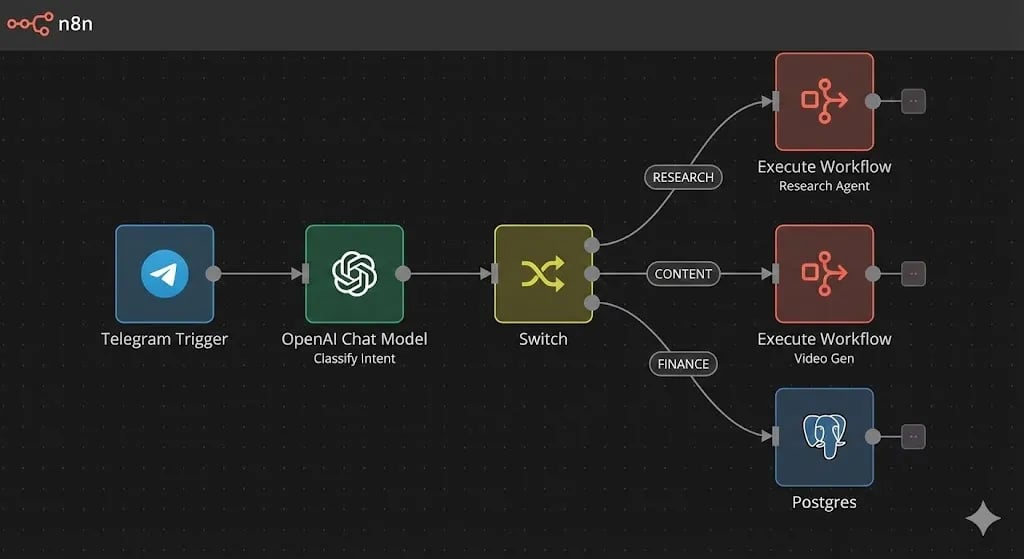
Add a Switch node connected to the Cortex output:
- Output 1 (Research): Condition
$json.intentequalsRESEARCH - Output 2 (Content): Condition
$json.intentequalsCONTENT - Output 3 (Finance): Condition
$json.intentequalsFINANCE - Output 4 (General): Condition
$json.intentequalsGENERAL(fallthrough)
In your n8n canvas, you will now see a single incoming line branching into four distinct highways. This visual representation is your "Second Brain" — a system that thinks before it acts.
 Click to expand
Step 4: The Sub-Agents (Execute Workflow Pattern)
The most common beginner mistake is building all logic inside one massive workflow — the scraper, the database connector, and the video generator all on one canvas. This creates a "monolith" that is impossible to debug and maintain.
Instead, use the Execute Workflow node. This allows the Master Orchestrator to call your existing Day 15-28 automations as if they were functions in code.
Path A: The Research Agent
- Node: Execute Workflow
- Source: Your Day 15 "Deep Research" workflow
- Data Passing: Map
$json.parameters.queryto the workflow's input - Benefit: If you improve the Research Agent later by adding a new news source, the Master Router automatically benefits with zero changes.
Path B: The Finance Agent
- Node: Postgres (or your preferred database)
- Operation: Insert Row
- Table:
transactions - Mapping:
amount: {{ $json.parameters.amount }},category: {{ $json.parameters.category }},description: {{ $json.parameters.description }},date: {{ $now }}
The real magic: You type "Lunch $50" in Telegram. GPT-4o strips the number, category, and description. The Finance Agent inserts it into your database. Next time you open your dashboard, the transaction is already there, reflected in your burn rate charts. This is ecosystem integration — tools that talk to each other automatically.
Path C: The Content Agent
- Node: Execute Workflow
- Source: Your Day 28 YouTube Shorts Generator workflow
- Data Passing: Map
$json.parameters.topicto the video topic input.
Path D: General Chat
- Node: OpenAI Chat Model with Window Buffer Memory (10 turns)
- System Prompt: Include your personal bio so responses feel contextually grounded. "You are Alfaz's personal assistant. He is a RevOps and Automation Architect building an agency..."
Step 5: The Feedback Loop (Making It Talk Back)
A system that executes but does not report is incomplete. The final step is translating technical outputs into readable Telegram messages.
After each agent branch completes, connect its output to an OpenAI Chat Model node (the "Spokesperson"):
The user asked: "{{ $json.original_message }}"
The agent performed: {{ $json.agent_result }}

Summarize this result in a concise, witty Telegram message. Use emojis appropriately. Be brief.
Then connect to a Telegram node → Send Message → {{ $json.formatted_response }}.
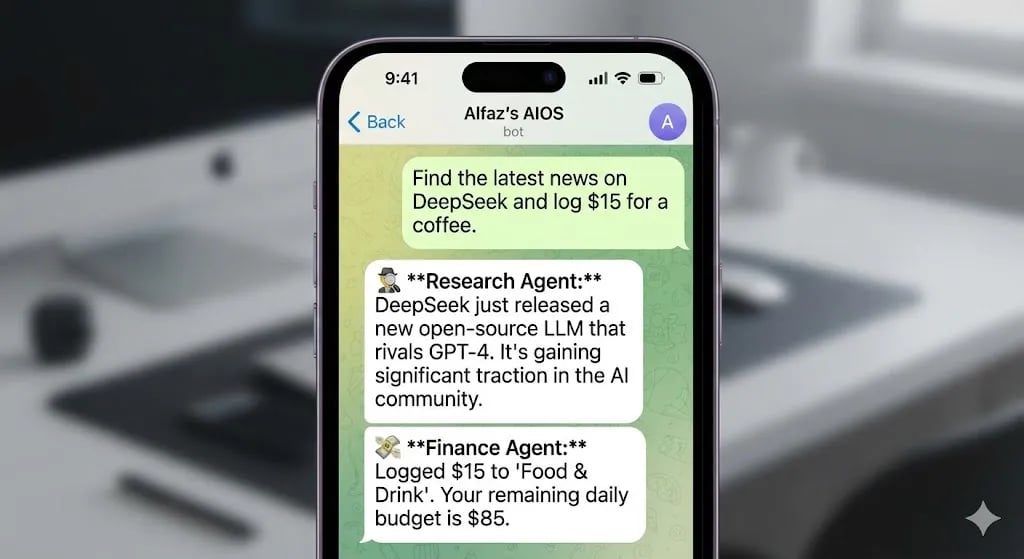
The complete experience:
You: "Research Acme Corp and log $50 for the tool I used."
AIOS: "🕵️ I've analyzed Acme Corp — they're focusing heavily on SEO content this month. Full brief attached. 💸 CashOps updated: $50 logged to 'Software'. Your burn rate is slightly up today, boss."
 Click to expand
The Iron Man Upgrade: Voice Mode
Typing is slow. Speaking is fast. Telegram supports native voice messages — and your AIOS can understand them too.
Add an IF node at the very top of your workflow, before the Cortex, that checks $json.message.voice exists. If true:
Now you can press the microphone icon, mumble "Research the latest AI news and make a video about it," and your entire automation stack executes instantly.
The Business Case: Selling the Executive Dashboard
This is not just a toy for your own productivity. This is a high-ticket product.
CEOs and founders suffer from "Dashboard Fatigue." They have logins for Stripe, HubSpot, Google Ads, and Slack. They hate checking 5 apps to understand their business.
The Pitch: "Stop checking dashboards. Text your secure business bot 'How much revenue did we make this week?' and it queries Stripe, formats the answer, and responds in 5 seconds."
The Pricing: $2,500–$5,000 setup + $500/month maintenance. The complexity to you is minimal — you already built the architecture today. You just swap the "Finance" node for a "Stripe API" node and configure their data sources.
Personal AI Assistant Architectures: Autonomous Capability Comparison
| Capability / Dimension | Single-Turn LLM Chain (Prompt + Output) | LangChain ReAct Tool Agent Node | Multi-Agent Supervisor Swarm | | --- | --- | --- | | Tool Calling Dexterity | None - purely informational responses | High - dynamically invokes Calendar & Email | Superior - delegates to specialized agents | | Context & Memory Persistence | Short-term rolling window memory | Vector-backed long-term memory (Qdrant) | Hierarchical memory partitioned by domain | | Execution Latency | Fast: 800ms–1.5s | Moderate: 2.5s–5.0s (multi-turn reasoning) | Higher: 4.0s–12.0s (inter-agent messages) | | Infinite Loop Risk | 0% (deterministic single-turn execution) | Moderate (requires maxIterations guardrails) | Low (governed by supervisory router limits) | | Cost per User Transaction | Lowest (<$0.005) | Moderate ($0.01–$0.03) | Higher ($0.04–$0.12) |
Architecture Verdict: You Are Now the Architect
Congratulations. You have centralized your digital operations. You are no longer running disparate scripts — you are conversing with an Operating System that controls your entire business automation stack.
Your Researcher talks to your Content Generator. Your Content Generator feeds your Finance Tracker. The system is alive — and it is yours.
What is Next? Tomorrow is Day 30 — The Grand Finale. We are not building a new tool. We are talking about Monetization and Strategy. I will show you exactly how to package these 29 days of knowledge into a $10,000/month Automation Agency offer.
See you at the finish line.
Follow the full series: 30 Days of n8n & Automation
Frequently Asked Questions
How do I store and recall long-term memory for my n8n personal assistant?
Connect the n8n AI Agent node to a Vector Store Retriever Tool connected to Qdrant or Pinecone. Store user preferences, past conversations, and project briefs with dynamic metadata (e.g. userId, topic, timestamp). During interaction, the agent performs a similarity search across the vector store to inject relevant historical context into the prompt before generating responses.
How do I prevent an AI Agent from executing destructive actions (e.g. deleting emails or files)?
Implement a Human-in-the-Loop (HITL) approval gateway using n8n's "Wait for Webhook" node. When the agent decides to trigger a high-risk tool (such as sending a client invoice or deleting records), the sub-workflow dispatches an interactive Telegram or Slack message with "Approve" and "Reject" inline buttons, pausing execution until you explicitly authorize the action.
Which communication interface works best for an n8n personal assistant?
Telegram is the premier interface for personal AI assistants due to its resilient bot API, support for instant voice note transcription, inline button keyboards, zero webhooks timeout constraints, and cross-platform desktop/mobile support. Discord and Slack are also excellent alternatives for team-based operational workflows.
About the Author
Alfaz Mahmud Rizve is a RevOps Engineer and Automation Architect helping SaaS founders and scaling agencies build self-healing, autonomous revenue infrastructure. Explore his work at whoisalfaz.me.
Deploy this Workflow
Skip building from scratch. Download the production-ready n8n template JSON and start running it in 5 minutes.
Core Deployment Stack
To build this exact architecture in production, you will need the core infrastructure. I strictly use and recommend the following enterprise-grade platforms.
n8n Cloud
The most powerful fair-code automation platform. Get 20% off your first year on any paid plan.
Vultr High-Performance Cloud
Deploy self-hosted vector databases & AI infrastructure worldwide. Get $300 in free credit.
Complementary RevOps Toolchain
Brevo (formerly Sendinblue)
Enterprise-grade email API and marketing automation. Excellent SMTP for n8n.
Pinecone Vector Database
The vector database for building AI applications. Essential for RAG architectures.
Qdrant Cloud
Rust-native vector search engine for the next generation of AI. Fast, scalable, and memory-efficient.
Ready to automate your agency?
Skip the manual grunt work. Let's build a custom system that runs your business on autopilot 24/7.