n8n RAG Tutorial: Build a Private Knowledge Base (2026)

This technical breakdown contains affiliate links. If you deploy this stack using my links, I earn a commission at no extra cost to you.
By Alfaz Mahmud Rizve | RevOps & Full Stack Automation Architect at whoisalfaz.me
TL;DR: RAG (Retrieval-Augmented Generation) lets your AI answer questions using your private documents instead of guessing from training data. In n8n, you build two separate workflows: an Ingestion pipeline (PDF → text chunks → OpenAI Embeddings → Pinecone) and a Retrieval agent (user question → vector similarity search → GPT-4o answer with citations). The result is a "Chat with your Docs" system you own and control, with zero hallucinations on business-critical data.
Welcome back to Day 26 of the 30 Days of n8n & Automation series on whoisalfaz.me.
We have spent the last 25 days building incredible machines. We gave our AI Eyes (Day 15 — Content Research), Hands (Day 25 — AI Agent Tools), and a Voice (Day 27 — AI Receptionist). But there is one critical component missing from our digital employee: Memory.
Standard Large Language Models like GPT-4o are extraordinary, but they are "frozen in time." They know everything published before their training cutoff, but they know nothing about your agency's new "Remote Work Protocol," your specific "Client Onboarding SOP," or the proprietary contract terms buried in a 100-page PDF you uploaded last week.
If you ask a standard ChatGPT bot: "What is our refund policy?" it will hallucinate: "Standard refund policies are usually 30 days." This is not just unhelpful — in a client-facing context, it is dangerous.
You need it to say: "According to your Service Agreement on Page 4, Section 3.2: refunds are only issued if the project is delayed by more than 10 business days attributable to the agency."
To achieve this precision, we need RAG — Retrieval-Augmented Generation. Today we are building it from scratch in n8n.
[!NOTE] Enterprise Escalation: If you are building a system for client-facing support or highly regulated compliance workloads where zero hallucination is mandatory, we recommend advancing from standard vector lookup to our self-healing Corrective RAG (CRAG) Pinecone Blueprint in n8n which adds programmatic document grading and tavily web-search failover buffers.
What is RAG (Retrieval-Augmented Generation)?
Retrieval-Augmented Generation (RAG) is an architectural framework that optimizes Large Language Model (LLM) responses by dynamically retrieving relevant facts from an external private knowledge base, such as a Pinecone vector database, before generating the final output.
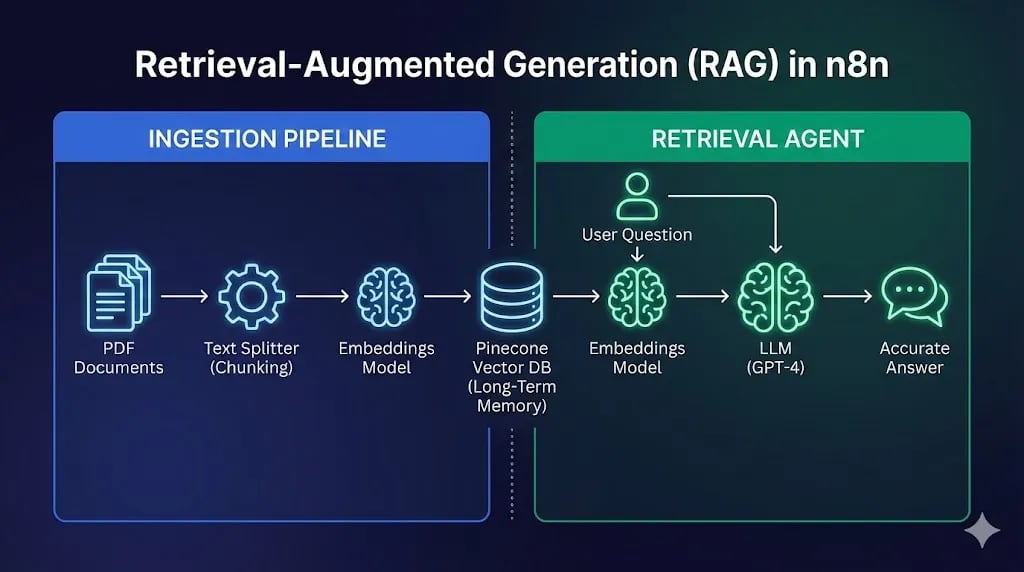
Before we drag a single node, you must understand the two-workflow architecture. RAG confuses beginners because it involves two completely separate pipelines that never touch each other directly.
Think of RAG like an Open Book Exam:
- Without RAG: The student (AI) has to memorize the entire textbook during training. If the book changes after training, they are wrong.
- With RAG: The student is allowed to open the book during the exam, locate the specific chapter relevant to the question, read that paragraph, and then answer. The answer is always current and grounded in the source material.
How Vector Search Works
The key question is: how does a computer "look up" the right paragraph? It does not use keyword search like CTRL+F. It uses semantic vectors.
We use an "Embedding Model" (like OpenAI's text-embedding-3-small) to convert text into a list of floating-point numbers — coordinates in a high-dimensional space.
"King"might become[0.9, 0.1, 0.5, ...]"Queen"might become[0.9, 0.1, 0.8, ...]"Apple"might become[0.1, 0.9, 0.1, ...]
Semantically similar words and phrases cluster together in this mathematical space. When your user asks "What is the refund policy?", we convert that question into a vector and search for the paragraph in your documents whose vector is mathematically closest — meaning most semantically similar. This is why RAG finds the right paragraph even when the user's phrasing does not exactly match the source document.
 Click to expand
What tech stack is required for n8n RAG?
A production-ready n8n RAG architecture requires an orchestration engine (n8n), a specialized vector database (such as Pinecone) to store and query text embeddings, and an intelligence layer (such as OpenAI GPT-4o) to generate embeddings and synthesize the final contextual responses.
To build this system, we need three specific services. All of them have usable free tiers for this tutorial.
text-embedding-3-small) and for the final chat completion (gpt-4o).Pre-Requisite: Pinecone Setup
n8n-knowledge-base.1536 (the required vector size for OpenAI's text-embedding-3-small model).Cosine (best for semantic similarity comparisons).How do you build the n8n Document Ingestion pipeline?
The document ingestion pipeline is built by configuring a trigger node (e.g. Google Drive) to detect new documents, extracting text via a Default Data Loader node, chunking the text into semantic pieces using a Text Splitter, converting chunks to coordinates via an Embedding model, and storing them inside a Pinecone vector index.
The first workflow is the Librarian. Its only job is to watch for new documents, read them, chunk them into digestible pieces, convert them to vectors, and file the vectors into Pinecone.
Step 1: The Document Trigger
Use a Google Drive Trigger node:
- Event: File Created
- Watch Folder: A Google Drive folder you designate as your "Knowledge Base Drop Zone" (e.g.,
Company SOPs → n8n Ingestion)
Every time you or a team member uploads a PDF, DOCX, or TXT file to this folder, the ingestion pipeline fires automatically.
Step 2: Extracting Text
Connect a Default Data Loader node to the trigger. This node supports PDF, DOCX, CSV, and plain text natively. It reads the binary file from Google Drive and converts it into a raw text string that downstream nodes can process.
Step 3: Chunking (The Secret Sauce)
You cannot feed a 100-page PDF into Pinecone as a single block. A single embedding for 50,000 words loses all granularity — searching it would be like searching a library by looking at only the cover title.
We need to chunk the document into meaningful, overlapping pieces:
- Node: Recursive Character Text Splitter
- Chunk Size:
1000characters (approximately half a page) - Chunk Overlap:
100characters (ensures context is not lost at chunk boundaries)
The overlap is critical. Without it, a sentence that starts at the end of chunk 3 and ends at the beginning of chunk 4 would never be retrievable as a complete thought.
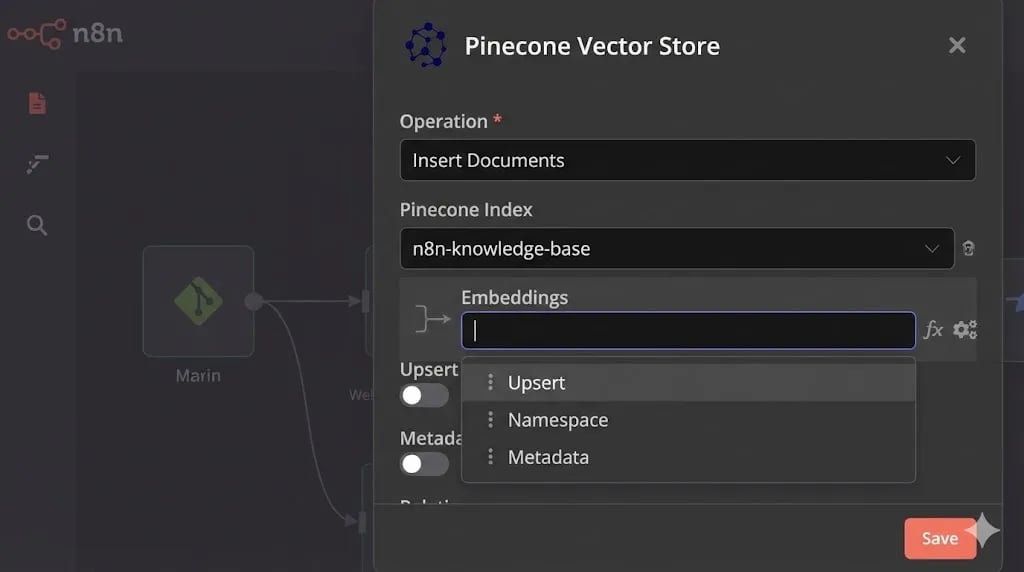
Step 4: Embedding and Storage
- Node: Pinecone Vector Store (Mode:
Insert Documents) - Sub-Node (Embeddings): OpenAI Embeddings (Model:
text-embedding-3-small)
n8n will automatically loop through every chunk, convert each one to a vector via the OpenAI Embeddings API, and upsert it into your Pinecone Index with metadata like the source document name and page number.
The result: Your private PDF is now permanently searchable by semantic meaning — not just keywords.
 Click to expand
How do you configure the n8n AI Retrieval Agent?
The n8n AI Retrieval Agent is configured by connecting a Chat Trigger to an AI Agent node running a Tools Agent framework, attaching a permanent Window Buffer Memory for conversation history, and equipping it with a Vector Store Tool pointing to the Pinecone index.
The second workflow is the one your users interact with. It is a standard n8n AI Agent with a specialized tool — the Vector Store — attached to it.
Step 1: The Brain (AI Agent Setup)
Start a new workflow with a Chat Trigger node connected to an AI Agent node:
- Chat Model: OpenAI
gpt-4o - Agent Type: Tools Agent (LangChain ReAct framework)
- Memory: Window Buffer Memory set to 10 turns (maintains conversational context)
- System Prompt:
You are a helpful HR and Operations assistant for this organization.
Answer user questions based ONLY on the context retrieved from the knowledge base.
Do NOT use your training data to answer questions about company policy.
Always cite the source document and section when providing information.
If the knowledge base does not contain the answer, clearly state: "I could not find that information in our current knowledge base."
The explicit instruction "Do NOT use your training data" is the key safety constraint that prevents hallucination.
Step 2: The Vector Store Tool
- Node: Vector Store Tool (Connect to the "Tools" input of the AI Agent)
- Description:
Call this tool to find information about company policies, SOPs, terms and conditions, and internal documentation. Always use this tool before answering any question about company-specific information. - Sub-Node: Pinecone Vector Store (Mode:
Retrieve) - Sub-Node (Embeddings): OpenAI Embeddings (
text-embedding-3-small)
When a user asks a question, the agent converts the question to a vector, searches Pinecone for the top 3-5 most semantically similar document chunks, and injects those chunks as "grounding context" into the final GPT-4o prompt.
Testing Your RAG Workflow
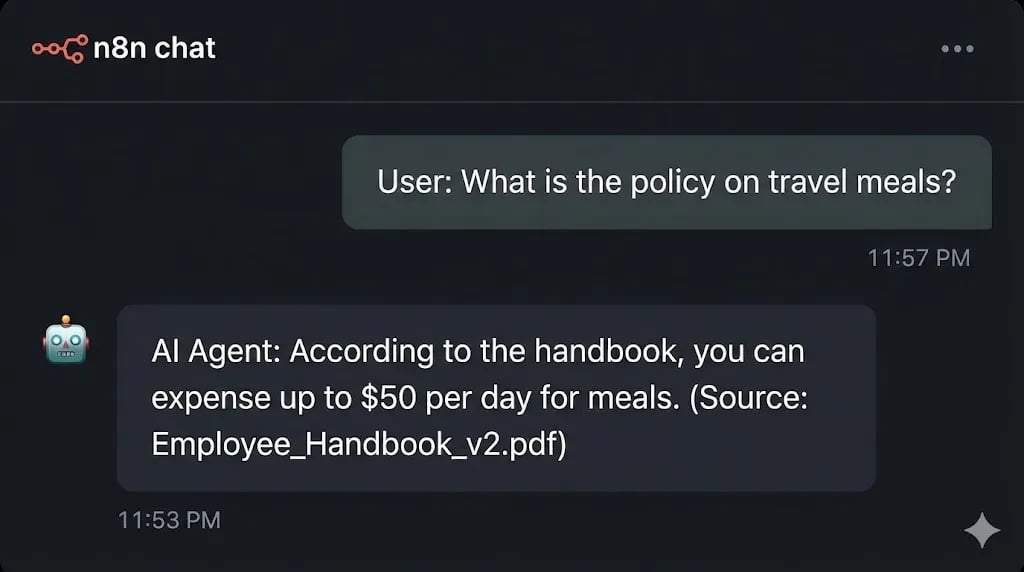
With both workflows active, open the Chat window and test with a specific policy question. Avoid generic questions like "What are your policies?" — be specific like a real employee would be.
"Can I expense a home office setup?"
Watch what happens in the execution logs:
No hallucination. No guessing. Source-grounded truth.
 Click to expand
Real-World Agency Use Cases
This architecture is not just for internal HR bots. Once you understand the pattern, the commercial surface area is enormous:
- Client Onboarding Bots: Ingest your entire proposal, SLA, and process documentation into Pinecone. When a new client asks "What is the revision policy?", the bot answers from the actual contract — not a boilerplate guess.
- Legal Document Analysis: Upload a competitor's terms of service or a vendor contract into the Pinecone index. Ask the agent to identify unfavorable clauses. Get cited, specific answers in seconds instead of hours of manual reading.
- Technical Support Systems: Ingest your entire product documentation and changelog into the knowledge base. Let customers self-serve answers with exact citations to the relevant documentation page.
[!TIP] Data sovereignty note: For client deployments containing sensitive legal or HR documents, I run the entire RAG stack — n8n, Pinecone alternative (
pgvectoron Postgres), and the embeddings pipeline — on a dedicated Vultr server with encrypted storage. This ensures the client's private documents never touch OpenAI's servers if their compliance requirements prohibit it. Swap the OpenAI Embeddings node for a locally hostedOllamamodel runningnomic-embed-textfor a fully air-gapped deployment.
Conclusion: From Chatbot to Knowledge Worker
You have successfully crossed the line from "AI Chatbot" to "AI Knowledge Worker."
The difference is fundamental: a chatbot responds from statistical probability. A knowledge worker responds from verifiable, sourced information. By implementing RAG in n8n, you have given your AI the latter capability.
This is the foundation of every "Chat with PDF" SaaS product you see on the market — and today you have built your own version, on your own infrastructure, for the cost of API calls.
What is Next? We have given our AI a voice, a brain, and memory. But it is still locked inside a text box. Tomorrow, on Day 27, we bridge the gap between the digital and physical worlds by building an n8n AI Receptionist that answers real telephone calls.
See you in the workflow editor.
Follow the full series: 30 Days of n8n & Automation
About the Author
Alfaz Mahmud Rizve is a RevOps Engineer and Automation Architect helping SaaS founders and scaling agencies build self-healing, autonomous revenue infrastructure. Explore his work at whoisalfaz.me.
Core Deployment Stack
To build this exact architecture in production, you will need the core infrastructure. I strictly use and recommend the following enterprise-grade platforms.
n8n Cloud
The most powerful fair-code automation platform. Get 20% off your first year on any paid plan.
Vultr High-Performance Cloud
Deploy self-hosted vector databases & AI infrastructure worldwide. Get $300 in free credit.
Pinecone Vector Database
The vector database for building AI applications. Essential for RAG architectures.
Complementary RevOps Toolchain
Brevo (formerly Sendinblue)
Enterprise-grade email API and marketing automation. Excellent SMTP for n8n.
Qdrant Cloud
Rust-native vector search engine for the next generation of AI. Fast, scalable, and memory-efficient.
Apollo.io
The ultimate B2B database and sales engagement platform for lead generation.
In this Article
Ready to automate your agency?
Skip the manual grunt work. Let's build a custom system that runs your business on autopilot 24/7.