n8n Global Error Handling: The Watchtower Protocol That Monitors Your Entire Instance

By Alfaz Mahmud Rizve | RevOps & Full Stack Automation Architect at whoisalfaz.me
TL;DR: You can implement n8n Global Error Handling by creating a dedicated "Watchtower" workflow using the Error Trigger node. This master workflow listens for system crashes across your entire n8n instance, formats the error data into a Discord Rich Embed, and generates a deep link that takes you directly to the failed execution. This eliminates the need to manually hunt through execution logs.
Welcome back to Day 23 of the 30 Days of n8n & Automation series here on whoisalfaz.me.
If you have been following this series, you are no longer a beginner. You have built Automated Content Research (Day 15), Social Listeners (Day 21), and Client Reporters (Day 22).
But as your library of workflows scales from 5 to 50, you face a new, insidious enemy: Maintenance Debt.
On Day 7: Debugging Basics, we covered how to handle errors locally. We explored the "Try-Catch" pattern to handle specific logic failures — for example, "If the lead is duplicate, update the row instead of creating it."
That works perfectly for logic. But what about system failures? What happens when a vendor's API key expires? What happens when an infinite loop causes n8n RAM to spike and crash a vital client workflow?
If you rely solely on the Day 7 method, you would need to copy-paste complex error nodes into every single workflow you ever build. That is not an "Agency-Grade" strategy; that is a nightmare waiting to happen.
Today, we level up. We are going to build n8n Global Error Handling — a single "Watchtower" workflow that monitors your entire instance. If any workflow fails, this Watchtower wakes up, diagnoses the crash, and pings you with a direct link to fix it.
Local vs. Global Error Handling: The Architecture
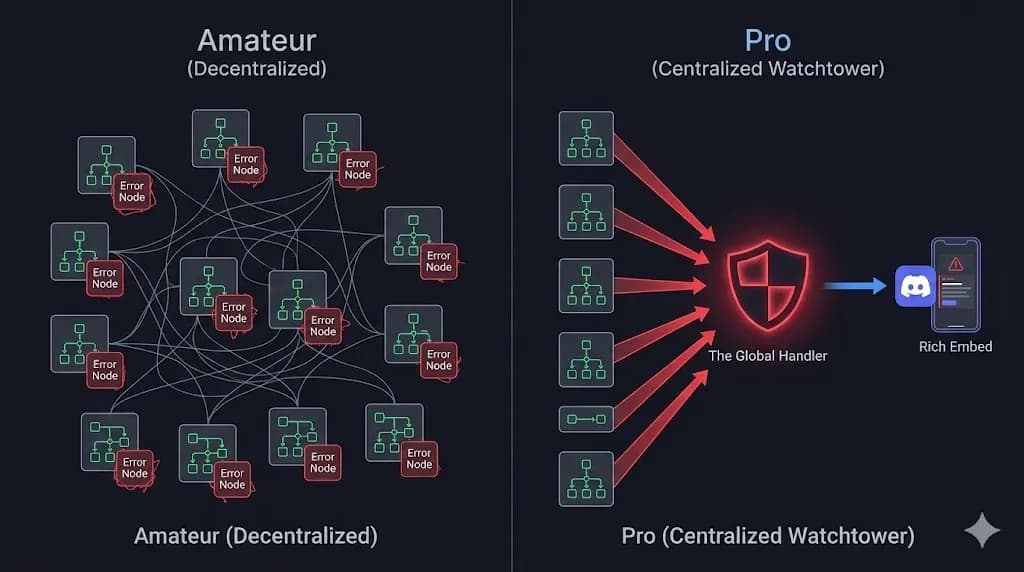
Before we open the n8n canvas, it is critical to understand the architectural distinction. Mixing these two strategies is the mark of an amateur automation engineer.
1. Local Error Handling (The Logic Layer)
- Context: Handled inside the specific operational workflow.
- Use Case: Expected data failures.
- Example: "The Google Sheet row is missing an email address."
- Action: Branch the workflow, log the missing row to a "Needs Review" sheet, and continue processing the rest of the batch.
- Reference: See Day 7 for this implementation.
2. Global Error Handling (The System Layer)
- Context: Handled by a separate master workflow.
- Use Case: Unexpected API crashes or critical infrastructure failures.
- Example: "The HubSpot API returned a 500 Internal Server Error."
- Action: Stop the execution and alert the developer immediately via Slack or Discord.
The goal today is to build an autonomous system where you never have to manually check your n8n execution logs again. If a critical component breaks, the system will diagnose the issue, package the telemetry, and deliver it to you proactively.
The Danger of Silent Failures in Automation
As an automation architect, your worst enemy is not a loud crash; it is a silent failure. If a client's lead generation webhook fails because of a malformed JSON payload, and you do not notice it until the end-of-month reporting cycle (which we automated on Day 22), you lose trust instantly.
A centralized Watchtower protocol prevents silent failures. It ensures that your Mean Time To Discovery (MTTD) for any glitch is measured in milliseconds, not weeks.
 Click to expand
Step 1: The "Error Trigger" Node
The heart of n8n global error handling is a specialized node that many users overlook: the Error Trigger.
Unlike standard triggers (like a Cron schedule or a Webhook) that start a workflow based on an external event, the Error Trigger starts based on an internal state. It listens directly to the n8n core execution engine.
Building the Workflow
Create a new workflow and name it ⚙️ WATCHTOWER: Global Error Handler. Add the Error Trigger node as your starting point.
When any other workflow crashes, this node automatically ingests a JSON object containing the forensic data of the failure:
workflow.id: The database ID of the failed workflow.workflow.name: The human-readable name (e.g., "Day 22 Client Reporter").execution.id: The exact trace ID of the run that failed.execution.error.message: The technical reason (e.g.,401 Unauthorized).
This raw data is crucial. Without it, your alert is just noise ("Something broke"). With it, the alert becomes a diagnostic report.
Parsing the Error Object
When the Error Trigger fires, the JSON output is heavily nested. Depending on how the workflow failed, the error message might be buried under execution.error.message (for standard crashes) or execution.error.description (for more complex API rejections).
As a best practice in E-E-A-T automation design, we must anticipate this variance. You should add a Set Node or Code Node immediately after the Error Trigger to normalize this data:
// Normalizing the Error Payload for reliable alerting
const errorData = $json.execution.error;

let cleanMessage = "Unknown System Error";
if (errorData.message) {
    cleanMessage = errorData.message;
} else if (errorData.description) {
    cleanMessage = errorData.description;
}

return {
    workflow_id: $json.workflow.id,
    workflow_name: $json.workflow.name,
    execution_id: $json.execution.id,
    error_message: cleanMessage,
    timestamp: new Date().toISOString()
};
This step guarantees that your downstream alerting nodes will never crash due to a missing property on the error object itself.
Step 2: The "Deep Link" Generator (The Value Add)
Here is the biggest friction point in daily debugging: You get an email saying "Workflow Failed." You open n8n. You search for the workflow name. You open the "Executions" tab. You scroll to find the specific red run.
That process takes 2 minutes. We can reduce it to 2 seconds by constructing a Deep Link URL that takes you directly to the failed execution canvas.
Add a Code Node (or a Set Node) connected to your Error Trigger to generate the URL:
// Ensure you have your Base URL set via ENV vars, or hardcode it
// Pro Tip: Access environment variables directly in n8n for portability
const baseUrl = $env.WEBHOOK_URL ? new URL($env.WEBHOOK_URL).origin : "https://n8n.your-agency-domain.com";
const workflowId = $json.workflow_id; // Using our normalized data
const executionId = $json.execution_id;

return {
  deep_link: `${baseUrl}/workflow/${workflowId}/executions/${executionId}`
};
Note on Environment Variables: Hardcoding your domain works for a single instance, but if you migrate from a staging n8n server to production, hardcoded URLs break. Using $env.WEBHOOK_URL ensures your Watchtower dynamically adapts to whatever server it is currently hosted on.
Now, your alert will contain a clickable link. One click, and you are staring exactly at the red node that caused the crash.
Step 3: The "Rich Embed" Alert (Discord/Slack)
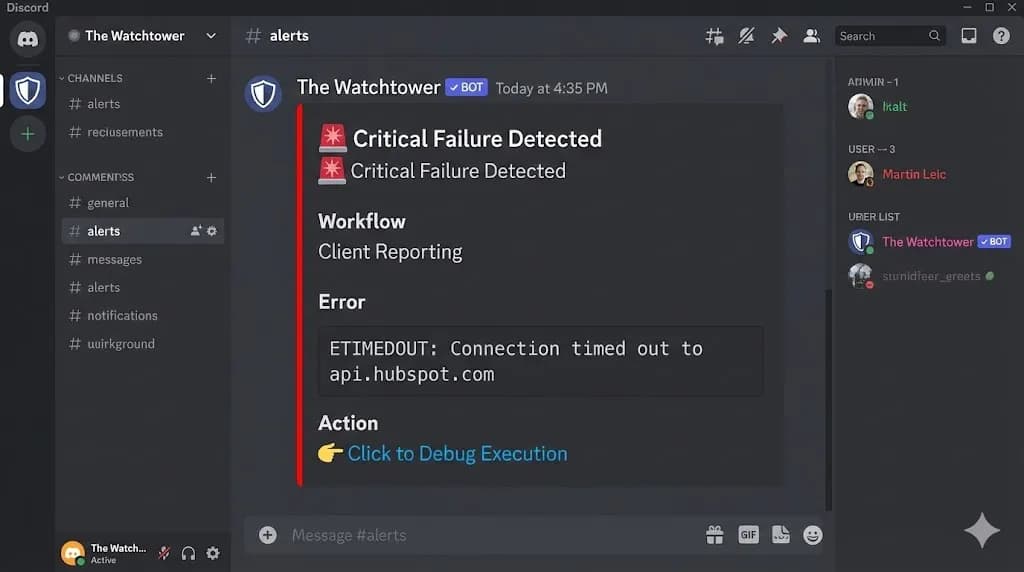
Plain text email alerts are easily ignored. We want a "Red Alert" format that commands immediate attention from your DevOps team.
For this guide, we use Discord because its "Rich Embeds" are visually superior for error reporting (supporting color-coded sidebars, distinct fields, and markdown). However, this same logic applies perfectly to Slack or Microsoft Teams.
The JSON Payload
Add an HTTP Request node pointing to your Discord channel's Webhook URL. Set the method to POST and pass the following JSON body. This structure organizes the raw technical data into a readable "Card."
{
  "username": "The Watchtower",
  "avatar_url": "https://whoisalfaz.me/profile.jpg",
  "embeds": [
    {
      "title": "🚨 Critical Failure Detected",
      "description": "A workflow has crashed in the production environment.",
      "color": 15158332,
      "fields": [
        {
          "name": "Workflow Name",
          "value": "{{$json.workflow.name}}",
          "inline": true
        },
        {
          "name": "Error Message",
          "value": "```{{$json.execution.error.message}}```"
        },
        {
          "name": "Action",
          "value": "[👉 Click to Debug Execution]({{$json.deep_link}})"
        }
      ]
    }
  ]
}
Why this specific layout matters:
- The Red Color (
15158332): Instantly tells your brain "This is an urgent crash, not a standard notification." - The Code Block: Protects the error formatting, making technical stack traces readable.
- The Deep Link: Reduces friction to zero.
 Click to expand
Step 4: Connecting the Fleet
This is the step 90% of beginners forget. Creating the WATCHTOWER workflow does nothing on its own. You must tell your other workflows to use it.
You do not need to add Error Trigger nodes to your operational workflows. You simply change a global setting on each workflow you want to monitor.
⚙️ WATCHTOWER: Global Error Handler workflow.That is it.
Now, if the Client Reporter encounters a fatal crash, n8n will automatically halt execution, package the error data, and delegate it to your Watchtower workflow in the background. You have successfully implemented n8n global error handling.
Repeat this "Settings" tweak for every critical production workflow in your agency.
Advanced: The "Self-Healing" Filter
As you scale your automation infrastructure, you will encounter "flaky" errors — a momentary HubSpot API timeout that resolves itself 1 second later. You do not want your DevOps team woken up at 3 AM for a temporary internet routing glitch.
We need to add Retry Logic before the Global Handler is ever triggered.
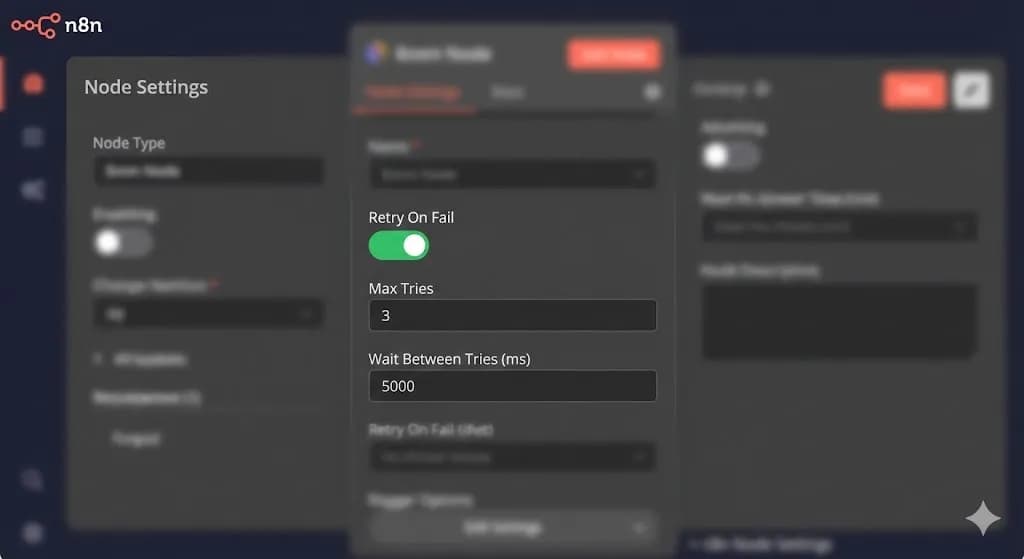
Node-Level Retries
In your operational workflows (not the error handler), open the settings of your fragile nodes (like HTTP Requests connecting to external APIs).
- On Error: Continue (Do not Fail) — only if you manage logic locally.
- Retry on Fail: Toggle On.
- Max Tries: 3.
- Wait Between Tries: 5000ms.
This configuration acts as a severe noise filter. If the API fails on attempt 1, n8n pauses for 5 seconds and tries again. If it succeeds on attempt 2, the workflow continues, and the Watchtower remains completely silent. The Watchtower is only triggered if the node fails all 3 attempts, representing a genuine, persistent problem requiring immediate human intervention.
Handling OOM (Out of Memory) Node Crashes
There is one specific type of error that standard retries cannot fix: Memory exhaustion. If you are querying 50,000 rows from a database and trying to parse them all at once in a Code node, n8n will hit its V8 engine RAM limit (usually around 1.4GB in standard Node.js environments) and the core process will crash.
When an OOM crash happens, the entire n8n container restarts. Because the execution was forcefully terminated at the operating system level, the Error Trigger might not fire because the overarching orchestrator died.
[!TIP] Hosting Reliability for Mission-Critical Workflows: If your n8n instance itself crashes due to RAM exhaustion, the Error Trigger cannot save you. This is why I host production n8n instances on Vultr using their High Frequency Compute instances. It allows me to easily deploy n8n using Docker with custom
--max-old-space-size=4096flags, expanding the V8 engine memory limit to 4GB, and preventing these catastrophic container crashes before they ever happen.
If you are dealing with massive datasets, always use the Split In Batches (now Loop) node to process data in chunks of 50-100 items. This keeps your RAM usage flat and predictable, ensuring your Error Handling architecture remains intact.
 Click to expand
Conclusion: From Fragile to Anti-Fragile
Automation is inherently powerful, but without safeguards, it is fragile. By implementing n8n Global Error Handling, you transform your agency from a reactive "break-fix" operation into a proactive engineering outfit.
You now have a system that:
This is exactly how I manage my systems at whoisalfaz.me. I do not neurotically check execution logs; I focus on building, and I wait for the Watchtower to tell me if something needs attention.
What is Next? We have secured the backend. Now, it is time to open up the gates. Tomorrow, on Day 24, we will explore n8n Webhooks & API Endpoints. I will show you how to turn your n8n workflows into a public, custom API that can receive dynamic data from your Next.js website, Stripe, or a custom mobile app.
See you in the workflow editor.
Follow the full series: 30 Days of n8n & Automation
About the Author
Alfaz Mahmud Rizve is a RevOps Engineer and Automation Architect helping SaaS founders and scaling agencies build self-healing, autonomous revenue infrastructure. Explore his work at whoisalfaz.me.
In this Article
Ready to automate your agency?
Skip the manual grunt work. Let's build a custom system that runs your business on autopilot 24/7.