n8n Data Privacy: Secure Your Workflows & Stop Data Leaks | Day 18

By Alfaz Mahmud Rizve | RevOps & Full Stack Automation Architect at whoisalfaz.me
Welcome back to Day 18 of our 30 Days of n8n & Automation sprint.
If you have been following this architectural series, you have officially graduated from building simple trigger-action "toys" to engineering complex, autonomous systems. We have covered Lead Enrichment pipelines (Day 11), Automated Content Research (Day 15), and yesterday, we crossed the Reliability Gap (Day 17) by deploying Docker Compose on a dedicated server.
But as you transition from a solopreneur tinkering on weekends to an Agency-Grade Automation Engineer, the stakes change completely.
When you are automating a personal to-do list, a database error is annoying. When you are automating a client's Lead Enrichment System, Financial Invoicing, or Patient Onboarding, a data leak is a lawsuit.
Most n8n developers I audit are sitting on a ticking time bomb. They focus entirely on "making it work" (Reliability) and completely ignore "making it safe" (Liability).
Today, we are going to fix the "Silent Leak."
This is a default setting in n8n that is currently recording every single email, password, and PDF you process into a plain-text database that you probably haven't looked at in months. We are going to permanently close this vulnerability. We are building the Agency Privacy Protocol—a 6-layer defense architecture that starts with where you host and ends with how you code.
This is not just about cybersecurity; it is about Professionalism. You cannot charge premium $5,000/mo retainer fees if you are treating client data like public property.
Let's secure your empire.
The "Open Book" Problem: Why Default n8n is Dangerous
To understand the legal risk, you have to understand how n8n operates under the hood.
n8n is fundamentally designed for developers. Developers need to debug failing APIs. To help you debug, n8n (by default) records the Full Execution History of every single workflow run.
This unredacted ledger includes:
- HTTP Headers: Often containing plain-text Bearer tokens or authorization keys.
- JSON Payloads: Containing raw Personally Identifiable Information (PII) like names, phone numbers, and home addresses.
- Binary Data: Full caching of downloaded PDFs, resumes, and images.
- Metadata: Exact IP addresses and timestamps of the execution requests.
The Nightmare Scenario
 Click to expand
Let's paint a picture of how this default behavior destroys an agency overnight.
Imagine you built an autonomous "Candidate Screening Bot" for a Recruitment Agency client six months ago. The workflow accepts a resume (PDF), extracts the phone number and email using OpenAI, and saves it to a CRM. At scale, it processes 100 applications a day.
Six months later, you hire a Junior Developer to fix a small routing bug in a completely different workflow. You give them global admin access to the n8n dashboard. They accidentally click on the "Executions" tab of the Recruitment workflow.
Suddenly, that Junior Developer has direct, unencrypted access to 18,000 resumes. They can download every PDF. They can read every email. They can see the private analytical notes the AI generated about the candidates' psychological profiles.
This data is not encrypted. It is sitting in your Postgres or SQLite execution_entity table, readable by anyone with dashboard or database access. If you are handling data for EU citizens, you have just severely violated GDPR (Article 5: Data Minimization). If you are in California, you violated CCPA.
This is The Silent Leak. It is not a malicious hacker breaking through a firewall; it is your own system working exactly as designed, aggressively hoarding data you thought was gone.
Layer 1: The Infrastructure Foundation (Data Residency)
The first rule of n8n Data Privacy is absolute: Own the Hard Drive.
Many beginners start with n8n Cloud or cheap shared hosting. While n8n Cloud is SOC2 compliant, "Agency-Grade" engineering for high-ticket clients often requires strict, provable Data Residency and Hardware Isolation.
If you have a client in Healthcare (HIPAA), Finance, or Legal, you cannot legally tell them: "Your data is stored on a shared cloud server in Frankfurt, mixed in a multi-tenant environment with other customers."
You need to tell them: "Your data is processed on a dedicated, encrypted server within your specific country's borders, and only WE hold the root access keys."
The Bare-Metal Mandate
This is why I exclusively require my clients to utilize Vultr for the infrastructure layer. It solves four critical compliance issues immediately:
- Dedicated IPs: Your traffic is isolated. You are not sharing an IP address with a spam server.
- Geographic Control: You can deploy the server in the exact city your client requires to satisfy local data residency laws.
- Hardware Level Security: High Frequency NVMe drives provide secure, isolated block storage.
- VPC Peering: You can lock the database server entirely away from the public internet.
Pause this tutorial and claim your $300 in Free Credits to Launch Your Private n8n Server on Vultr here.
(Architect's Note: Use this link to spin up a 4GB RAM server. Do not use a $5 shared plan for production; you need the CPU overhead to handle AES database encryption and real-time log pruning).
Layer 2: The "Burn After Reading" Strategy (Auto-Pruning)
Now that you own the metal, we must stop the data hoarding.
You only need Execution History to debug recent errors. You do not need to know that a marketing workflow succeeded perfectly on a Tuesday three months ago. Keeping that data is a massive legal liability. We must configure n8n to aggressively Prune (Shred) old data from the Postgres database.
The Environmental Configuration
In your Vultr server, open your .env file (or your Docker Compose environment block) and inject these exact commands. This is the baseline "Agency Standard" configuration:
# 1. Enable Pruning (Turn the automated shredder on)
EXECUTIONS_DATA_PRUNE=true

# 2. Burn Time (Delete all logs older than 24 hours)
EXECUTIONS_DATA_MAX_AGE=24

# 3. Fail-Safe (Keep a maximum of 1,000 executions to prevent DB bloat)
EXECUTIONS_DATA_PRUNE_MAX_COUNT=1000

# 4. Error Only Logging (Optional but recommended for extreme privacy)
EXECUTIONS_DATA_SAVE_ON_SUCCESS=none
The Legal Defense of the 24-Hour Rule
Why 24 hours?
If a client reports a missing lead, they almost always report it within the same business day. 24 hours gives your engineering team enough time to trace the error log.
More importantly, by automatically deleting all data after 24 hours, you shift your legal classification. You can legitimately argue to compliance auditors that you are not "storing" client data, but merely "processing" it in transit. This is a massive distinction in GDPR and B2B vendor security questionnaires.
Layer 3: Ghost Mode (Node-Level Privacy)
Sometimes, global auto-pruning is not enough. What if you are passing a User Password, a Stripe Credit Card Token, or a Private API Key through an HTTP Request node?
You never want that specific, highly sensitive payload to appear in the database logs, even for 1 second. For this, n8n has a powerful, hidden feature I call "Ghost Mode."
How to Architect Ghost Mode:
The Engineering Result:
Execute the workflow. Navigate to the Execution History tab and click on that specific node. You will see a grayed-out message: "No data available."
The sensitive payload existed in the Node.js RAM (Memory) just long enough to execute the API call, and then it instantly vanished. It was never written to the disk. Even if a rogue employee accessed your database, they could not recover that password.
The Agency Mandate: Every single node that touches PII, financial data, or credentials must be set to Ghost Mode. No exceptions.
Layer 4: The Vault (AES Credential Encryption)
I still see developers making this catastrophic error in 2026.
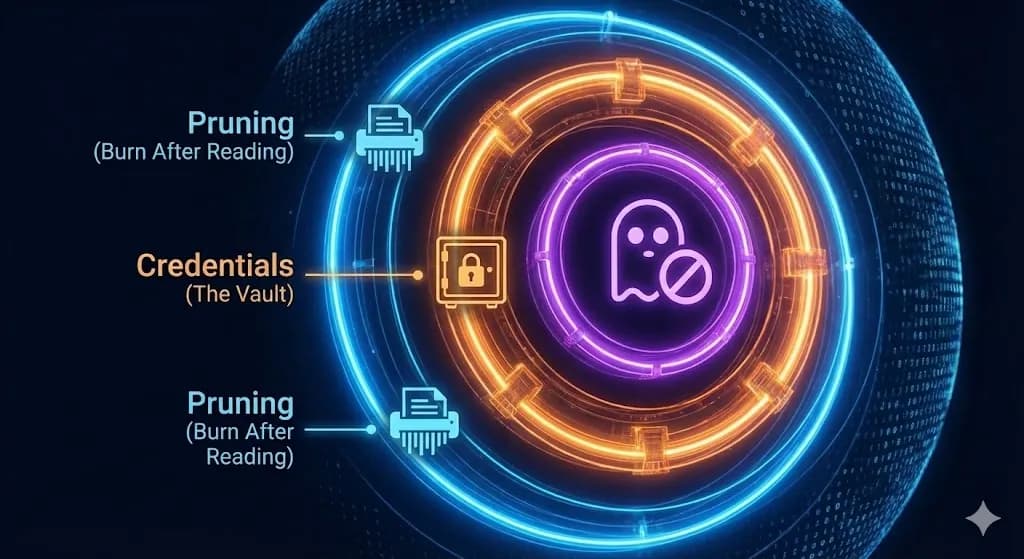
The Mistake: You need to call the OpenAI API. You paste your secret key (sk-proj-12345...) directly into the "Header" field of an HTTP Request node.
 Click to expand
The Risk: That key is now permanently embedded in your workflow's JSON export.
- If you share the workflow JSON template with a client? They now own your API key.
- If you commit the workflow to a public GitHub repository? Scraping bots will steal your key and rack up $10,000 in OpenAI charges in under three minutes.
- If you look at the Execution History? The key is visible in plain text to anyone looking over your shoulder.
The Fix: You must exclusively use n8n's built-in Credential Manager.
Why The Vault is Mathematically Safer:
When you use the Credential Manager, n8n encrypts the data inside the Postgres database using a heavy AES-256 algorithm. The encryption is powered by your server's N8N_ENCRYPTION_KEY.
Furthermore, n8n implements Automated Log Redaction. When you run the workflow, the Execution History will automatically mask the output. Instead of seeing your secret token, you will just see [Credentials].
(Pro-Tip: Ensure you have explicitly defined a massive, 64-character randomized string as your N8N_ENCRYPTION_KEY in your Vultr .env file. If you lose this key, you permanently lose access to all your credentials. Store it in a secure offline password manager).
Layer 5: Network Defense (The UFW Moat)
We have secured the inside of the database. Now we must lock the physical server gate.
A self-hosted n8n instance on Vultr is a server sitting on the public internet. If you just run docker-compose up without configuring your network, you are exposing port 5678 to the entire world. Automated scraping bots will find your IP address. They will try to brute-force your login panel.
The Reverse Proxy Barrier
Never expose n8n directly. You must sit it behind a Reverse Proxy like Nginx, Caddy, or Traefik. The proxy handles the strict SSL/TLS certificates (HTTPS). This ensures that when you log into your n8n dashboard from a public airport Wi-Fi network, your password is mathematically encrypted in transit. The proxy also serves to strip out dangerous, malformed HTTP headers before they ever reach the n8n container.
The UFW Firewall Lockdown
You must sever all unauthorized access at the kernel level. SSH into your Vultr server and configure the Uncomplicated Firewall (UFW) with these exact commands:
sudo ufw default deny incoming
sudo ufw default allow outgoing
sudo ufw allow 22/tcp  # Allow SSH for you
sudo ufw allow 80/tcp  # Allow HTTP (for SSL renewal routing)
sudo ufw allow 443/tcp # Allow HTTPS (Secure web traffic)
sudo ufw enable
This configuration dictates that even if n8n develops a zero-day vulnerability on port 5678, external attackers cannot reach it. They are forced to go through the heavily encrypted HTTPS front door.
Layer 6: System-Level Access & The Human Element
The final layer is operational architecture. You can have the most secure server in the world, backed by AES encryption and UFW firewalls, but if you give a junior contractor global admin access, your entire system is compromised.
System-level gateway crashes and execution tool failures are a reality of automation engineering. When an external API throws a "Tool not found" or "Validation failed" error, a developer needs to access the logs to restart the gateway and fix the path parameters.
However, they do not need access to your production client data to do this.
- Environment Separation: You must maintain a distinct "Development" server and a "Production" server. Junior engineers build and debug on the Dev server using dummy data. Only Senior Architects possess the keys to push the finalized JSON payload to the Production Vultr server.
- Role-Based Access Control (RBAC): If you are scaling an agency team, you must upgrade to n8n Enterprise or build strict architectural silos. Do not share a single admin login.
- Audit Logging: Maintain a strict ledger of who logged into the server, when they logged in, and what workflow they modified.
 Click to expand
The Day 18 Mandate: Stop Acting Like a Freelancer
There is a distinct reason why enterprise clients will aggressively pay $5,000 for an automation architecture that a novice freelancer will happily build for $500.
Enterprise clients are not paying for the workflow. They are paying for the Assurance. They are paying for the guarantee that their operational efficiency will not result in a catastrophic, brand-destroying data leak.
By implementing this 6-layer Agency Privacy Protocol, you fundamentally differentiate yourself from the amateur crowd. You can sit across the table from a CEO, look them in the eye, and state: "We don't just automate your CRM. We process your data through isolated Vultr hardware, secure it with military-grade AES encryption, and algorithmically shred the payloads every 24 hours to guarantee GDPR compliance."
That is not just technical jargon. That is how you close the deal.
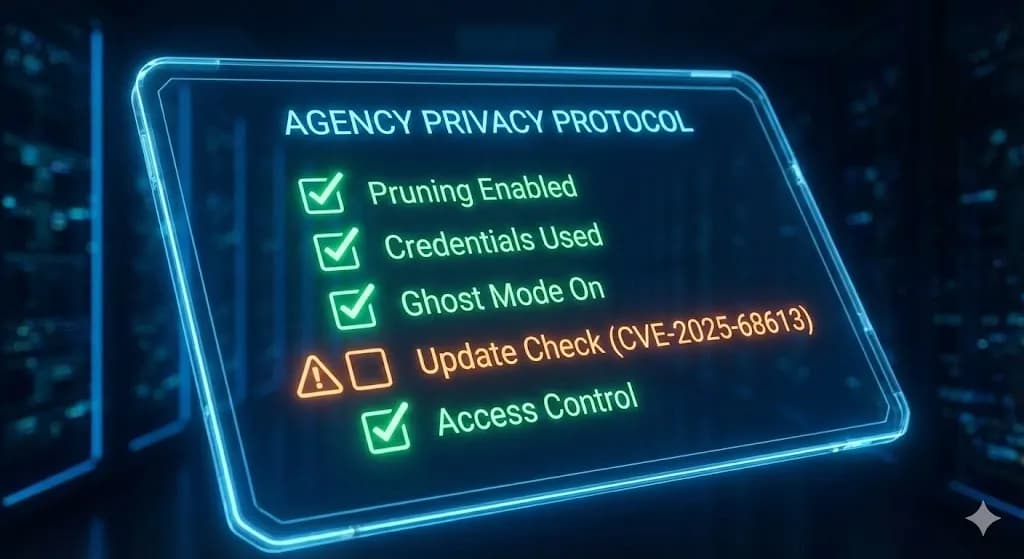
Your Final Security Checklist:
- [ ] Provisioned dedicated NVMe infrastructure (Vultr).
- [ ]
.envupdated with 24-hour Auto-Pruning logic. - [ ] Ghost Mode activated on all PII and financial nodes.
- [ ] Hardcoded API keys migrated to the AES Credential Vault.
- [ ] UFW configured to block all non-HTTPS traffic.
You have secured the backend. Tomorrow, on Day 19 of the 30 Days of n8n & Automation sprint, we are going to leave the server room and move to the frontend. I will show you how to wrap these secure, complex workflows into beautiful, interactive Client Apps using custom User Interfaces.
Subscribe to the newsletter, and I will see you on the canvas tomorrow.
In this Article
Ready to automate your agency?
Skip the manual grunt work. Let's build a custom system that runs your business on autopilot 24/7.