n8n AI Agent Tools: Give Your Chatbot Real Hands with Function Calling | Alfaz

By Alfaz Mahmud Rizve | RevOps & Full Stack Automation Architect at whoisalfaz.me
TL;DR: n8n AI Agent Tools (Function Calling) allow you to give an LLM external capabilities beyond its training data. By defining tools with a name, description, and JSON schema, the AI agent autonomously decides which tool to invoke based on the user's question. Connected to the verification API from Day 24, your agent can look up real-time account status, query databases, or generate PDFs — all without you hardcoding any API call logic.
Welcome back to Day 25 of the 30 Days of n8n & Automation series here on whoisalfaz.me.
We have reached a pivotal architectural milestone in this series. We are moving from "Automation" to "Autonomous Agents." Here is a quick recap of what we have built:
- Day 15: AI Content Researcher — basic LLM workflow
- Day 22: Client Reporting Engine — complex data pipeline to PDF
- Day 23: Global Error Watchtower — infrastructure monitoring system
- Day 24: Serverless API Backend — n8n as an Express-style API server
Today, we connect the Brain (Day 15 AI) with the Backend (Day 24 API).
Standard LLMs like ChatGPT or GPT-4o are "frozen in time." They have no knowledge of your client's current subscription status, your internal CRM records, or your live website data. If you ask a standard chatbot "Is my account active?", it will either hallucinate an answer or admit it does not know — neither is acceptable in a production support context.
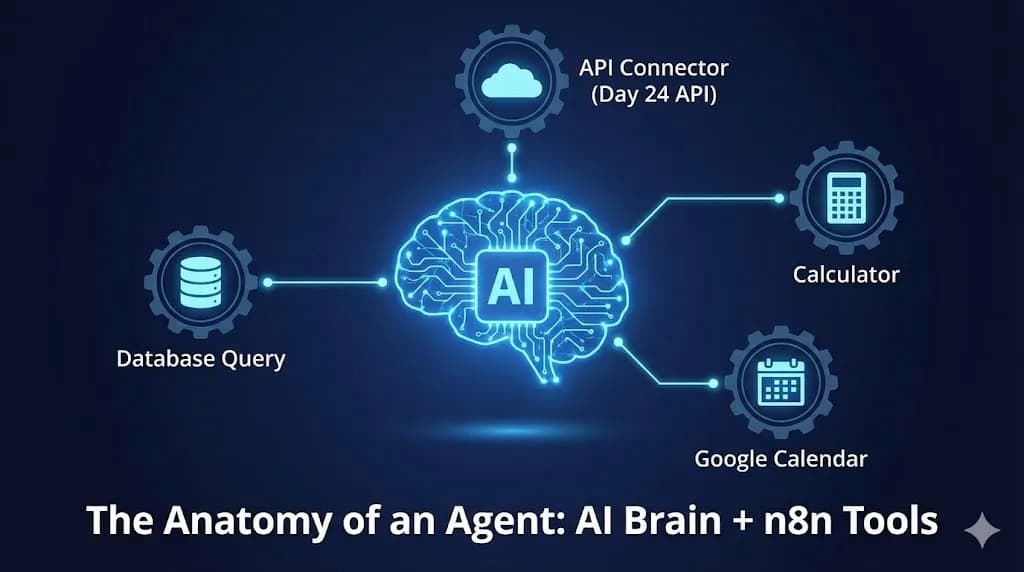
To solve this, we need n8n AI Agent Tools, often called Function Calling. We are giving our AI a backpack of capabilities — specifically, access to the verification API we built yesterday — so it can fetch real-time data autonomously before answering the user.
The Concept: Why AI Needs "Hands"
Before we build, you must understand the paradigm shift from Prompt Engineering to Agentic Engineering.
A standard LLM prompt is stateless and passive:
- User: "What is the capital of France?"
- AI: "Paris."
The AI answers from training data. It cannot look anything up. It cannot perform actions.
An AI Agent with Tools is active. It reasons over the prompt and determines whether it needs external help before responding:
- User: "Is the user [email protected] active right now?"
- AI (internal chain of thought): "I do not know this user's account status from training data. I have a tool called
verify_user_status. I should call it with the email '[email protected]'." - AI (action): Invokes the tool → n8n calls the verification API → receives
{"verified": true}. - AI (final response): "Yes, Alfaz currently has an active premium account."
In n8n, which leverages the LangChain framework under the hood, we define these tools declaratively and attach them to the AI Agent node. The model then decides if and when to invoke them based on the conversation context.
 Click to expand
The Architecture: The Tier 1 Support Agent
We are building an autonomous Tier 1 customer support agent for a SaaS platform. This is a real use case — one of the most common early deployments of AI agents in an agency environment.
The goal: A chatbot that accurately answers questions about user account status without requiring human agent intervention.
The full stack:
The critical architectural point here is that we are not hardcoding the API call. We are teaching the AI how to call the API and what information it needs, then letting the model decide autonomously when the call is warranted.
Step 1: The Brain (AI Agent Node Setup)
Create a new n8n workflow. Add a Chat Trigger node as the entry point and connect it to an AI Agent node.
In the AI Agent node settings:
- Chat Model: Select your OpenAI credentials and choose
gpt-4o(orgpt-4o-minifor lower cost per query). - Agent Type: "Tools Agent" (uses LangChain's ReAct reasoning framework).
- Memory: Enable "Window Buffer Memory" to retain 5-10 turns of conversation context.
The System Prompt
The system prompt defines the agent's persona and critically instructs it to rely on tools rather than guessing. Under "System Message":
You are a helpful Tier 1 support agent for our SaaS platform. Your job is to assist users with their account questions.

You have access to tools to look up real-time data. ALWAYS use the available tools to verify information before answering any question about a user's account status, subscription plan, or access rights.

Do NOT guess or make assumptions about account status. If a tool returns an error or returns verified: false, report that plainly to the user and suggest they contact [email protected].
This constraint is the most important architectural decision in the prompt. Without it, GPT-4o will occasionally hallucinate "Yes, your account is active" even without calling the tool.
Step 2: The Hands (Defining the Custom Tool)
This is the technical core of today's tutorial. We need to define the "Tool Specification" so the AI model understands what capabilities it has access to.
In n8n, under the Tools category in the nodes panel, drag in a Custom n8n Tool node and connect it to the "Tools" input port of the AI Agent node (the special socket labelled "Tools" — not the standard data connector).
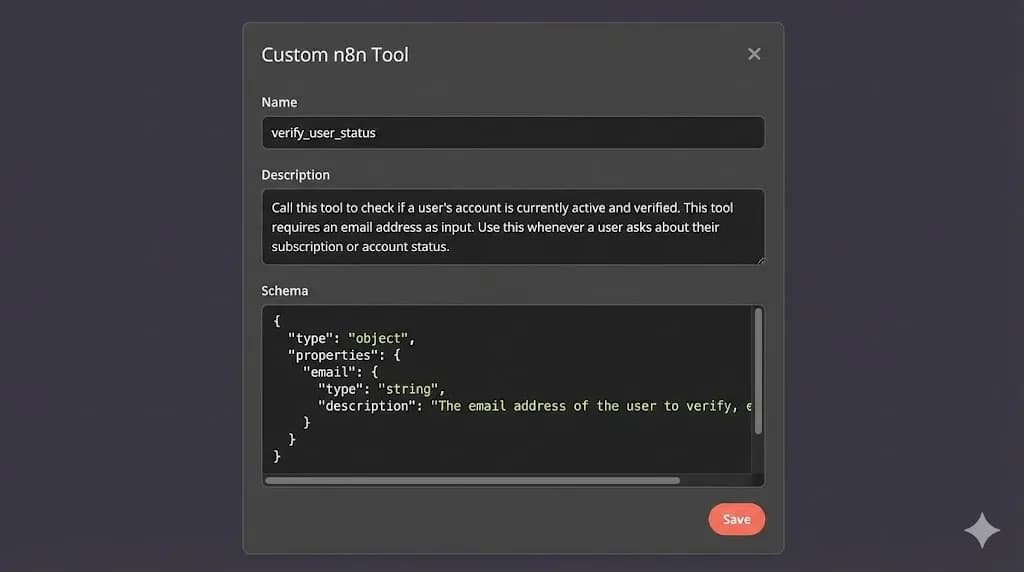
We configure three critical fields:
1. Name
Must be a single word or snake_case string. The AI model sees this name when reasoning about which tool to use.
verify_user_status
2. Description (The AI's Instruction Manual)
This field is not for humans — it is the instruction the LLM reads to decide when to invoke this tool. Vague descriptions cause the AI to skip the tool or call it unnecessarily. Be explicit.
Call this tool to check if a user's account is currently active and verified on the platform. This tool requires an email address as input. Use this tool whenever a user asks about their subscription status, account access, or whether their account is active.
3. Schema (Input Definition)
Define the structured input parameters the AI must extract from the conversation before it can invoke this tool. We use a JSON Schema object:
{
  "type": "object",
  "properties": {
    "email": {
      "type": "string",
      "description": "The full email address of the user to verify, e.g., [email protected]"
    }
  },
  "required": ["email"]
}
The AI now understands: "Before I can call verify_user_status, I need to identify an email string from the conversation. If the user has not provided one, I should ask for it."
 Click to expand
Step 3: Connecting the API (The Tool's Internal Logic)
Now that we have defined the abstract tool spec, we need to implement the concrete action it takes when invoked.
The Custom n8n Tool node is a sub-workflow wrapper. Double-click it to open its internal canvas. You will see a "Tool Workflow Trigger" at the start and a "Tool Workflow Output" at the end. The AI's extracted input parameters arrive via the Trigger, and whatever you connect to the Output node gets returned to the agent as the "tool result."
Inside the sub-workflow, add an HTTP Request node with these settings:
- Method: POST
- URL:
https://n8n.your-domain.com/webhook/verify-user(the Production URL from Day 24) - Headers:
{"x-api-key": "sk_prod_8293482394a7b9c2d1e5f"} - Body (JSON):
{"email": "{{ $json.email }}"}
The $json.email expression dynamically maps the email the AI extracted from the conversation directly into the API request body. Connect this HTTP Request output to the Tool Workflow Output node.
This is the link between the AI's cognitive layer and your real backend data layer.
[!TIP] Performance note: Because the agent waits synchronously for the tool call to complete before formulating its response, latency matters here. Running your Day 24 API on Vultr High Frequency Compute ensures tool calls resolve in under 200ms — keeping the overall agent response time feeling snappy for your end users.
Step 4: Testing the Agent (Watching It Think)
Enable "Test" mode on your workflow and open the Chat panel in n8n. Send the following test message:
"Hey, can you check if [email protected] has an active account?"
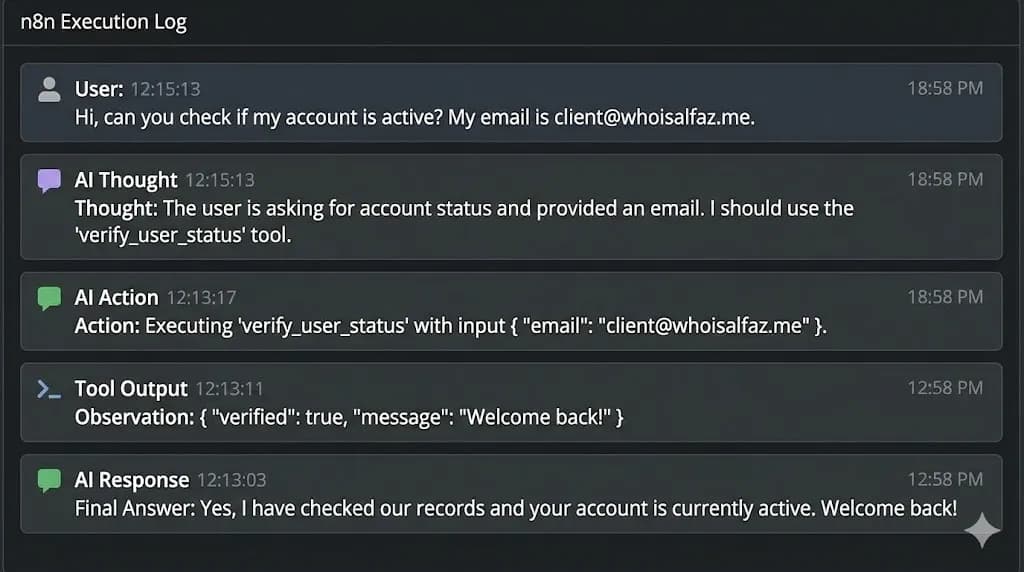
Do not just look at the final response. Open the execution details and expand the AI Agent node logs. You will see the full "Chain of Thought" the model executed autonomously:
verify_user_status tool. The user provided an email: [email protected]."{"email": "[email protected]"}.{"verified": true, "name": "Alfaz"}.The AI did not just chat — it performed a secure, authenticated backend lookup on its own initiative. That is the difference between a chatbot and an autonomous agent.
 Click to expand
Real-World Agency Use Cases for n8n AI Tools
Connecting GPT-4o to a single verification API is just the foundation. Once you understand the pattern, the surface area of what you can build expands dramatically:
- CRM Enrichment Agent: Give the agent a HubSpot lookup tool. When a prospect lands on your site and chats, the agent can query their deal stage and tailor its pitch accordingly, completely automatically.
- On-Demand Report Generation: Attach the Day 22 PDF engine as a tool. Users can request "Generate my monthly report" via chat, and the agent will call the pipeline, receive the binary PDF link, and send it back in the conversation.
- Multi-Tool Reasoning: Give the agent 3 tools simultaneously (user verification + subscription lookup + billing history). GPT-4o will intelligently decide which combination of tools to call based on the complexity of the question — no routing logic needed.
Conclusion: The Era of Autonomous Automation
By combining the cognitive power of GPT-4o with the connectivity of n8n AI Agent Tools, we have moved beyond simple automation scripts. We are building systems that can reason, plan, and act autonomously on behalf of your clients.
This is the paradigm shift that separates a junior automation freelancer from an Autonomous Revenue Systems architect. It is not about connecting APIs — it is about building layered, intelligent systems that compound in value over time.
What is Next? We have built agents that can use tools and query live APIs. But what if the knowledge the agent needs is locked inside a 100-page PDF contract or a large internal documentation base? Tomorrow, on Day 26, we dive into RAG (Retrieval-Augmented Generation) — one of the highest-value implementations in this entire series.
See you in the workflow editor.
Follow the full series: 30 Days of n8n & Automation
About the Author
Alfaz Mahmud Rizve is a RevOps Engineer and Automation Architect helping SaaS founders and scaling agencies build self-healing, autonomous revenue infrastructure. Explore his work at whoisalfaz.me.
In this Article
Ready to automate your agency?
Skip the manual grunt work. Let's build a custom system that runs your business on autopilot 24/7.