Stop Editing Videos Manually — Build an Automated...

This technical breakdown contains affiliate links. If you deploy this stack using my links, I earn a commission at no extra cost to you.
By Alfaz Mahmud Rizve | RevOps & Full Stack Automation Architect at whoisalfaz.me
TL;DR: Build a fully automated YouTube Shorts factory with n8n that converts a text topic into a complete, uploaded video. The pipeline uses GPT-4o in JSON Mode to generate a structured script, DALL-E 3 to generate a cinematic background image, Creatomate to render the video with synchronized subtitles and TTS audio, and the YouTube Data API to upload and publish the final MP4 — all triggered from a single n8n form or schedule node.
Welcome back to Day 28 of the 30 Days of n8n & Automation series here on whoisalfaz.me.
We have reached the final tier of automation.
Over the last 27 days, we have mastered text, data, images, and voice. We gave our AI Vision, Hands, Memory, and Speech.
Today, we conquer the medium that still rules the internet: Video.
The Problem: Why Manual Video Production Is a Trap
If you are trying to build a personal brand or grow an agency's social presence, you have heard the advice: "You must post vertical video daily."
TikTok, Instagram Reels, and YouTube Shorts are the most reliable organic growth channels in 2026. But the production process is brutal.
To produce a single 30-second "Faceless" short (voiceover + stock footage + captions), a human editor must:
That is 3-4 hours of skilled work for 30 seconds of content. At any scale, this is unworkable.
As an Automation Architect, I refuse to do manual labor that a machine can do better. We are going to build a Programmatic Video Factory — a workflow where you enter a text topic and receive a fully produced, uploaded .mp4 Short in return.
The Tech Stack: The Director's Suite
We need a specialized video rendering engine — FFMPEG is too complex for rapid iteration, and Canva lacks a production API.
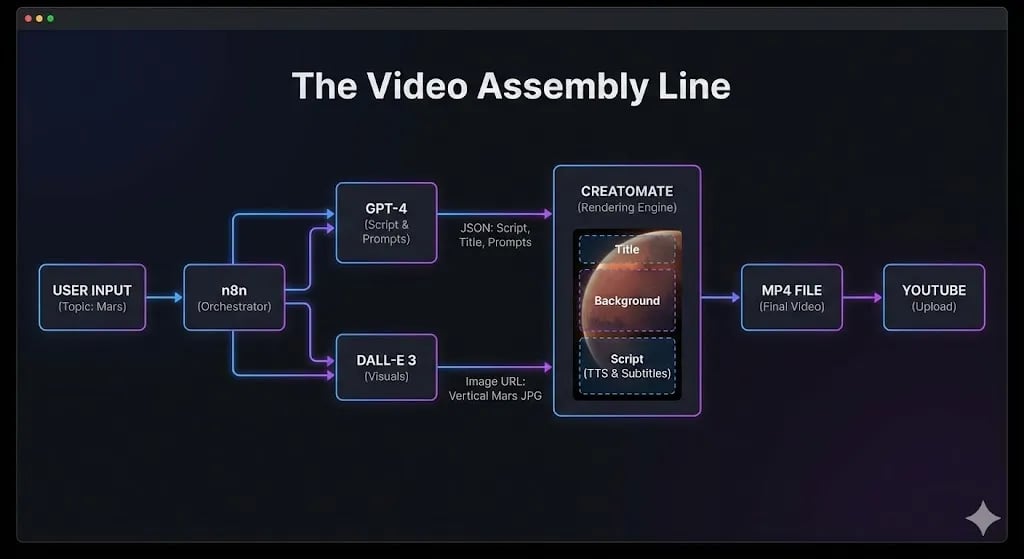
We will use the Agency-Grade Video Stack:
Prerequisite: Sign up for a free account at Creatomate.com and create your first video template.
 Click to expand
Step 1: The Screenwriter (GPT-4o JSON Mode)
The biggest mistake beginners make is asking ChatGPT to "write a script." It returns a prose block with scene directions like [Camera pans left] — that breaks automation because downstream nodes cannot parse ambiguous text.
We need Structured Data — the AI must return a strictly formatted JSON object that separates the spoken words from the visual instructions so we can route each piece to the correct service.
Add an OpenAI Chat Model node to your workflow:
- Model:
gpt-4o - Response Format: JSON Object (forces structured output)
- System Prompt:
You are an expert viral content scriptwriter for YouTube Shorts.
The user will provide a topic. You must generate a concise, 30-second script.
You must return ONLY a valid JSON object with this exact structure:

{
  "title": "A punchy 3-5 word title for the video overlay (e.g., 'The Mars Mystery')",
  "script": "The full spoken voiceover script. Keep it under 60 words. No scene directions.",
  "image_prompt": "A highly detailed, cinematic DALL-E 3 prompt for a background image matching the topic. Aspect ratio 9:16. No text in the image.",
  "keywords": "comma, separated, tags, for, youtube"
}
- User Message:
{{ $json.topic }}(mapped from your Form or Schedule trigger input)
Test it with the topic: "The history of Bitcoin."
Expected output:
{
  "title": "Bitcoin: The Digital Gold",
  "script": "In 2009, an anonymous creator named Satoshi Nakamoto released Bitcoin to the world. There was no CEO. No headquarters. Just a whitepaper and an idea: money that no government could control. Today, that idea is worth over a trillion dollars.",
  "image_prompt": "A golden digital coin glowing on a dark futuristic circuit board, cybernetic style, vertical 9:16 composition, dramatic lighting, no text",
  "keywords": "bitcoin, crypto, finance, history, satoshi"
}
By separating script and image_prompt, we can now process them in parallel — sending the script to Creatomate's TTS engine while DALL-E 3 generates the background image simultaneously.
Step 2: The Art Department (DALL-E 3)
A short with a single static screenshot as background will lose viewers in 3 seconds. We generate unique, branded visuals using DALL-E 3.
Add an OpenAI Image node:
- Resource: Image
- Operation: Create
- Model:
dall-e-3 - Prompt:
{{ $json.image_prompt }}(from the Step 1 JSON output) - Size:
1024x1792(vertical, 9:16 aspect ratio) - Quality:
hd
The node returns a public image URL that expires after 1 hour. This is fine — Creatomate will download and embed the image during rendering, which happens within seconds.
Note: For more variation, ask GPT-4o to generate 3 separate image_prompts in the JSON output and map them to a 3-scene Creatomate template for higher retention.
Step 3: The Template (Creatomate Setup)
In your Creatomate account, create a new Vertical Short Template (9:16, 1080×1920):
- Add a Video/Image layer named
Background— this will display your DALL-E 3 image. - Add a Text layer named
Titlein the overlay position with your brand font. - Add a Text-to-Speech Audio layer named
Script— Creatomate will synthesize the voiceover from the text you pass. - Enable Auto-Captions on the audio layer — Creatomate will generate and sync captions automatically.
Save the template. Copy the Template ID and your Creatomate API Key.
What this gives you: An API endpoint that accepts JSON like { "Background": "url...", "Title": "text...", "Script": "text..." } and returns a fully rendered, captioned, voiced .mp4 file.
Step 4: The Director (n8n Orchestration)
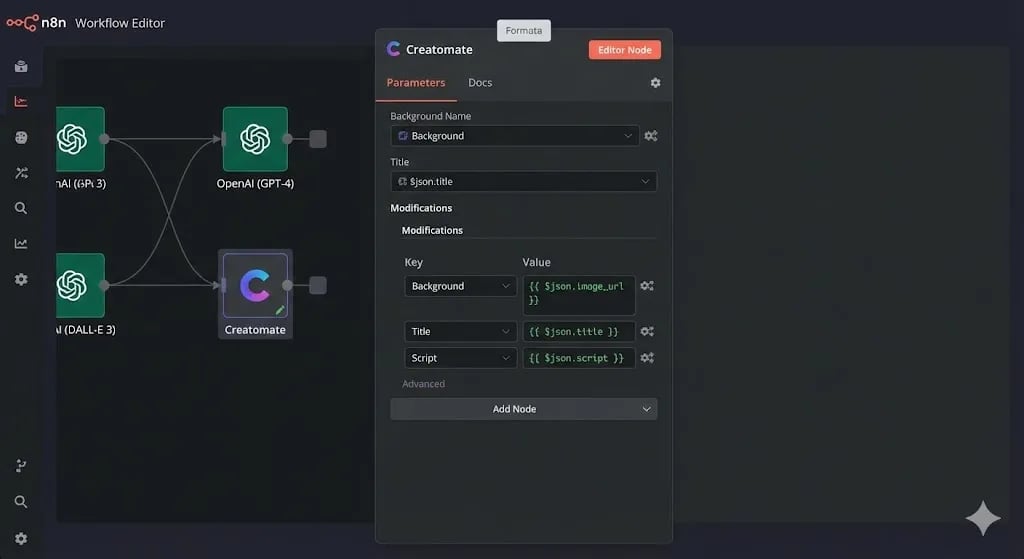
Back in n8n, bring all the components together. Add an HTTP Request node to call the Creatomate Renders API:
- Method: POST
- URL:
https://api.creatomate.com/v1/renders - Headers:
{"Authorization": "Bearer YOUR_CREATOMATE_API_KEY"} - Body:
{
  "template_id": "YOUR_TEMPLATE_ID",
  "modifications": {
    "Background": "{{ $json.dalle_image_url }}",
    "Title": "{{ $json.title }}",
    "Script": "{{ $json.script }}"
  }
}
Creatomate will queue the render and return a status. Add a Wait node (30 seconds) followed by a second HTTP Request to poll the render status until it returns succeeded. When done, the response contains the final .mp4 URL.
 Click to expand
Step 5: Distribution (Upload to YouTube)
A video sitting on a server earns $0. We need to ship it.
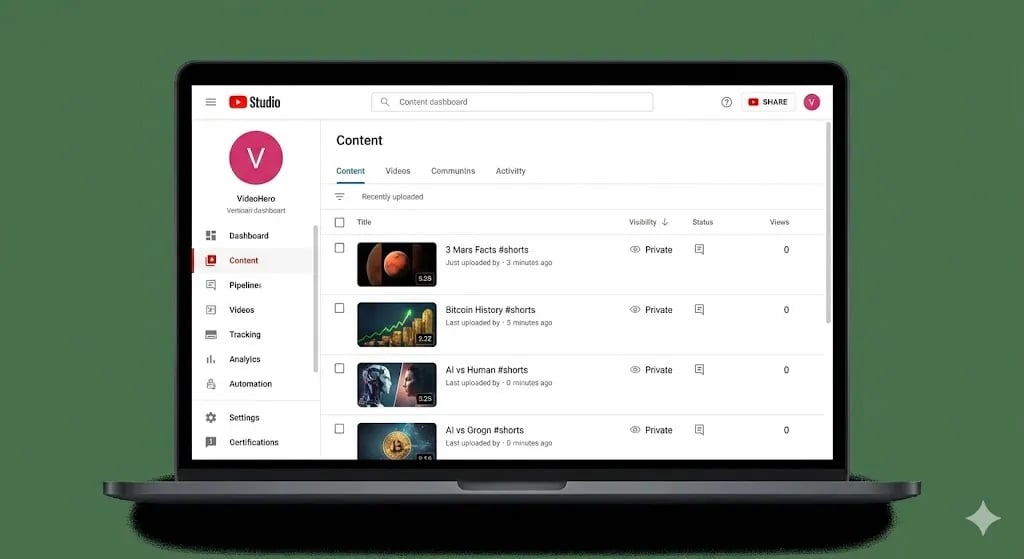
The Creatomate response contains a .mp4 download URL. Use a second HTTP Request node to download the binary file, then add a YouTube node:
- Operation: Upload Video
- Title:
{{ $json.title }} - Description: Auto-generate with GPT-4o using the script as context.
- Tags:
{{ $json.keywords }} - Category: 22 (People & Blogs)
- Privacy Status:
publicorunlisted(for review before publishing)
[!TIP] Infrastructure note: Video rendering is compute-intensive. If you chain 10 concurrent video renders through one n8n instance and Creatomate webhooks start queuing, you need a reliable server with consistent uptime. I run production content pipelines on Vultr High Frequency Compute — the NVMe-backed instances handle concurrent webhook traffic without the cold-start latency you get from shared hosting.
Making It Agency-Grade
The basic pipeline above creates a solid MVP video. To sell this as a productized service to clients, add:
Multi-Scene Videos (Higher Retention)
Ask GPT-4o to return three distinct image_prompts in the JSON. Set up your Creatomate template with 3 timed scenes. Each scene transitions after 10 seconds, creating the visual movement that keeps viewer retention above 60%.
Background Music
In your Creatomate template, add an Audio element on loop set to a royalty-free lo-fi track. Every generated video will automatically have music without any additional API calls.
Brand Watermark
Add your logo as a static image layer in the bottom corner of the Creatomate template. Every video — whether for your brand or a client's — is watermarked automatically.
The Content-as-a-Service Model
This workflow changes your agency's business model entirely. Instead of selling "hours of video editing" at $75/hour, you now sell:
- 30 Shorts/month: $800/month per client
- 60 Shorts/month: $1,400/month per client
- 90 Shorts/month: $1,800/month per client
Your marginal cost per Short is approximately $0.15–$0.30 in API costs (GPT-4o + DALL-E 3 + Creatomate). Your margin on a $800/month package is over 95%.
 Click to expand
Conclusion: From Ideas to Assets
You have just built a machine that converts text ideas into video assets — automatically, at scale, with consistent quality.
This workflow decouples "Output" from "Time." You can test 10 different video concepts overnight while you sleep, analyze which format gets the best retention the next morning, and double down on what works — all without touching a video editor.
What is Next? We have built incredible separate systems: Research, Support, Content, Video, Voice. But they are siloed. Your Voice Bot does not talk to your Video Bot. Tomorrow, on Day 29, we build the Master Orchestrator — a personal AI Operating System that unifies all of these agents under a single Telegram interface.
See you in the workflow editor.
Follow the full series: 30 Days of n8n & Automation
About the Author
Alfaz Mahmud Rizve is a RevOps Engineer and Automation Architect helping SaaS founders and scaling agencies build self-healing, autonomous revenue infrastructure. Explore his work at whoisalfaz.me.
Core Deployment Stack
To build this exact architecture in production, you will need the core infrastructure. I strictly use and recommend the following enterprise-grade platforms.
n8n Cloud
The most powerful fair-code automation platform. Get 20% off your first year on any paid plan.
Vultr High-Performance Cloud
Deploy self-hosted vector databases & AI infrastructure worldwide. Get $300 in free credit.
AdCreative.ai
Generate conversion-focused ad creatives and social media post designs in seconds.
Complementary RevOps Toolchain
Brevo (formerly Sendinblue)
Enterprise-grade email API and marketing automation. Excellent SMTP for n8n.
Pinecone Vector Database
The vector database for building AI applications. Essential for RAG architectures.
Qdrant Cloud
Rust-native vector search engine for the next generation of AI. Fast, scalable, and memory-efficient.
In this Article
Ready to automate your agency?
Skip the manual grunt work. Let's build a custom system that runs your business on autopilot 24/7.