Automated Marketing Reporting: Send Weekly Lead Su...


This technical breakdown contains affiliate links. If you deploy this stack using my links, I earn a commission at no extra cost to you.
Dashboards are where data goes to die.
As operations professionals, we love building complex, interactive dashboards in Looker Studio, Databox, or Tableau. We spend hours perfecting the pie charts and configuring the date filters. But if you manage clients at a B2B agency or report to a non-technical SaaS founder, let's acknowledge the reality: They never log in to look at them.
Clients lose their passwords. CEOs are too busy running the company to remember the specific URL for their marketing metrics. If your stakeholders have to hunt for their ROI data, they will eventually assume you aren't generating any.
If you want your clients to actually respect the results you are driving, you must push the data to where they already live: their email inbox.
This requires automated marketing reporting.
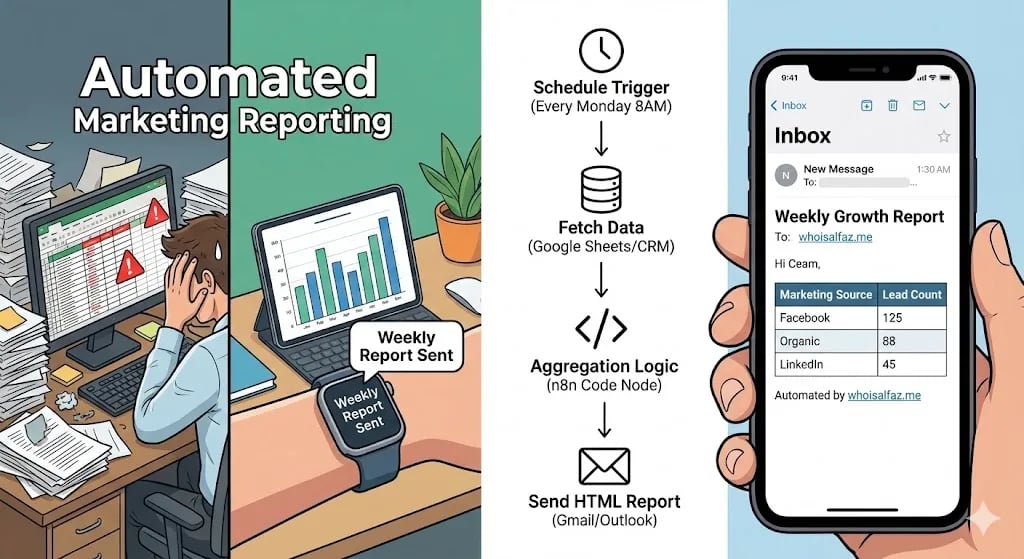
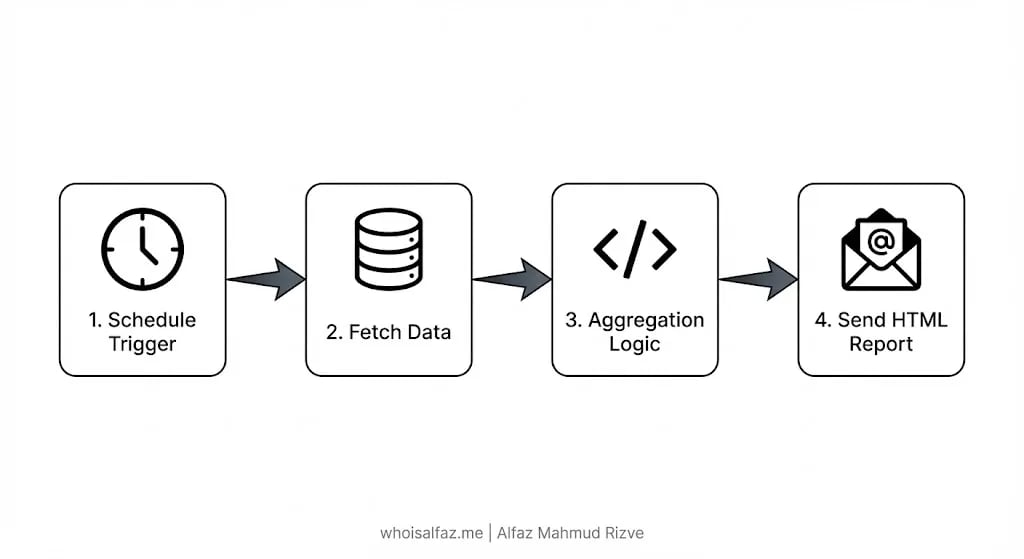
In Day 14 of our 30 Days of n8n & Automation sprint, we are transitioning from "reactive" workflows (triggering instantly when a lead submits a form) to "batch processing" workflows. We are going to build a server-side aggregation engine that wakes up every Monday morning, queries your database for the past 7 days of performance, mathematically summarizes the metrics, and delivers a beautifully formatted HTML report directly to your client's inbox.
This is the exact retention architecture I build for high-ticket agencies at whoisalfaz.me to guarantee their clients never question the value of their retainer.
 Click to expand
The Architectural Shift: Push vs. Pull Reporting
A dashboard is a "Pull" system. It requires the user to exert willpower to retrieve the data. An automated marketing reporting workflow is a "Push" system. It requires zero effort from the stakeholder; the data simply arrives.
When an agency client wakes up at 8:00 AM on a Monday and sees an email explicitly stating: "Here are the 43 qualified leads we generated for you last week, broken down by ad source," the perceived value of your agency skyrockets. It acts as an operational heartbeat. It proves you are executing.
To build this in n8n, we must utilize the Aggregation Pattern.
Unlike the Facebook Lead Capture pipeline we built in Day 13, which processes a single JSON payload at a time, today's architecture must process an array of JSON payloads. It must fetch 50 rows of data, group them by a specific attribute (like UTM Source), count them, and then output a single, consolidated summary.
Infrastructure Prerequisites
To execute this batch-processing logic reliably, you need three components:
- The Orchestrator: A stable n8n environment. Because this workflow runs on a strict cron schedule, you cannot rely on a laptop that might be asleep. You must deploy this on a cloud server like n8n Cloud or a self-hosted Vultr VPS.
- The Database: A structured ledger containing your leads. For this tutorial, we will use the Google Sheets database we established in Day 8. Ensure your sheet has a Timestamp column and a Source column.
- The Email Engine: A standard SMTP connection (Gmail or Outlook node) to deliver the final HTML payload.
Phase 1: The Cron Scheduler and Data Retrieval
We begin by establishing the rhythm of the reporting engine and retrieving the raw dataset.
Step 1: The Schedule Trigger
Core: Weekly Marketing Report.- Trigger Interval: Weeks.
- Days of Week: Monday.
- Hour: 8:00 AM.
(Architect's Note: Always schedule reports for the recipient's local timezone. A report delivered at 3:00 AM gets buried under the morning spam. A report delivered exactly at 8:00 AM sits at the very top of their inbox when they open their laptop).
Step 2: Calculating the "Lookback" Window
We do not want to pull the entire database; we only want the leads generated in the last 7 days. We must mathematically calculate last Monday's date.
{{ $now }}.YYYY-MM-DD. (Let's assume this outputs 2026-03-02).Step 3: Querying the Database
Now we ask the database for the specific rows.
2026-03-02).If your agency generated 43 leads last week, this node will output a single JSON array containing 43 items.
Phase 2: The Aggregation Engine (JavaScript)
This is where n8n's programmatic superiority shines. We can summarize the entire 43-item array into a clean report using 12 lines of vanilla JavaScript.
Attach a Code Node to your Google Sheets node. We want to group the leads by their marketing source (e.g., how many came from Facebook, how many from SEO) so the client can see which channels are actually driving ROI.
Paste this exact JavaScript aggregation logic:
// Automated Marketing Reporting: Aggregation Logic
// Authored by Alfaz Mahmud Rizve

// 1. Ingest the raw array of leads from the Google Sheet
const leads = $input.all().map(item => item.json);

// 2. Initialize an empty object to hold our totals
const summary = {};
let totalLeads = 0;

// 3. Loop through every lead and count them by Source
leads.forEach(lead => {
  // Check the 'Source' column. If blank, label it 'Unknown'
  const source = lead.Source || 'Unknown Source';

  // Increment the counter for that specific source
  summary[source] = (summary[source] || 0) + 1;
  totalLeads++;
});

// 4. Convert the summary object back into an n8n-friendly JSON array
const reportData = Object.keys(summary).map(key => ({
  json: {
    "Marketing Channel": key,
    "Total Leads Generated": summary[key]
  }
}));

// 5. Append the grand total as the final row for the report
reportData.push({
    json: {
        "Marketing Channel": "GRAND TOTAL",
        "Total Leads Generated": totalLeads
    }
});

return reportData;
Execute the node. Your messy array of 43 individual leads has just been instantly transformed into a clean, mathematical summary:
- Facebook Ads: 25
- Organic SEO: 12
- LinkedIn Outbound: 6
- GRAND TOTAL: 43
Phase 3: The HTML Formatter
Executives do not read JSON. They read tables. We must convert this clean data array into an HTML format that renders beautifully inside a standard email client.
(Pro-Tip: If you know basic CSS, you can inject inline styles into the HTML node to ensure the table borders are crisp and the header row matches your agency's brand colors).
 Click to expand
Phase 4: The Delivery Payload
The data is compiled and formatted. Now we push it to the stakeholder.
client@theircompany.com (and CC your internal Account Manager).📈 Weekly Performance Report: {{ $('Date & Time').item.json.formatted_date }} to {{ $now.format('YYYY-MM-DD') }}Defensive Engineering: The Null State Error
There is one critical edge-case you must engineer for: What happens if your agency generates zero leads during the week?
If the Google Sheets node returns 0 rows, the Code Node will fail, the workflow will crash, and the email will never send. When a client doesn't receive their Monday report, they panic.
You must handle the Null State. Between the Google Sheets node and the Code Node, insert an IF Node.
- Condition: Check if the length of the Google Sheets output array is greater than 0.
- True Branch: Route to the Code Node and build the table as normal.
- False Branch: Route directly to a separate Email Node that sends a polite, pre-written message: "Good morning. Just a quick automated update: We recorded 0 new inbound leads during the holiday week. Ad spend has been paused accordingly."
 Click to expand
Your Day 14 Deployment Mandate
You now possess the architectural blueprint to completely eliminate manual spreadsheet reporting from your agency operations.
By deploying automated marketing reporting, you are no longer relying on your client to log into a dashboard to understand your value. You are forcing your ROI directly into their line of sight every single Monday morning. It is the ultimate operational flex.
If your Account Managers are spending their Friday afternoons manually counting leads in a spreadsheet, you are burning cash. Build the machine today.
Tomorrow, in Day 15 of our 30 Days of n8n & Automation sprint, we will pivot to handling client finances: Automated Stripe Invoice Reconciliation.
Subscribe to the newsletter, and I will see you on the canvas tomorrow.
Core Deployment Stack
To build this exact architecture in production, you will need the core infrastructure. I strictly use and recommend the following enterprise-grade platforms.
n8n Cloud
The most powerful fair-code automation platform. Get 20% off your first year on any paid plan.
Vultr High-Performance Cloud
Deploy self-hosted vector databases & AI infrastructure worldwide. Get $300 in free credit.
Complementary RevOps Toolchain
Brevo (formerly Sendinblue)
Enterprise-grade email API and marketing automation. Excellent SMTP for n8n.
Pinecone Vector Database
The vector database for building AI applications. Essential for RAG architectures.
Qdrant Cloud
Rust-native vector search engine for the next generation of AI. Fast, scalable, and memory-efficient.
In this Article
Ready to automate your agency?
Skip the manual grunt work. Let's build a custom system that runs your business on autopilot 24/7.