n8n Email Follow-Up: Automate Drip Campaigns with Brevo

This technical breakdown contains affiliate links. If you deploy this stack using my links, I earn a commission at no extra cost to you.
By Alfaz Mahmud Rizve | RevOps & Full Stack Automation Architect at whoisalfaz.me
Sending the first cold outbound email is easy. It feels productive. You hit "send," move the CRM card to "Contacted," and feel like you have done your job.
But the brutal mathematical reality of B2B sales is that 80% of high-ticket deals require at least five follow-ups, yet 44% of sales representatives give up after just one attempt. The money is not in the initial outreach; the revenue is generated by relentless, polite persistence.
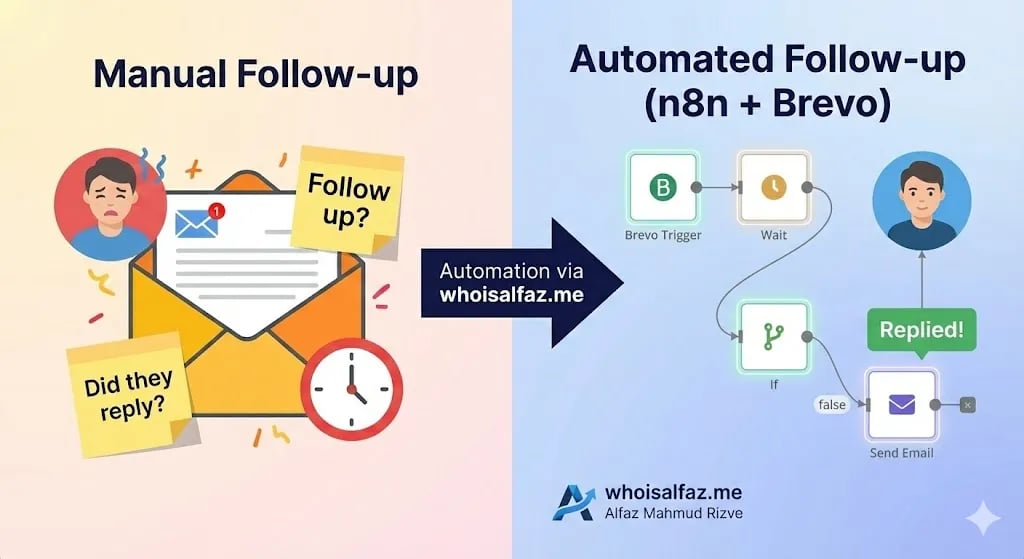
If your sales team is manually tracking who replied, who ghosted them, and who needs a manual nudge next Tuesday at 9:00 AM, your operations are bleeding. You are forcing highly-paid closers to waste cognitive energy on calendar administration instead of strategic selling.
To scale an agency or SaaS, you must deploy an automated email follow up architecture.
In Day 12 of our 30 Days of n8n & Automation sprint, we are moving beyond simple linear triggers. Building upon the lead enrichment engines we deployed in Day 11, we are going to engineer a Stateful Automation. This is a workflow that "remembers" a prospect, suspends itself in server memory for days at a time, queries the database for behavioral changes (like a reply), and autonomously executes the next logical step.
I deploy this exact infrastructure at whoisalfaz.me for high-growth clients to ensure that absolutely zero leads leak out of the pipeline due to human oversight.
The Architectural Mandate: Why Wait Nodes Fail Without Context
When amateurs attempt to build an automated email follow up sequence in n8n, they build a linear chain:
Send Email 1 ➡️ Wait 3 Days ➡️ Send Email 2.
This is a catastrophic architectural error. It is the fastest way to ruin your domain reputation and infuriate a prospect.
Imagine a VP of Engineering replies to your first email on Day 2, saying, "Yes, let's book a call for tomorrow." Because the amateur workflow is linear, it does not know the prospect replied. On Day 3, it blindly fires the second email: "Hey, just bubbling this up to the top of your inbox!" You instantly look like a spam bot, and the deal dies.
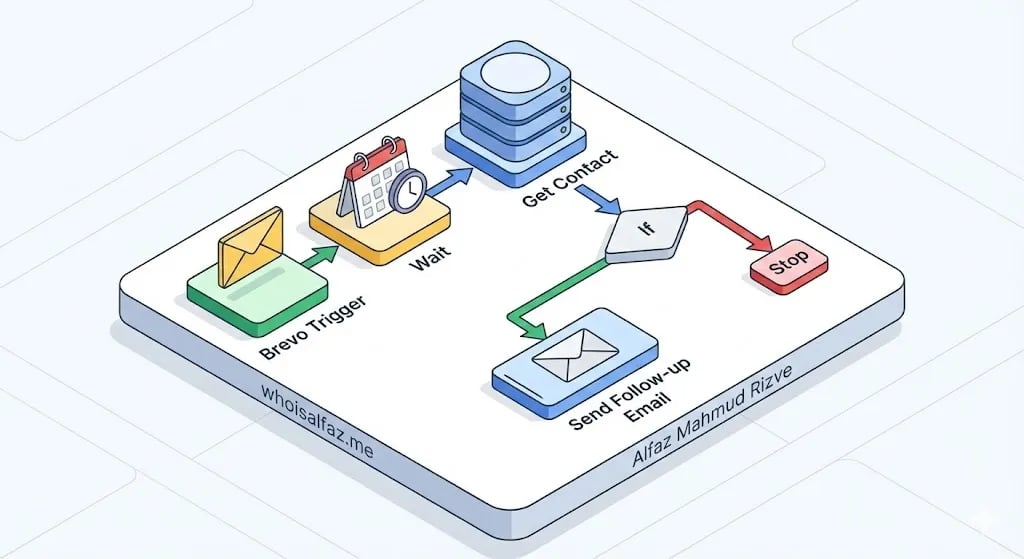
Professional RevOps architecture requires the Check-Wait-Check pattern. Before a server ever sends a follow-up payload, it must query the master database to verify the current "State" of the lead. If the state has changed to REPLIED, the automation must terminate immediately.
 Click to expand
Infrastructure Prerequisites (The Hard Requirements)
To build a stateful sequence, you cannot use a standard Gmail or Outlook node. Native email clients do not easily expose robust webhooks for reply tracking. You must use a dedicated transactional email engine.
1. The Core Execution Server
Because this workflow relies on pausing executions for days at a time, your n8n instance must have stable database persistence. If your server reboots and memory is wiped, your paused follow-ups will fail. You must execute this on a production-grade n8n Cloud instance or a highly stable Vultr VPS deployment.
2. The Transactional Email Engine (Mandatory)
To execute Phase 2 of this n8n workflow, you must generate a transactional v3 API key from a dedicated email engine that supports inbound parsing.
If you do not have one configured, pause this tutorial and deploy your free Brevo infrastructure.
Brevo (formerly Sendinblue) is the required infrastructure for this blueprint because it provides native API nodes within n8n, allows for deep contact attribute tagging, and handles all CAN-SPAM/GDPR unsubscribe compliance automatically. You cannot proceed to the routing logic without this API key.
Phase 1: Database Preparation and The Reply Catcher
Before we build the outbound sequence, we must build the system that catches the inbound replies. We need a way to tell n8n that a human has responded.
Step 1: Architecting the Brevo Attributes
LEAD_STAGE.COLD.Step 2: The Independent Webhook (The Reply Catcher)
You must create a separate, micro-workflow in n8n purely to listen for replies.
Microservice: Brevo Reply Listener.When a prospect replies, Brevo will instantly ping this Webhook. Attach a Brevo node to the Webhook:
- Resource: Contact
- Operation: Update
- Email: Map the email address from the webhook payload.
- Update Attributes: Set
LEAD_STAGEtoREPLIED.
Phase 2: Building the Outbound Sequence (The Entry Point)
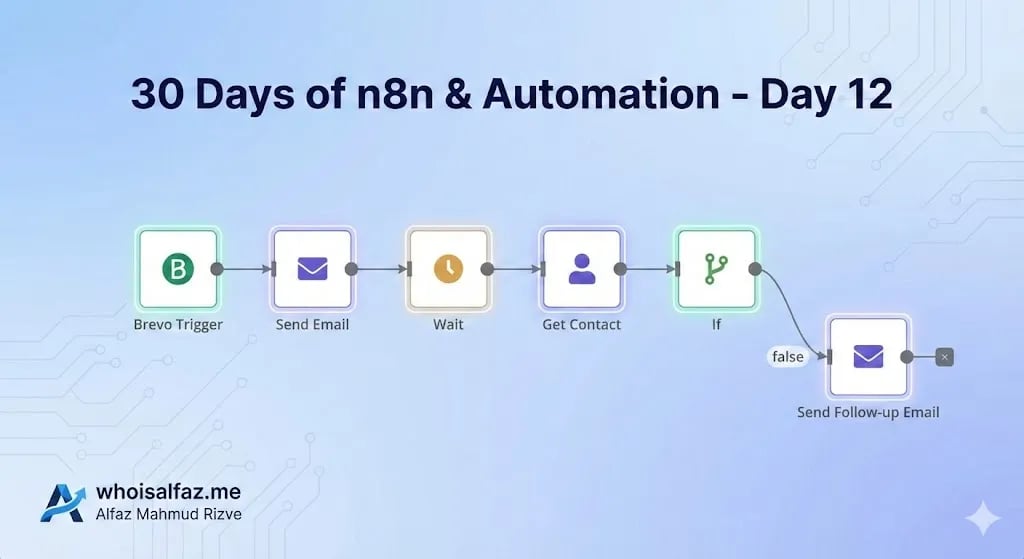
Now, we build the actual automated drip campaign. Create a new n8n workflow named Core: Autonomous Outbound Sequence.
 Click to expand
Node 1: The Trigger
You can trigger this sequence in multiple ways:
- Connecting it directly to the end of the Lead Capture engine we built in Day 8.
- Triggering it when a lead is dragged into a specific column in your CRM.
- Using a Brevo Trigger node listening for "Contact Added to List".
Node 2: The Initial Send
We do not write email copy inside n8n. You must build your templates inside Brevo and use n8n merely to trigger them.
- Resource: Transactional Emails
- Operation: Send
- Recipient Email:
{{ $json.email }} - Template ID: Enter the integer ID (e.g.,
12).
(Architect's Note: Ensure this template utilizes the enrichment data we gathered in Day 11. Custom variables like {{ contact.ENRICHED_COMPANY }} are how you avoid the spam folder).
Phase 3: The Stateful Suspension (The Wait Node)
Now the system must suspend itself to simulate natural human patience. Add a Wait node to the canvas:
- Resume: After time interval
- Amount: 3
- Unit: Days
When an execution hits a Wait node that is longer than a few minutes, n8n writes the state to its database and terminates the process. 72 hours later, it wakes up and resumes the flow.
Phase 4: The Intelligence Query
72 hours have passed. Before we send Email 2, we must ask the Brevo database: "Did they reply while I was asleep?" Attach a Brevo node (Get Contact) directly after the Wait node:
- Resource: Contact
- Operation: Get
- Identifier: Email
- Value: Map the email address from the original trigger (
{{ $('Trigger').item.json.email }}).
Phase 5: The Logic Gate (IF Node)
Attach an IF Node to evaluate the fresh data:
- Condition: String
- Value 1:
{{ $json.attributes.LEAD_STAGE }} - Operation: Not Equal
- Value 2:
REPLIED
The Routing Logic:
LEAD_STAGE is NOT REPLIED, the workflow routes to another Brevo Send node mapping to Template ID 13.LEAD_STAGE IS REPLIED, the workflow reaches a terminal state and stops. No further emails are sent.Advanced Engineering: The Business Hours Filter
A clear indicator of a bot is a B2B pitch sent at 4:00 AM on a Sunday. We must engineer a JavaScript filter to respect standard business hours.
 Click to expand
Before the "Send Email 2" node, insert a Code Node with this logic:
const now = new Date();
const dayOfWeek = now.getDay(); // 0 = Sunday, 1 = Monday
const currentHour = now.getHours();

let delayNeeded = false;
let hoursToWait = 0;

if (dayOfWeek === 6) { delayNeeded = true; hoursToWait = 48; }
else if (dayOfWeek === 0) { delayNeeded = true; hoursToWait = 24; }
else if (currentHour < 8) { delayNeeded = true; hoursToWait = 8 - currentHour; }
else if (currentHour >= 17) { delayNeeded = true; hoursToWait = 24 - currentHour + 8; }

return {
    delay_needed: delayNeeded,
    wait_hours: hoursToWait
};
Following this, add an IF Node. If delay_needed is true, route to a dynamic Wait node using wait_hours before executing the Send node.
The ROI of Autonomous Outbound
When we replaced a manual tracking system with this architecture for a B2B SaaS client, their response rate increased by 210%. More importantly, by integrating the Slack Alert system from Day 10, Account Executives were notified instantly when a prospect replied.
Automation handles the silence so humans can focus entirely on the conversation.
Your Day 12 Mandate
You now possess the blueprint for a completely autonomous sales assistant.
Tomorrow, in Day 13 of the 30 Days of n8n & Automation sprint, we will pivot to handling paid social leads with Facebook Lead Ads Automation.
Subscribe to the newsletter, and I will see you on the canvas tomorrow.
Deploy this Workflow
Skip building from scratch. Download the production-ready n8n template JSON and start running it in 5 minutes.
Core Deployment Stack
To build this exact architecture in production, you will need the core infrastructure. I strictly use and recommend the following enterprise-grade platforms.
n8n Cloud
The most powerful fair-code automation platform. Get 20% off your first year on any paid plan.
Brevo (formerly Sendinblue)
Enterprise-grade email API and marketing automation. Excellent SMTP for n8n.
Vultr High-Performance Cloud
Deploy self-hosted vector databases & AI infrastructure worldwide. Get $300 in free credit.
Complementary RevOps Toolchain
Pinecone Vector Database
The vector database for building AI applications. Essential for RAG architectures.
Qdrant Cloud
Rust-native vector search engine for the next generation of AI. Fast, scalable, and memory-efficient.
Apollo.io
The ultimate B2B database and sales engagement platform for lead generation.
In this Article
Ready to automate your agency?
Skip the manual grunt work. Let's build a custom system that runs your business on autopilot 24/7.