Automate Client Reporting with n8n: White-Label PDF Engine (Save 5h/Client) | Alfaz


By Alfaz Mahmud Rizve | RevOps & Full Stack Automation Architect at whoisalfaz.me
TL;DR: You can automate client reporting with n8n by extracting data from platform APIs (GA4, Facebook Ads), normalizing the metrics in a Set node, injecting them into a branded HTML/Handlebars template, and converting the HTML string to a PDF using an API like Gotenberg or APITemplate. The final PDF is then emailed directly to the client with a Human-in-the-Loop review option.
Welcome back to Day 22 of the 30 Days of n8n & Automation series here on whoisalfaz.me.
If you run an agency or manage stakeholders, you likely dread the end-of-month reporting cycle. You log into Google Analytics, take a screenshot. You log into Facebook Ads Manager, take a screenshot. You paste them into a Canva slide, export a PDF, and email it.
This process is slow, unscalable, and prone to human error. Worse, you might be paying $50–$300/month for tools like AgencyAnalytics or Databox just to generate generic reporting dashboards.
Yesterday, on Day 21: Automating Personal Branding, we built a "Digital Twin" to handle your social presence. Today, we turn our focus outward to the lifeblood of any service business: The Client.
In this guide, I will show you how to automate client reporting with n8n. We will build a system that pulls data from the pipelines we built earlier in this series, injects it into a branded HTML template, converts it to a professional PDF, and delivers it to your client's inbox — touched by human hands only if you choose.
Why You Should Automate Client Reporting with n8n
The "SaaS Trap" is real. Agencies often subscribe to reporting tools that offer "white labeling," but you are ultimately limited by their inflexible templates and high per-client costs.
By building your own reporting engine in n8n, you gain three massive advantages:
- Complete Data Control: Combine structured data (Salesforce pipeline stages) with unstructured data (sentiment analysis from support tickets) in the same report.
- Zero Marginal Cost: Whether you have 10 clients or 1,000, your reporting stack runs on the same infrastructure footprint without seat-based pricing.
- True Granular Branding: Design reports with custom CSS, Handlebars logic, and dynamically generated charts that perfectly match your agency's design system.
 Click to expand
The Architecture: From JSON to PDF
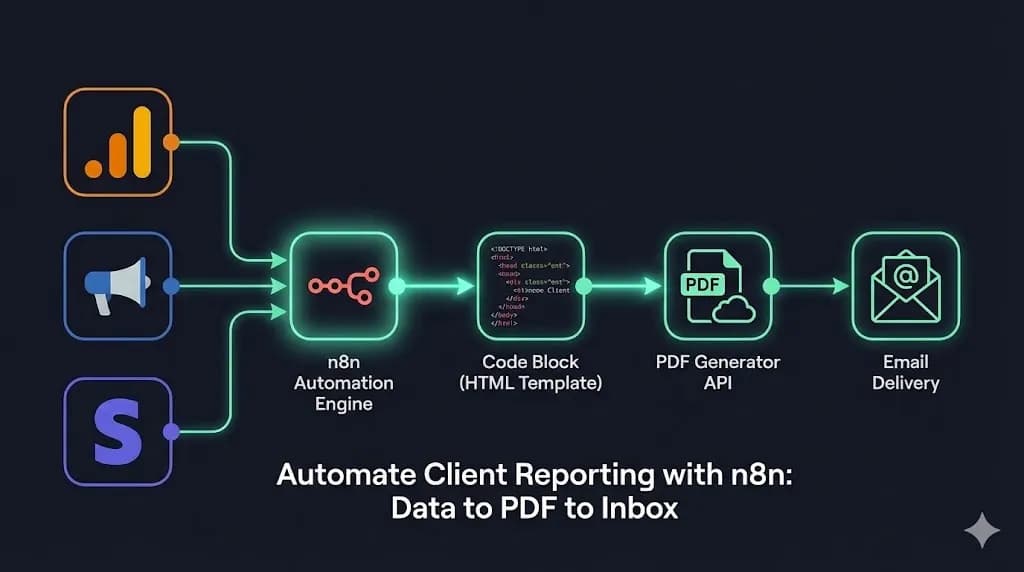
Before we build, we must map the data flow. Generating a PDF in automation is not as simple as clicking print. We need a structured data pipeline.
Here is the architectural stack we will use:
Step 1: Aggregating the Data
To automate client reporting with n8n, we first need the numbers. Start with a Schedule Trigger set to run on the 1st of every month at 09:00 AM.
Pulling Google Analytics 4 Data
Referencing our work from Day 20: n8n Google Analytics 4 Pipeline, we use the GA4 node:
- Metrics:
activeUsers,screenPageViews,conversions - Date Range:
Last Month
Pulling Facebook Ads Data
Referencing our earlier API explorations, use the HTTP Request node against the Facebook Graph API to get ad performance:
- Metrics:
spend,impressions,cpc,actions(leads) - Date Range:
Last Month
The "Set" Node (Data Normalization)
Pro tip: Do not pass raw API data directly into your PDF generator. API payloads are messy and heavily nested. Use a Set or Code node to clean the data and define flat variables.
// Example in n8n Code Node
return {
  json: {
    client_name: "Acme Corp",
    report_date: "March 2026",
    total_spend: "$1,250.00",
    total_leads: 45,
    cpa: "$27.77",
    traffic: "15,400",
    mom_growth: "+12%" // Calculated from historical data array
  }
};
Step 2: The HTML Template (The Secret Sauce)
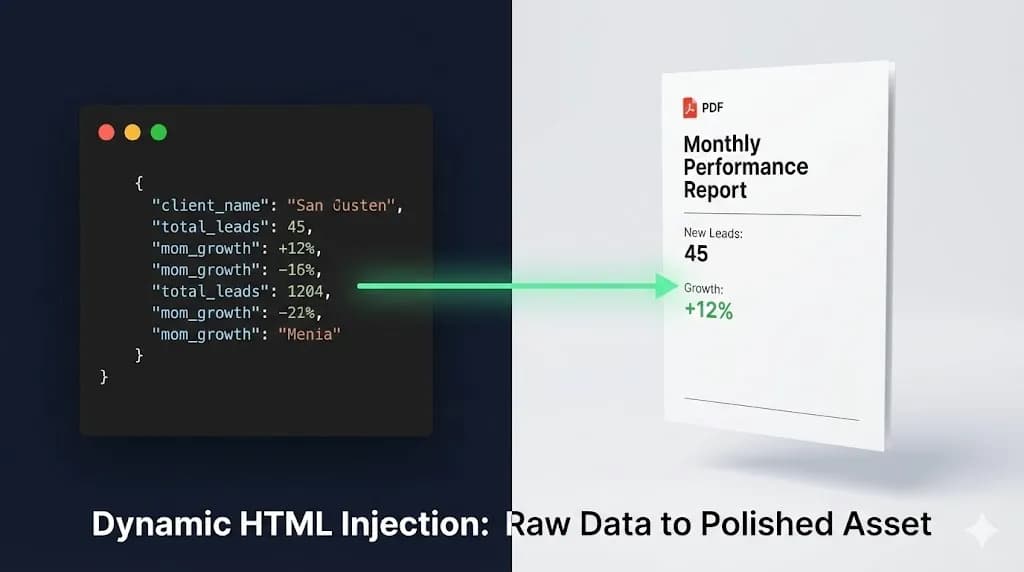
This is where you provide real value. Instead of a boring, generic table, we use dynamic HTML.
In n8n, create a Code Node or a string manipulation node. We treat the template as a raw string of HTML, using Handlebars syntax (like {{total_leads}}) to inject the normalized data from Step 1.
The Agency-Grade Code Snippet
Use Flexbox or CSS Grid for a modern layout that converts perfectly to PDF without rendering breaks.
<html>
<head>
<style>
  body { font-family: 'Helvetica', sans-serif; color: #333; }
  .header { background: #000; color: #fff; padding: 20px; text-align: center; }
  .grid { display: flex; justify-content: space-between; margin-top: 40px; }
  .card { border: 1px solid #ddd; padding: 20px; width: 30%; text-align: center; border-radius: 8px; }
  .number { font-size: 36px; font-weight: bold; color: #ff6b6b; }
  .label { font-size: 14px; text-transform: uppercase; letter-spacing: 1px; }
</style>
</head>
<body>
  <div class="header">
    <h1>Monthly Performance Report</h1>
    <p>Prepared for: {{client_name}} | {{report_date}}</p>
  </div>

  <div class="grid">
    <div class="card">
      <div class="number">{{total_leads}}</div>
      <div class="label">New Leads</div>
    </div>
    <div class="card">
      <div class="number">{{cpa}}</div>
      <div class="label">Cost Per Acquisition</div>
    </div>
    <div class="card">
      <div class="number">{{traffic}}</div>
      <div class="label">Website Traffic</div>
    </div>
  </div>

  <p>Summary: Growth is {{mom_growth}} compared to last month.</p>
</body>
</html>
This approach allows you to fully brand the report. You can add your logo, inject client-specific hex colors dynamically based on their CRM record, and adjust layouts without asking a frontend developer.
 Click to expand
Step 3: Generating the PDF (The Render Layer)
Now we need to turn that HTML string into a .pdf file.
For this tutorial, we will use the HTTP Request node to hit a PDF generation API like APITemplate, PDFShift, or an open-source self-hosted instance of Gotenberg.
- Node: HTTP Request
- Method: POST
- URL:
https://api.pdf-engine.com/v1/create - Body Parameters:
html: [The HTML string from Step 2]format: "A4"margin: "1cm"
Handling Binary Data (Crucial)
This is the most common point of failure. PDF generation APIs return a file stream (binary data), not JSON text.
- In the HTTP Request node, you must set "Response Format" to "File".
- Name the binary property
dataorreport_pdf.
If you miss this step, n8n will attempt to parse the raw PDF byte stream as text, which crashes the workflow immediately.
Step 4: Automated Delivery
The final step in our mission to automate client reporting with n8n is delivery.
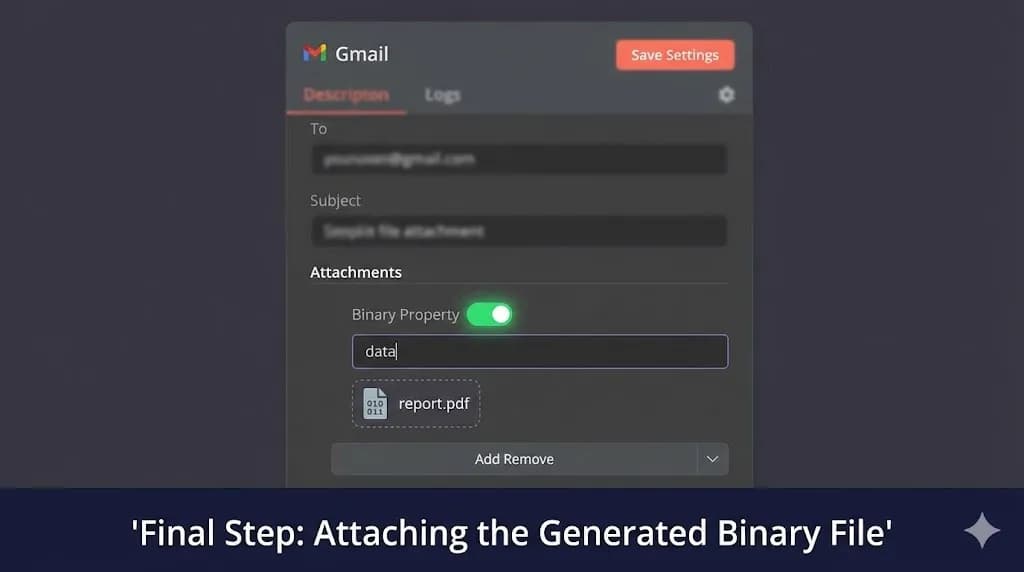
We use the Gmail or Brevo node (refer to Day 12: Automated Email Follow-Up for SMTP best practices).
- To:
{{client_email}} - Subject:
Monthly Performance Report: {{report_date}} - Body: "Hi {{client_first_name}}, Please find attached your performance report for this month. We saw a {{mom_growth}} increase in traffic!"
- Attachments: Select the
databinary property from the previous HTTP request node.
Pro Tip: The Human-in-the-Loop Review
If you are not ready to trust the robot fully with client communications, change the recipient email to your own internal Account Manager address. This ensures a human reviews the numbers before manually forwarding the PDF to the client.
This still saves 95% of the manual labor (gathering data and formatting tables) while maintaining a strict quality assurance layer.
 Click to expand
Advanced: Injecting Dynamic Charts (Chart.js)
Text metrics are great, but clients buy visuals. Since we use HTML templating, we can embed charts easily via a service like QuickChart.io.
In your data preparation Code node, construct a URL that generates a chart image using Chart.js syntax dynamically:
https://quickchart.io/chart?c={type:'bar',data:{labels:['Jan','Feb'],datasets:[{label:'Users',data:[120, 150]}]}}
Then, in your HTML template, simply inject the URL into an image tag: <img src="{{chart_url}}" width="100%" />. This renders a visual graph directly inside your generated PDF without requiring complex headless browser rendering setups in n8n.
Conclusion: Your Reporting is Now an Asset
By learning to automate client reporting with n8n, you have done more than save 5 hours per month per client. You have transformed a chore into a consistent, beautifully branded product.
You are no longer the agency owner frantically compiling spreadsheets at 11 PM. You are the architect of a system that delivers predictable value like clockwork.
This workflow, combined with the Rank Tracker from Day 16 and Social Listening from Day 21, gives your agency a fully automated technical foundation.
[!TIP] Performance infrastructure: If you process heavy HTML-to-PDF conversions at scale, shared hosting instances will throttle you. I run all my PDF-heavy operations on Vultr's High Frequency Compute, which processes Chromium render cycles significantly faster.
What is Next? We have covered data extraction, brand pipelines, and reporting. But what happens when things break? Tomorrow, on Day 23, we build "The Global Error Handler." I will show you how to construct a fall-back workflow that catches failed executions and alerts you via Slack with the exact stack trace — so you fix bugs before clients notice.
See you in the workflow editor.
Follow the full series: 30 Days of n8n & Automation
About the Author
Alfaz Mahmud Rizve is a RevOps Engineer and Automation Architect helping SaaS founders and scaling agencies build self-healing, autonomous revenue infrastructure. Explore his work at whoisalfaz.me.
In this Article
Ready to automate your agency?
Skip the manual grunt work. Let's build a custom system that runs your business on autopilot 24/7.