n8n Security Best Practices for Production Deployments

This technical breakdown contains affiliate links. If you deploy this stack using my links, I earn a commission at no extra cost to you.
By Alfaz Mahmud Rizve | RevOps & Full Stack Automation Architect at whoisalfaz.me
TL;DR: Build an n8n AI Receptionist that costs under $0.02/minute to run using Twilio, OpenAI Whisper, and GPT-4o. The system answers inbound calls with a TwiML greeting, records the caller's message, downloads the audio file, transcribes it with Whisper, classifies the urgency with GPT-4o, and triggers a Twilio callback call to your phone if the lead is high-priority. No SaaS subscription needed, full data ownership.
Welcome back to Day 27 of the 30 Days of n8n & Automation series here on whoisalfaz.me.
We have given our AI Vision (Day 15), Hands (Day 25), and Memory (Day 26). But until now, our AI has been locked inside a text box. It cannot interact with the physical world.
Today, we break the silence. We are building an n8n AI Receptionist — a voice-enabled system that lives in your phone number.
The Problem: If you run an agency, consultancy, or service business, you miss calls. Every missed call is a missed revenue opportunity.
- Standard voicemail is a black hole — nobody listens to it.
- Hiring a human receptionist costs $2,500–$4,000/month in salary.
- Paying for commercial voice AI tools costs $0.10–$0.25 per minute.
The Solution we are building today: A custom n8n Voice Bot that answers calls, transcribes the message, evaluates urgency using GPT-4o, and calls you back immediately when a high-priority lead leaves a voicemail — all for approximately $0.015 per minute.
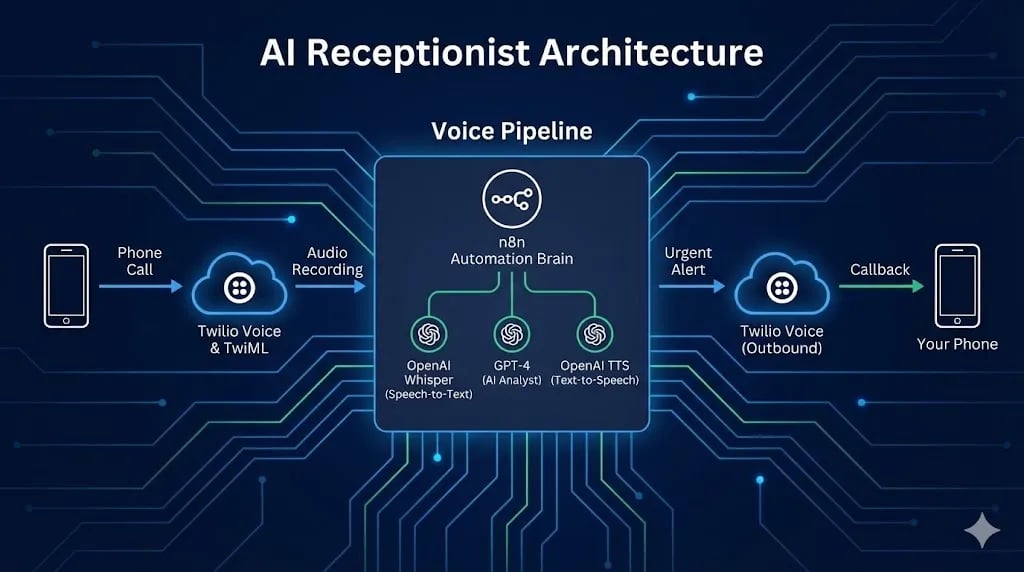
The Tech Stack: The Voice Pipeline
We are combining three battle-tested APIs to create this system:
Prerequisites: A Twilio account with a purchased phone number. Numbers start at $1/month in most countries.
 Click to expand
Step 1: The Listening Ear (Twilio Setup)
First, we need to tell Twilio what to do when someone calls your number. We use TwiML (Twilio Markup Language) — XML markup that controls phone behavior, like HTML controls a webpage.
Creating the Webhook
Create a new n8n workflow and add a Webhook node:
- HTTP Method:
POST - Path:
incoming-call - Authentication: None (Twilio will send a signed request, but for simplicity here we trust the path obscurity)
- Copy the Production URL
Configure Twilio
The Greeting (TwiML Response)
When Twilio hits n8n, n8n must immediately respond with TwiML instructions. Connect a Respond to Webhook node to your Webhook trigger:
- Respond With: Text
- Content-Type: Set to
text/xmlin the response headers
Paste this XML as the response body:
<?xml version="1.0" encoding="UTF-8"?>
<Response>
    <Say voice="alice" language="en-US">
        Hi, you have reached Alfaz's AI Assistant.
        He is currently building automation workflows.
        Please state your name and how he can help you after the beep.
        I will analyze your message and alert him immediately if it is urgent.
    </Say>
    <Record action="https://n8n.your-domain.com/webhook/handle-recording" maxLength="30" playBeep="true" />
</Response>
Critical Detail: The <Record action="..."> attribute tells Twilio: "After the caller finishes speaking, POST the recording metadata to this second n8n URL." Replace n8n.your-domain.com with your actual n8n instance domain.
Step 2: The Thinking Brain (Handling the Recording)
Now we build the second webhook workflow — the one that processes the audio.
Creating Webhook #2
Create a new separate workflow. Add a Webhook node:
- HTTP Method:
POST - Path:
handle-recording
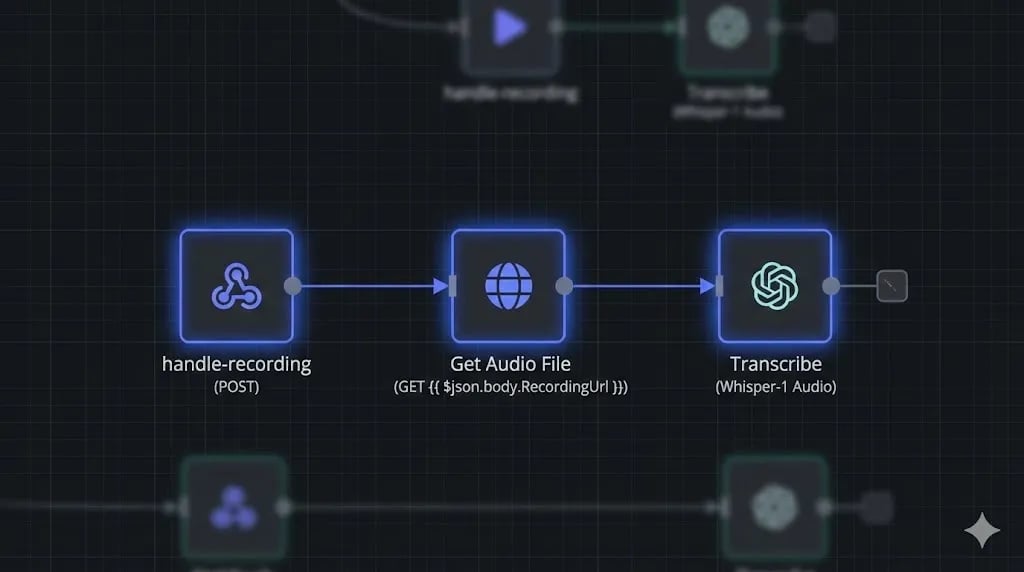
When Twilio finishes recording, it sends a POST request to this URL containing a field RecordingUrl with the MP3 audio file location.
Downloading the Audio
Twilio sends the location of the audio, not the audio itself. We need to download it:
- Node: HTTP Request
- Method: GET
- URL:
{{ $json.body.RecordingUrl }} - Response Format: File (Binary)
- Property Name:
data
Transcribing with Whisper
Now we convert the MP3 voice recording into text:
- Node: OpenAI
- Resource: Audio
- Operation: Transcribe
- Input Binary Field:
data - Model:
whisper-1
The output will be a clean text string like: "Hi this is John I need a website built for my restaurant by Friday I have a budget please call me back."
 Click to expand
Step 3: The Analyst (AI Classification)
Not all calls deserve a callback. You do not want to be interrupted for a car warranty spam call. We use GPT-4o to act as a business analyst that reads the transcript and classifies its value.
Add an OpenAI Chat Model node connected to the Whisper output:
- Model:
gpt-4o - System Prompt:
You are a business development classifier for an automation agency.
Read the voicemail transcript and return a JSON object with two fields:
- "intent": one of ["HOT_LEAD", "SUPPORT", "SPAM", "VENDOR", "GENERAL"]
- "summary": a one-sentence business summary of what the caller wants

HOT_LEAD = someone with a budget, timeline, or specific project request.
SUPPORT = existing client with an issue.
SPAM = automated or sales call with no value.
Return only the JSON object, no other text.
- User Message:
{{ $json.text }}(the Whisper transcript output)
A good lead like John's message above will return:
{
  "intent": "HOT_LEAD",
  "summary": "John needs a restaurant website built by Friday and mentions having a budget."
}
Step 4: The Speaking Mouth (The Urgent Alert)
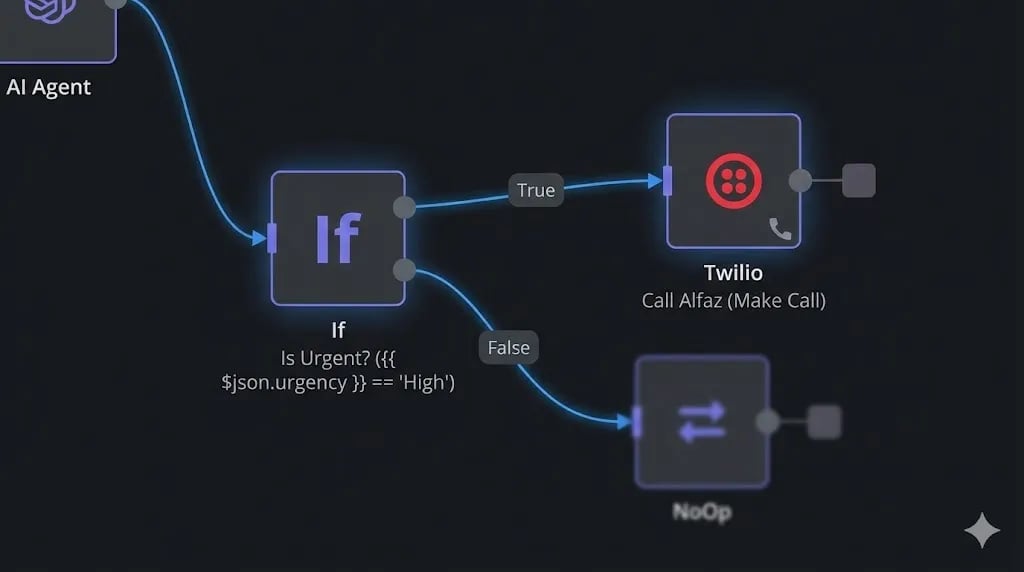
If the AI classifies the intent as HOT_LEAD, we want n8n to call us back immediately. Add an IF node:
- Condition:
{{ $json.intent }}equalsHOT_LEAD
For the True path, add a Twilio node:
- Operation: Make a Call
- To: Your personal mobile number
- From: Your Twilio phone number
- TwiML:
<Response><Say>Alert: New hot lead. {{ $json.summary }} Please call back immediately.</Say></Response>
The complete experience: You are at dinner. Your phone rings from your own Twilio number. It says: "Alert: New hot lead. John needs a restaurant website built by Friday and mentions having a budget. Please call back immediately." You excuse yourself, call John back within 5 minutes, and close the deal.
 Click to expand
Why Build Instead of Buy? (Bland AI vs. n8n)
| Factor | Bland AI / Air.ai | n8n + Twilio |
|---|---|---|
| Cost per minute | $0.10 – $0.25 | ~$0.015 |
| Data ownership | Vendor's servers | Your server |
| Customization | Limited | Full code control |
| CRM Integration | Native (locked) | Any API via n8n |
| Savings at scale | — | ~93% cheaper |
The cost savings compound dramatically at scale. If you handle 500 calls/month, Bland AI costs $50-125/month just for the calls. n8n + Twilio costs approximately $7.50 — and you can save every transcript to your CRM, Notion, or Airtable automatically as part of the same workflow.
[!TIP] Infrastructure: For mission-critical voice workflows, your n8n server needs stable uptime. I deploy production voice bots on Vultr High Frequency Compute — the low-latency CPU ensures your Twilio webhook responds in under 500ms, which is critical. If your webhook times out, Twilio will drop the call.
Conclusion: Your AI Is Now Answering Phones
You have bridged the gap between the digital and physical worlds. Your n8n AI Receptionist now lives in the real telephone network — filtering noise, identifying value, and routing high-priority leads to your attention in real time.
Your system can now: Listen (Whisper), Think (GPT-4o), and Speak (Twilio).
What is Next? We have covered text, images, PDFs, voice — nearly every modality. But we have not touched Video. Tomorrow, on Day 28, we conquer the highest-engagement medium on the internet: we build an Automated YouTube Shorts Generator that scripts, illustrates, voices, and renders a complete short-form video from a single text topic.
See you in the workflow editor.
Follow the full series: 30 Days of n8n & Automation
About the Author
Alfaz Mahmud Rizve is a RevOps Engineer and Automation Architect helping SaaS founders and scaling agencies build self-healing, autonomous revenue infrastructure. Explore his work at whoisalfaz.me.
Deploy this Workflow
Skip building from scratch. Download the production-ready n8n template JSON and start running it in 5 minutes.
Core Deployment Stack
To build this exact architecture in production, you will need the core infrastructure. I strictly use and recommend the following enterprise-grade platforms.
n8n Cloud
The most powerful fair-code automation platform. Get 20% off your first year on any paid plan.
Vultr High-Performance Cloud
Deploy self-hosted vector databases & AI infrastructure worldwide. Get $300 in free credit.
ElevenLabs
The most realistic text-to-speech and voice cloning software.
Complementary RevOps Toolchain
Brevo (formerly Sendinblue)
Enterprise-grade email API and marketing automation. Excellent SMTP for n8n.
Pinecone Vector Database
The vector database for building AI applications. Essential for RAG architectures.
Qdrant Cloud
Rust-native vector search engine for the next generation of AI. Fast, scalable, and memory-efficient.
In this Article
Ready to automate your agency?
Skip the manual grunt work. Let's build a custom system that runs your business on autopilot 24/7.