[Benchmark] Headless WordPress vs Monolithic CMS for SEO

This technical breakdown contains affiliate links. If you deploy this stack using my links, I earn a commission at no extra cost to you.
 Click to expand
Migrating from monolithic WordPress to headless Next.js drops Time to First Byte (TTFB) from 650ms+ down to under 45ms on global edge networks, but it increases engineering and DevOps complexity threefold. In my enterprise client builds, decoupled WordPress only pays off when content repositories exceed 5,000 URLs, require sub-second mobile page loads across international locales, or demand custom interactive UI components that break standard PHP templates. If your editorial team relies on legacy page builders like Elementor or 40+ plugins, decoupling will break their preview workflows and double your monthly maintenance overhead.
But why should an engineering team take on the added complexity of managing a separate frontend application? Understanding why use headless wordpress requires a deep dive into the underlying data flow and processing pipelines. When developers shift to a headless architecture, they must re-evaluate their entire decoupled wordpress seo approach, ensuring that metadata is preserved and sitemaps remain synchronous. Building a comprehensive headless cms seo strategy is critical to preventing indexation drops while unlocking the speed and flexibility of modern frontend frameworks. Evaluating the headless wordpress pros and cons alongside performance goals helps determine if a custom headless wordpress nextjs build yields the necessary ROI.
What Is the Core Structural Difference Between Monolithic and Headless WordPress?
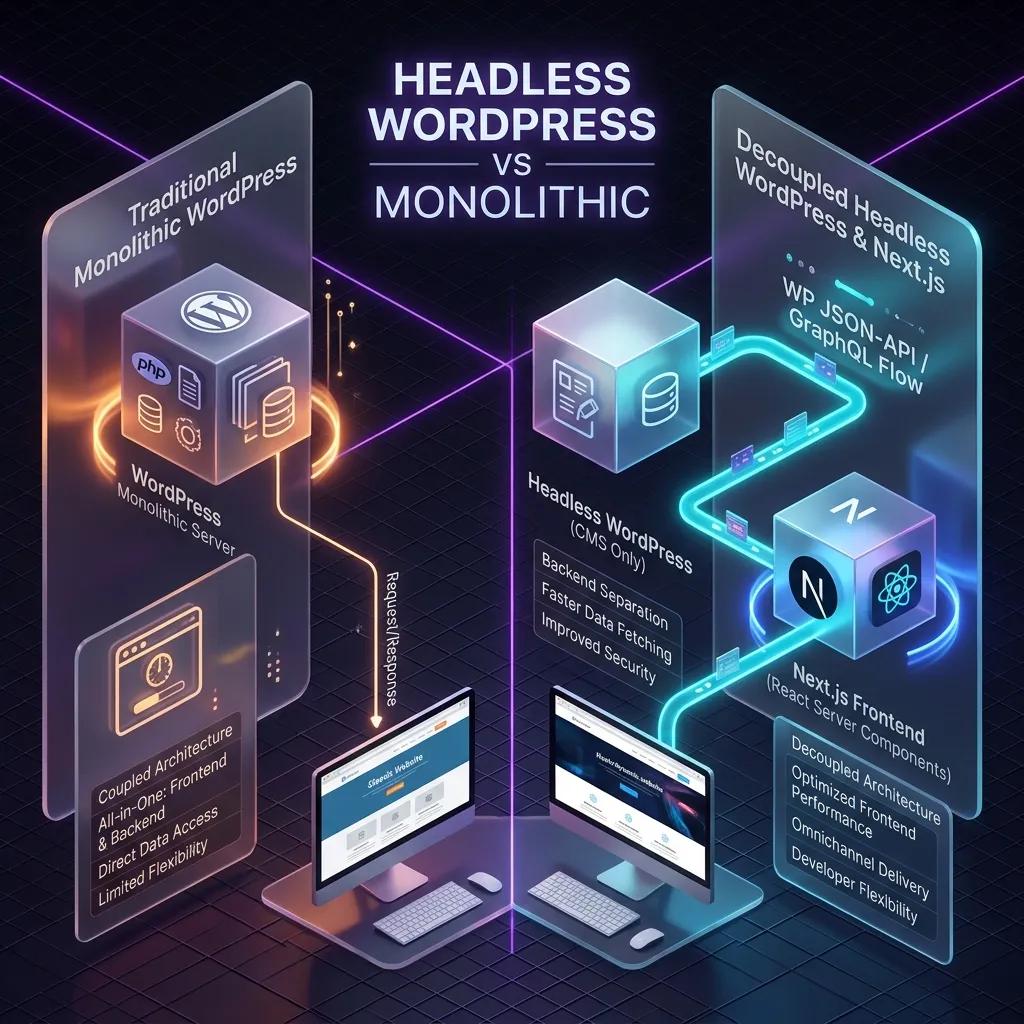
The core structural difference is that monolithic WordPress couples the content management backend and frontend presentation layer on a single server, whereas headless WordPress completely decouples them, utilizing the backend database solely to serve content via APIs to an independent, external frontend framework like Next.js.
The Database Model and Relational Fragmentation
To understand why traditional WordPress behaves the way it does, one must examine its storage model. WordPress stores content in a MySQL or MariaDB relational database. The core tables—primarily wp_posts and wp_postmeta—are highly normalized but structurally fragmented when handling complex metadata.
In a traditional Content Management System (CMS) setup, custom page layouts, Advanced Custom Fields (ACF) data, and plugin configurations are serialized into the database as individual key-value pairs in the wp_postmeta table. When a user requests a single page, the server must query the wp_posts table to find the target page, then run dozens of separate query operations or execute complex SQL JOIN statements against the wp_postmeta table to assemble the page's metadata, custom fields, page blocks, and settings.
The N+1 Execution Thread of the Monolithic PHP Loop
The defining technical constraint of a Monolithic Application like traditional WordPress is its sequential, synchronous execution model. This is most prominent in the classic WordPress Loop.
When a client browser requests a URL from a monolithic WordPress server, the request traverses the following lifecycle:
wp-settings.php), loads all active plugins, and initializes the active theme.$wp_query).single.php or archive.php).while ( have_posts() ) : the_post();
// Executed sequentially for each post node
the_title();
the_content();
get_post_meta( get_the_ID(), 'custom_field', true );
endwhile;
Inside this loop, elements are connected sequentially. If the page displays a list of 10 posts, and each post needs to fetch its author's metadata, featured image source, and custom layout fields, the PHP engine often executes a separate query database call for each property. This is the classic N+1 query problem.
Because PHP is single-threaded and executes synchronously, the execution thread blocks while waiting for each database transaction to resolve. If a plugin injects blocking network calls or unoptimized database JOINs inside the loop, the entire thread stalls. The web server cannot send the HTTP response headers or the HTML payload back to the browser until the entire document has been parsed and constructed in memory. This synchronous bottleneck limits Time-To-First-Byte (TTFB) and increases server CPU load.
The Decoupled Model: Next.js JSON-Payload REST/GraphQL Endpoints
In contrast, a Headless Content Management System architecture separates content storage from presentation. The WordPress dashboard serves exclusively as an administrative backend and content database. The active PHP theme is completely disabled or replaced with a headless router, bypassing the PHP template rendering layer entirely.
Instead of rendering HTML server-side inside a PHP loop, the headless WordPress instance exposes its data via standardized JSON API endpoints: the native WordPress REST API (/wp-json) or a WPGraphQL gateway.
Next.js functions as the independent frontend presentation application, running on a separate Node.js server or at the global CDN edge. The data flow undergoes a major structural transition:
query GetPostDetails($slug: ID!) {
  post(id: $slug, idType: URI) {
    title
    content
    author {
      node {
        name
      }
    }
    customFields {
      bannerImage {
        node {
          sourceUrl
        }
      }
    }
  }
}
Promise.all) or pre-compile the page static markup at build time.Comparative Data Flow Diagram
The following digital ASCII diagram visualizes the structural divergence in data routing between monolithic and decoupled architectures:
=========================================================================================
                                MONOLITHIC FLOW ARCHITECTURE (COUPLED)
=========================================================================================

  +----------------------+
  |  MySQL/MariaDB DB    |  <-- Relational tables (wp_posts, wp_postmeta)
  +-----------+----------+
              ^
              | SQL Query (Sequential JOINs / N+1 Loops)
              v
  +----------------------+
  |     WordPress Core   |  <-- Initiates PHP execution thread (wp-settings.php)
  |      PHP Engine      |
  +-----------+----------+
              |
              | Renders elements sequentially via:
              v
  +----------------------+
  | PHP Template / Loop  |  <-- loops through data (while(have_posts()): the_post())
  | (index.php / single) |      and outputs HTML server-side
  +-----------+----------+
              |
              | Sends fully rendered HTML string
              v
  +----------------------+
  |    Client Browser    |  <-- Blocks page render until entire DOM payload is loaded
  +----------------------+


=========================================================================================
                                DECOUPLED FLOW ARCHITECTURE (HEADLESS)
=========================================================================================

  +----------------------+
  |  MySQL/MariaDB DB    |  <-- Content storage only
  +-----------+----------+
              ^
              | Read Operation
              v
  +----------------------+
  |  WordPress Backend   |  <-- Headless CMS administrative dashboard
  +-----------+----------+
              |
              | Formats relational database rows into unified Graph schema
              v
  +----------------------+
  | GraphQL API Gateway  |  <-- Resolves queries via WPGraphQL into a single round-trip
  |   (JSON Endpoints)   |      JSON payload, preventing database bottlenecks
  +-----------+----------+
              |
              | Fetch Request (SSG / ISR / SSR)
              v
  +----------------------+
  | Next.js RSC Node     |  <-- React Server Components process JSON payload server-side
  | (Server Application) |      without executing DB connection logic
  +-----------+----------+
              |
              | Generates optimized static HTML markup & React chunks
              v
  +----------------------+
  |    CDN Edge Server   |  <-- Cache layers (Vercel, Cloudflare) serve requests
  |   (Global Edge)      |      instantly in sub-50ms window
  +-----------+----------+
              |
              | Delivers cached HTML dynamically
              v
  +----------------------+
  |    Client Browser    |  <-- Hydrates page instantly, reducing CLS and TTI
  +----------------------+
How Does Headless WordPress Next.js Affect Page Loading Speeds and Core Web Vitals?
A headless Next.js frontend significantly improves page loading speeds and Core Web Vitals by replacing database-heavy dynamic rendering with static site generation and incremental static regeneration. This eliminates server-side processing lag, directly optimizing Largest Contentful Paint, minimizing Interaction to Next Paint, and ensuring zero Cumulative Layout Shift.
The Dynamic Bottleneck of Monolithic WordPress
In a traditional monolithic WordPress configuration, every incoming client request triggers a sequential server-side chain reaction. The web server (typically Apache or Nginx) passes the request to the PHP processor, which subsequently issues multiple database queries to MySQL. PHP must then fetch the data, parse the WordPress template hierarchy, construct the HTML document, and finally return it to the client. This dynamic cycle introduces substantial latency, particularly under heavy traffic or when running complex plugins. Consequently, the Time-To-First-Byte (TTFB) suffers, directly dragging down all subsequent loading metrics and harming overall Web Performance.
By decoupling the frontend using a modern decoupled architecture, we shift the execution environment. The WordPress backend becomes a pure data repository accessible via REST APIs or GraphQL. The frontend is built using Next.js, a resilient React-based framework. Instead of processing requests on-demand at runtime, pages are compiled ahead of time or cached at the edge, drastically reducing server response times.
 Click to expand
Deep-Dive into Next.js Rendering Strategies: SSG, SSR, and ISR
Next.js provides developers with flexible rendering models that determine how and when content is generated. Understanding these strategies is critical to achieving superior core web vitals and ensuring the success of search engine optimization.
1. Static Site Generation (SSG)
Using Next.js as a Static Site Generator (SSG), the framework builds your pages during the deployment phase. Next.js fetches all required data from WordPress via GraphQL or REST API, compiles the code, and generates static HTML, CSS, and JSON files.
- TTFB Impact: Because these files are ready-made, they are deployed directly to a global Content Delivery Network (CDN) edge. When a user requests a page, the CDN serves the static file instantly. This completely avoids PHP execution latency, resulting in an exceptionally low and protected Time-To-First-Byte (TTFB).
- Best Use Cases: Marketing pages, documentation, contact pages, and archive pages that do not change frequently.
2. Server-Side Rendering (SSR)
For pages that demand real-time data custom-tailored to the user, Server-Side Rendering (SSR) generates the HTML dynamically on each request.
- TTFB & SEO Implications: SSR resolves the issues of client-side rendering where crawlers might struggle with blank pages. Integrating a targeted server-side rendering (SSR) seo strategy ensures that search engines crawl pre-rendered, indexable markup instantly. However, because the server must query WordPress and build the HTML on-the-fly, TTFB is higher than SSG and relies heavily on server resources.
- Best Use Cases: E-commerce carts, user dashboards, and highly personalized user portals.
3. Incremental Static Regeneration (ISR)
Incremental Static Regeneration (ISR) bridges the gap between static compilation and dynamic updates. ISR allows developers to update static pages after the site has been built, without needing to rebuild the entire application.
- How it Works: You define a revalidation time window (e.g., 60 seconds). The first request to a page within this window receives the cached static page. Subsequent requests trigger a background compilation of that specific page using updated data from WordPress. Once compiled, the edge cache is swapped, and subsequent users receive the fresh version.
- Performance Advantage: ISR protects the backend from database spikes because traffic hits the CDN cache, while still keeping content up-to-date.
Comparison of Next.js Rendering Strategies
The table below outlines the key operational differences between these strategies:
| Strategy | Page Speed & TTFB | Crawlability & SEO | WordPress Integration |
|---|---|---|---|
| Static Site Generation (SSG) | Instant (CDNs serve static files directly; optimal TTFB) | Excellent (Crawlers receive fully rendered HTML) | Simple (Requires standard REST/GraphQL queries at build time) |
| Server-Side Rendering (SSR) | Variable (Depends on database response & server latency) | Excellent (Full HTML delivered directly to bots) | Moderate (Requires dynamic API fetching on every request) |
| Incremental Static Regeneration (ISR) | Near-Instant (Cached static files with background regeneration) | Excellent (Pre-rendered content is continuously updated) | Advanced (Requires revalidation triggers or webhooks) |
Optimizing Core Web Vitals in a Decoupled Stack
Google’s Core Web Vitals evaluate real-world user experience based on three primary pillars: loading, interactivity, and visual stability. Here is how a headless Next.js setup addresses each metric.
Largest Contentful Paint (LCP)
Largest Contentful Paint measures when the main content of a page is likely loaded. Under a monolithic WordPress setup, slow server response and unoptimized assets push the LCP past the recommended 2.5-second threshold. Headless architectures optimize LCP by:
- Pre-rendering pages at the edge using SSG or ISR, meaning the initial document arrives in milliseconds.
- utilizing Next.js image optimization components (
next/image), which automatically serve WebP images in responsive sizes, crop layouts, and lazy-load elements below the fold.
Interaction to Next Paint (INP)
Replacing the deprecated First Input Delay (FID), Interaction to Next Paint (INP) measures overall page responsiveness by tracking the latency of all user interactions (clicks, taps, key presses) during the entire page lifecycle. Headless architectures achieve Interaction to Next Paint (INP) optimization by reducing main-thread blocking time. In a monolithic setup, heavy, un-minified jQuery scripts and third-party plugin bloat clog the browser's execution thread. In contrast, Next.js utilizes the modern React (software library) framework, which features:
- Automatic Code Splitting: Splitting code bundles so only the JavaScript required for the active viewport is loaded, rather than parsing a massive monolithic script bundle.
- Selective Hydration: Hydrating only critical visual elements first, keeping the main thread free for user interaction.
- Concurrent Features: Using React transitions to defer non-essential state updates, ensuring the UI remains interactive and preventing main-thread lockups.
Cumulative Layout Shift (CLS)
Cumulative Layout Shift (CLS) measures visual stability by tracking unexpected layout shifts during the loading phase. Monolithic sites often suffer from high CLS due to late-loading ads, dynamic CSS injections, or un-sized media files. In a headless React-based project, developers maintain granular control over layout structures:
- Explicit sizing values are passed to components, and layout placeholders (skeletons) are served immediately within the pre-rendered HTML.
- Modern CSS-in-JS or Tailwind CSS setups compile styling details upfront, eliminating flashes of unstyled content (FOUC).
- Font preloading configurations prevent font-swapping shifts, resulting in a smooth, zero-CLS browsing experience.
How Do You Securely Isolate the WordPress Backend in a Decoupled Stack?
You securely isolate the WordPress backend in a decoupled stack by hosting it on a private subdomain or virtual private network, locking down public access via strict firewalls or IP whitelisting, disabling unnecessary REST API endpoints, and utilizing secure token-based authentication for external API requests.
Architectural Separation: Eliminating SQLi and XSS Vulnerability Vectors
In a traditional monolithic WordPress setup, the database, core application files, admin panel (wp-admin), and presentation layer (themes and plugins) live on the exact same server. This unified footprint means that any request hitting the public-facing site has direct execution access to the underlying PHP environment. A vulnerability in a single poorly coded frontend plugin or theme file can expose the database to SQL Injection (SQLi) or render the system vulnerable to Cross-Site Scripting (XSS) by allowing malicious script injections into dynamically rendered templates.
By decoupling the CMS, you physically isolate the WordPress backend from the client-facing presentation layer. The public site is generated as static HTML or server-side rendered (SSR) pages hosted on a global Content Delivery Network (CDN).
This setup neutralizes traditional attack vectors in several ways:
- Database Isolation: Public visitors interact only with the CDN edge. There is no direct execution pipeline from the public browser to the WordPress PHP runtime or MySQL database, rendering SQLi attacks virtually impossible against frontend users.
- XSS Mitigation: Because the frontend templates are rendered separately (using frameworks like Next.js, Nuxt, or Gatsby) and populated via pre-fetched data, server-side dynamic HTML injection is avoided. Sanitization is controlled entirely at the frontend application layer.
- Reduced Attack Surface: The core admin portal and database can be hidden entirely behind a Virtual Private Cloud (VPC), a private subdomain (e.g.,
admin-backend.internal), or a strict firewall, completely removing it from the public internet.
Token Security and CORS Configuration
To facilitate dynamic features such as form submissions, user authentication, or search queries, the frontend application must communicate with the WordPress Application Programming Interface (API). Hardening this API channel requires resilient token security and strict proxy configurations:
1. Stateless Token Authentication via JWT
Traditional WordPress utilizes session-based cookie authentication, which is bound to browser origins and highly vulnerable to Cross-Site Request Forgery (CSRF) in decoupled scenarios. In a headless setup, developers use JWT Authentication (JSON Web Tokens) to securely authorize API requests.
However, storing raw JWT tokens in browser localStorage or sessionStorage exposes them to theft via frontend XSS. To mitigate this risk, secure architectures use one of two patterns:
- The BFF (Backend-for-Frontend) Pattern: The frontend server acts as a middleman, storing the JWT securely in its server session and passing requests to the WordPress API.
- HttpOnly Cookies: JWTs are returned from the auth endpoint using the
Set-Cookieheader with theHttpOnly,Secure, andSameSite=Strictdirectives. This prevents client-side scripts from reading the token.
2. Resolving Cross-Origin Resource Sharing (CORS) Issues
When your frontend (e.g., example.com) and your WordPress API backend (e.g., api.example.com) reside on different hostnames, browsers enforce CORS policies. Permissive configuration wildcard headers (Access-Control-Allow-Origin: *) should never be used in production, as they allow malicious third-party origins to send authenticated requests to your CMS backend.
To resolve this fluidly while maintaining maximum security, developer-centric platforms like WP Engine headless hosting (Atlas) orchestrate secure proxy layers automatically. Alternatively, you can configure an Nginx reverse proxy to route traffic under a single root domain, routing /wp-json/ requests directly to the backend while keeping cookies in a first-party context.
Production-Ready Nginx Proxy Configuration
The Nginx configuration below illustrates how to securely reverse proxy requests from a single domain to separate backend (WordPress) and frontend (Node.js/Next.js) servers. This setup solves CORS issues natively and allows both layers to share SameSite session cookies securely.
## Nginx routing configuration for a decoupled Headless WordPress stack.
## Securely routes public traffic to the frontend and API traffic to the backend,
## maintaining SameSite cookies and restricting admin access to a whitelisted IP range.

upstream nodejs_frontend {
    server 127.0.0.1:3000; # Next.js / Nuxt Node server
    keepalive 64;
}

upstream wordpress_backend {
    server 127.0.0.1:8080; # WordPress origin / PHP-FPM gateway
    keepalive 64;
}

server {
    listen 443 ssl http2;
    server_name whoisalfaz.me;

    # SSL Certs and general hardening options (TLSv1.3, Cipher Suites) go here...

    # 1. API Route: Forward REST API requests directly to the WordPress Backend
    location /wp-json/ {
        proxy_pass http://wordpress_backend;
        proxy_http_version 1.1;
        proxy_set_header Connection "";

        # Pass client headers and forward origin IPs
        proxy_set_header Host $host;
        proxy_set_header X-Real-IP $remote_addr;
        proxy_set_header X-Forwarded-For $proxy_add_x_forwarded_for;
        proxy_set_header X-Forwarded-Proto $scheme;

        # Force cookies into a first-party context
        proxy_cookie_domain wordpress_backend whoisalfaz.me;
        proxy_cookie_path / /;

        # Lock down CORS to only allow the frontend domain
        add_header 'Access-Control-Allow-Origin' 'https://whoisalfaz.me' always;
        add_header 'Access-Control-Allow-Credentials' 'true' always;
        add_header 'Access-Control-Allow-Methods' 'GET, POST, OPTIONS, PUT, DELETE' always;
        add_header 'Access-Control-Allow-Headers' 'DNT,X-CustomHeader,Keep-Alive,User-Agent,X-Requested-With,If-Modified-Since,Cache-Control,Content-Type,Authorization' always;
    }

    # 2. Admin Hardening: Allow admin and login access only from specific IP/VPN range
    location ~* ^/(wp-admin|wp-login\.php) {
        allow 192.168.1.0/24;  # Replace with private VPN subnet
        allow 203.0.113.50;    # Replace with administrator's static IP
        deny all;              # Block all other public requests to admin endpoints

        proxy_pass http://wordpress_backend;
        proxy_set_header Host $host;
        proxy_set_header X-Real-IP $remote_addr;
        proxy_set_header X-Forwarded-For $proxy_add_x_forwarded_for;
        proxy_set_header X-Forwarded-Proto $scheme;
    }

    # 3. Frontend Route: Proxy all other public routes to the static/SSR application
    location / {
        proxy_pass `http://nodejs_frontend;`
        proxy_http_version 1.1;
        proxy_set_header Upgrade $http_upgrade;
        proxy_set_header Connection 'upgrade';
        proxy_set_header Host $host;
        proxy_cache_bypass $http_upgrade;
    }
}
How Do Content Editors Manage Previews and Forms in a Headless Setup?
Content editors manage previews via dynamic Next.js preview routes that use temporary access tokens to fetch WordPress drafts, and handle forms by routing submissions through WP REST API endpoints or serverless third-party form services, ensuring editors retain a familiar editorial workflow without frontend disruption.
The Preview Mode Gap and Draft Authentication
In a traditional monolithic WordPress setup, the rendering engine and content repository live on the same server. When a content editor clicks the "Preview" button in the Gutenberg editor, WordPress generates a temporary revision in the database and renders it immediately using the active PHP theme template.
In a headless architecture, this native coupling is severed. The frontend is a decoupled Next.js application running on a separate host (e.g., Vercel or AWS Amplify), while WordPress acts solely as an administrative backend. When an editor attempts to preview a draft, WordPress defaults to its internal routing, resulting in a broken view or leading to an unintended URL Redirection back to the WordPress admin panel instead of the headless frontend.
To bridge this "Preview Mode Gap" and secure the editorial experience, developers implement token-based draft authentication. Because drafts and revisions are unpublished, they are not exposed to public REST API or WPGraphQL endpoints. To retrieve this protected content, the headless frontend must authenticate its request:
WPGraphQL JWT Authentication is installed on the WordPress instance./api/preview). This route validates a secret token, generates a short-lived JWT for the WordPress draft, and sets temporary preview cookies.Authorization header to query the WordPress GraphQL/REST API for the unpublished revisions, rendering them in real-time.This secure, token-authenticated preview workflow is mission-critical for maintaining a strong decoupled wordpress seo strategy, ensuring that draft content is never indexed by search engines while still being fully verifiable by editors before publication.
The Form Ingestion Gap
Another major challenge in headless API-driven development is form handling. Popular monolithic WordPress plugins like Contact Form 7, Gravity Forms, or WPForms are designed with the assumption that WordPress handles both the form rendering (via PHP) and processing (via server postback).
When the frontend is decoupled, these plugins break out-of-the-box. The React or Next.js frontend cannot execute the WordPress PHP engine to render the form markup, nor can it natively process the submission, handle CSRF nonces, or run WordPress-side email dispatch hooks.
To resolve the Form Ingestion Gap, developers use one of three main architectural patterns:
1. REST API Proxy
The headless frontend renders custom React form components and submits the payload to a Next.js Route Handler. This handler acts as a secure proxy, forwarding the data to the WordPress REST API endpoints provided by the form plugin (e.g., Gravity Forms REST API). This keeps form entries stored centrally within the WordPress database while shielding the actual WordPress backend URL from the client.
2. Custom Next.js Endpoints
For maximum performance and control, developers build custom API Route Handlers in Next.js. These endpoints receive the form submission, perform validation (such as validation of input schemas using libraries like Zod), and then use GraphQL mutations or custom REST endpoints to store the submission in WordPress or send it directly to external transactional email services (like SendGrid or Postmark).
3. Serverless Form Tools
For a completely decoupled, low-maintenance approach, developers bypass WordPress ingestion entirely. They route submissions directly from the Next.js frontend to third-party serverless form backends like Formspree, Basin, or Getform. These services handle validation, spam filtering (e.g., via Akismet or reCAPTCHA), and notifications, eliminating the need to maintain form-processing code or store form data on the WordPress server.
Next.js 15 App Router Data Fetching with wpGraphQLFetch
The following snippet demonstrates a Next.js 15 App Router dynamic page route (app/posts/[slug]/page.tsx) that implements dynamic data fetching. It shows how the page uses asynchronous params and searchParams to handle drafts, using a custom wpGraphQLFetch utility that supports cache revalidation tags for preview content.
import { notFound } from 'next/navigation';

interface PostData {
  title: string;
  content: string;
  date: string;
  status: string;
}

interface WpGraphQLResponse {
  data: {
    postBy: PostData | null;
  };
}

// Custom wrapper to fetch from WordPress GraphQL endpoint
async function wpGraphQLFetch<T>(
  query: string,
  variables: Record<string, any> = {},
  options: { tags?: string[]; previewToken?: string } = {}
): Promise<T> {
  const headers: HeadersInit = {
    'Content-Type': 'application/json',
  };

  if (options.previewToken) {
    headers['Authorization'] = `Bearer ${options.previewToken}`;
  }

  const response = await fetch(process.env.WORDPRESS_GRAPHQL_ENDPOINT as string, {
    method: 'POST',
    headers,
    body: JSON.stringify({ query, variables }),
    next: {
      tags: options.tags || ['wordpress-posts'],
      // Bypass standard cache if we are previewing draft content
      revalidate: options.previewToken ? 0 : 3600,
    },
  });

  if (!response.ok) {
    throw new Error(`Failed to fetch GraphQL data: ${response.statusText}`);
  }

  return response.json();
}

interface PageProps {
  params: Promise<{ slug: string }>;
  searchParams: Promise<{ preview?: string; token?: string }>;
}

export default async function BlogPostPage({ params, searchParams }: PageProps) {
  // Await the asynchronous params and searchParams as required in Next.js 15
  const { slug } = await params;
  const { preview, token } = await searchParams;

  const isPreview = preview === 'true' && token;

  const postQuery = `
    query GetPostBySlug($id: ID!, $idType: PostIdType!) {
      postBy(uri: $id, idType: $idType) {
        title
        content
        date
        status
      }
    }
  `;

  try {
    const response = await wpGraphQLFetch<WpGraphQLResponse>(
      postQuery,
      {
        id: isPreview ? slug : `/posts/${slug}`,
        idType: isPreview ? 'DATABASE_ID' : 'URI',
      },
      {
        tags: [`post-${slug}`],
        previewToken: isPreview ? token : undefined,
      }
    );

    const post = response.data.postBy;

    if (!post) {
      notFound();
    }

    return (
      <article className="prose mx-auto py-8">
        {isPreview && (
          <div className="bg-yellow-100 border-l-4 border-yellow-500 text-yellow-700 p-4 mb-6">
            You are viewing a draft preview.
          </div>
        )}
        <h1>{post.title}</h1>
        <div dangerouslySetInnerHTML={{ __html: post.content }} />
      </article>
    );
  } catch (error) {
    console.error('Error rendering post:', error);
    return (
      <div className="text-red-500 p-4">
        Error loading post. Please try again later.
      </div>
    );
  }
}
Is Headless WordPress Worth the Development and Maintenance Premium?
Headless WordPress is worth the premium for enterprise platforms requiring high-security, custom designs, and rapid load times, but remains overkill for standard websites. The decision depends on balancing development costs, custom UX requirements, and performance gains against monolithic ease of use and instant plugin support.
Decoupling WordPress to build a modern, API-driven headless content management system frontend is not merely a technical migration; it is a fundamental business shift that alters your capital allocation. To determine if this architectural investment makes sense for your organization, you must evaluate the real numbers behind the Total Cost of Ownership (TCO), the ongoing maintenance overhead, and the measurable Return on Investment (ROI).
The Financial Reality: Monolithic TCO vs. Headless Infrastructure
In a traditional monolithic WordPress setup, the application logic, content database, and presentation layer (PHP theme) are packed into a single runtime environment. This simplicity keeps infrastructure costs exceptionally low:
- Monolithic WP Hosting ($10–$50/month): Shared or managed WordPress hosting (such as Kinsta, WP Engine, or SiteGround) hosts the entire stack on one virtual machine. Dynamic page rendering, database queries, and basic content delivery networks (CDNs) are bundled into a single package.
- Decoupled Headless Infrastructure ($200–$500/month): Shifting to a headless architecture forces you to run and license multiple independent layers:
1WordPress CMS Backend ($100–$300/month): A dedicated WP Engine Atlas or Kinsta Headless instance optimized for fast API responses and WPGraphQL schema compilation.2Serverless Frontend Hosting ($20–$100/month): A serverless computing platform like Vercel, Netlify, or AWS Amplify to run the Node.js environment required to host Next.js or React applications.3Global Edge CDN & Web Application Firewall ($50–$100/month): A resilient security and caching layer like Cloudflare Enterprise or Fastly to intercept traffic, handle SSL/TLS handshakes, and cache static HTML builds on the edge.
MONOLITHIC INFRASTRUCTURE: $10 - $50 / Month
+-------------------------------------------------------------+
|                      Shared/VPS Host                        |
|   +------------------+  +-----------------+  +----------+   |
|   |  PHP App Engine  |  |  MySQL Database |  |  Themes  |   |
|   +------------------+  +-----------------+  +----------+   |
+-------------------------------------------------------------+

HEADLESS INFRASTRUCTURE: $200 - $500 / Month
+------------------------+      WPGraphQL     +-----------------------+
|  WP Backend (CMS API)  | -----------------> |   Next.js Frontend    |
|  (WP Engine Atlas)     |     (JSON Payload) | (Vercel Edge Platform)|
|  $100 - $300 / Month   |                    | $20 - $100 / Month    |
+------------------------+                    +-----------------------+
                                                          |
                                                          v
                                              +-----------------------+
                                              |    Cloudflare CDN     |
                                              | $50 - $100 / Month    |
                                              +-----------------------+
The Headless Maintenance Premium: Why Retainers Cost $1,000–$3,000/Month
While hosting bills scale up moderately, the true cost driver of headless WordPress is developer hours. Monolithic websites allow non-technical administrators to click "Update" on plugins or themes with minimal risk. In contrast, a headless setup is a custom application.
Professional agencies and developers command monthly maintenance retainers of $1,000 to $3,000 for several critical reasons:
The Performance ROI: 1-Second Speed Improvements and Ad Spend Efficiency
The high entry price of headless WordPress pays dividends when performance directly impacts the bottom line. Decoupling WordPress using Next.js allows you to achieve sub-second page loads and pass Google's Core Web Vitals (Largest Contentful Paint, Cumulative Layout Shift, Interaction to Next Paint).
This speed optimization drives two primary financial outcomes:
1. Direct Conversion Rate Optimization (CRO)
According to conversion research by Portent, a site that loads in 1 second experiences a conversion rate 3x higher than a site that loads in 5 seconds. For e-commerce and high-value lead generation, shaving 1 second off your load time can recover thousands of lost transactions, turning a $3,000/month developer retainer into a profitable investment.
2. Cost-Per-Click (CPC) and Google Ads Efficiency
Google Ads relies heavily on a landing page's speed to calculate its Quality Score.
- Monolithic Bottleneck: Heavy PHP themes, bloated plugins, and database roundtrips drag down landing page loading times, lowering the Landing Page Experience rating. This forces you to bid higher to secure top ad positions.
- Headless Edge Delivery: Decoupled sites served from Vercel edge networks load almost instantly. A higher Quality Score directly lowers your CPC (cost-per-click), allowing you to acquire the same number of leads for up to 30% less ad spend. For companies spending over $10,000/month on Google Ads, the headless stack pays for itself entirely in advertising savings.
Strategic Decision Matrix
| Metric | Monolithic WordPress | Headless WordPress (Next.js) |
|---|---|---|
| Ideal For | Blogs, small business sites, rapid MVPs | Enterprise platforms, e-commerce, high-security apps |
| Monthly Hosting | $10 – $50 | $200 – $500 |
| Maintenance Retainer | $0 – $500 (self-managed updates) | $1,000 – $3,000 (required developer support) |
| Page Speed & Core Web Vitals | Variable (highly dependent on plugins & hosting) | Ultra-fast (sub-second edge delivery by default) |
| Security Risk Profile | Higher (exposed database and admin login) | Near-zero frontend attack surface (decoupled DB) |
| Design Flexibility | Limited to theme constraints & builders | Infinite (unrestricted React/Tailwind frontend) |
Mitigating the Premium with Professional Execution
Decoupling your site is a powerful growth lever, but implementing it incorrectly will destroy your SEO, split your crawl budget, and balloon your development budget. Before investing in a headless rebuild, you must audit your current performance and design a resilient migration strategy.
We help brands navigate these complex architectural decisions:
- Determine Your Real Performance Bottlenecks: Use our Web Audit Engine to analyze your site's speed, Core Web Vitals, and SEO configurations, identifying exactly where a monolithic setup is costing you customers.
- Build a Secure, Scalable Roadmap: Schedule a Headless Architecture Consulting service session to map your database schema, design custom GraphQL interfaces, and plan your serverless edge infrastructure.
- Automate Your Backend Workflows: Implement automated publishing pipelines and editorial notifications using our n8n Automation workflows.
- Deploy a Decoupled Stack: Build custom, high-performance static frontends with our Custom Full-Stack development solutions.
- Maximize Conversion Performance: Align your technical stack with enterprise growth targets through our Growth Consulting services.
To learn more about our engineering philosophies and client successes, read more about Alfaz Mahmud Rizve.
Complementary RevOps Toolchain
n8n Cloud
The most powerful fair-code automation platform. Get 20% off your first year on any paid plan.
Vultr High-Performance Cloud
Deploy self-hosted vector databases & AI infrastructure worldwide. Get $300 in free credit.
Brevo (formerly Sendinblue)
Enterprise-grade email API and marketing automation. Excellent SMTP for n8n.
Ready to automate your agency?
Skip the manual grunt work. Let's build a custom system that runs your business on autopilot 24/7.