Stop Missing Calls: Build a Smart AI Voice Bot with n8n (Step-by-Step)
Welcome back to Day 27 of the 30 Days of n8n & Automation series here on whoisalfaz.me.
We have given our AI Vision (Day 15), Hands (Day 25), and Memory (Day 26). But until now, our AI has been silent. It only lives in text boxes.
Today, we break the silence. We are building an n8n AI Receptionist.
The Problem: If you run an agency or a service business (like a plumbing or consulting firm), you miss calls.
- Missed calls = Missed revenue.
- Standard voicemail is a “black hole” (nobody listens to it).
- Hiring a human receptionist costs $3,000/month.
- Paying for Voice AI tools like Bland AI or Air.ai costs $0.20/minute (expensive).
The Solution: We will build a custom n8n Voice Bot that:
- Answers the phone 24/7.
- Records the user’s message.
- Transcribes it using OpenAI Whisper (better than human accuracy).
- Analyzes if it’s a “Lead”, “Spam”, or “Urgent Client”.
- Acts: If it’s urgent, the AI calls you back and speaks the summary to you.
This is not a toy. This is a deployable Bland AI alternative that runs for pennies.
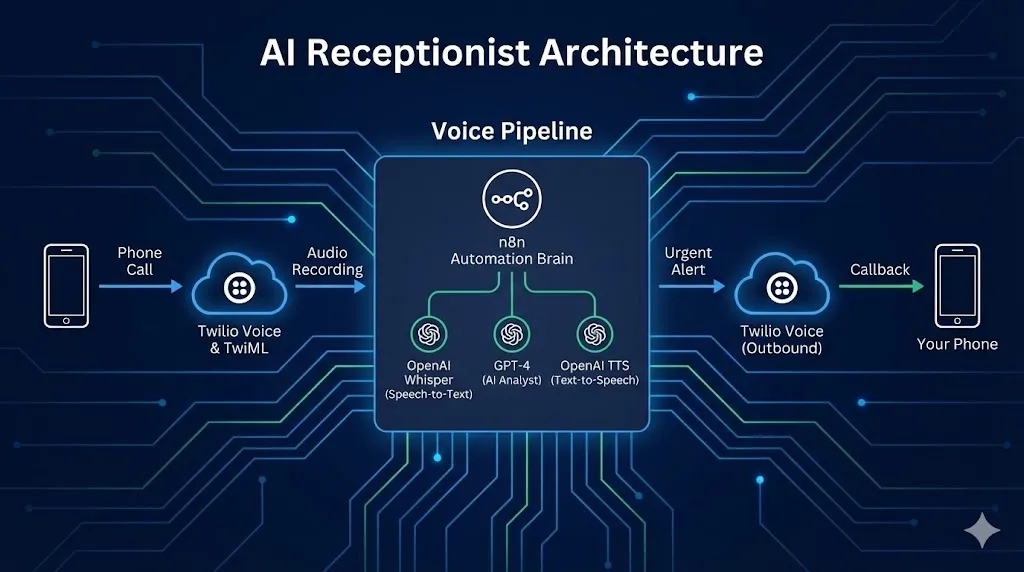
The Tech Stack (The Voice Pipeline)
We are combining three powerful APIs to create this system.
- Twilio: The telephony provider (Phone Numbers & Voice).
- OpenAI Whisper: The “Ear” (Speech-to-Text).
- OpenAI TTS (Text-to-Speech): The “Mouth” (for the outbound alert).
- n8n: The brain that connects them.
Prerequisites: You need a Twilio Account and a purchased phone number ($1/month).
Step 1: The “Listening” Ear (Twilio Setup)
First, we need to tell Twilio what to do when someone calls your number. We use TwiML (Twilio Markup Language), which is just XML for phones.
1. Create the Webhook
- Create a new n8n workflow.
- Add a Webhook node.
- Method:
POST. - Path:
incoming-call. - Copy the Production URL.
2. Configure Twilio
- Go to your Twilio Console > Phone Numbers > Active Numbers.
- Click your number.
- Scroll down to the “Voice & Fax” section.
- A Call Comes In: Select “Webhook”.
- Paste your n8n Production URL.
- Save.
3. The Greeting (TwiML Response)
Now, when Twilio hits n8n, n8n must answer.
- Connect a Respond to Webhook node to your trigger.
- Respond With:
Text. - Body: Paste this XML code:
XML
<?xml version="1.0" encoding="UTF-8"?>
<Response>
    <Say voice="alice" language="en-US">
        Hi, you have reached Alfaz's AI Assistant.
        He is currently building automation workflows.
        Please state your name and how he can help you after the beep.
        I will analyze your message and alert him immediately if it is urgent.
    </Say>
    <Record action="https://n8n.your-domain.com/webhook/handle-recording" maxLength="30" playBeep="true" />
</Response>
Critical Detail: Look at the <Record action="..."> tag. This tells Twilio: “After the user finishes talking, send the audio file to THIS second URL.” You need to replace your-domain.com with your actual n8n instance domain.
Step 2: The “Thinking” Brain (Handling the Recording)
Now we need to build that second webhook to catch the audio file.
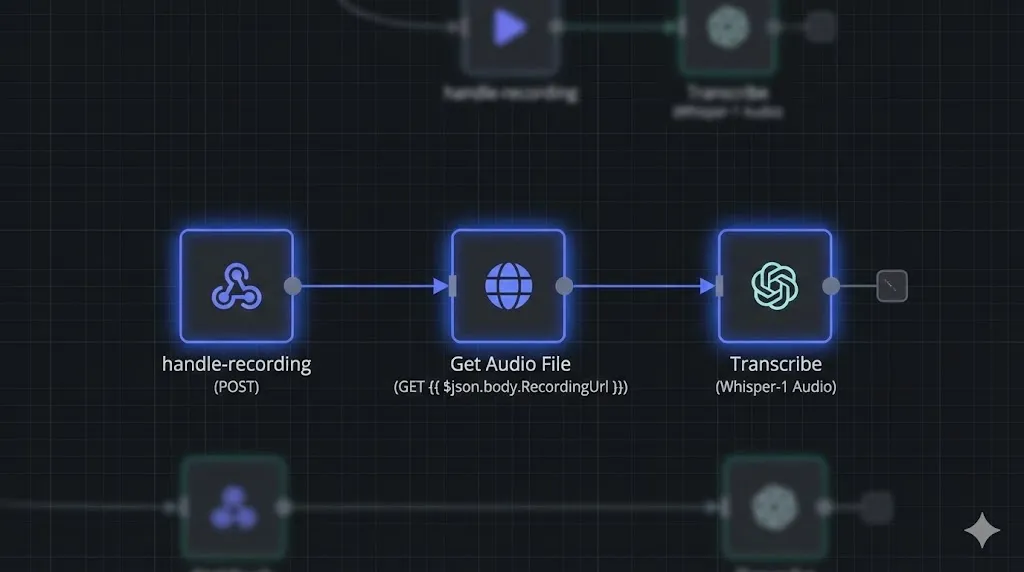
1. Create Webhook #2
- Add a new Webhook node (separate workflow or same canvas).
- Method:
POST. - Path:
handle-recording.
2. Download the Audio
Twilio sends the audio location in a field called RecordingUrl. We need to download the actual file.
- Add an HTTP Request node.
- Method:
GET. - URL:
{{ $json.body.RecordingUrl }}. - Response Format:
File(or Binary). - Property Name:
data.
3. Transcribe (Whisper)
Now we convert the MP3 into text.
- Add an OpenAI node.
- Resource:
Audio. - Operation:
Transcribe. - Input Binary Field:
data. - Model:
whisper-1.
Now, your workflow has converted the voice “I need a website built ASAP” into the text string "I need a website built ASAP".
Step 3: The “Analyst” (AI Classification)
We don’t want to be bothered by spam calls about “car warranties.” We only want to know about money.
- Add an AI Agent node (or a Basic LLM Chain).
- System Prompt:“You are a reception assistant. Analyze the following voicemail transcript. Output a valid JSON object with:
summary: A 1-sentence summary.sentiment: ‘Positive’, ‘Neutral’, or ‘Angry’.urgency: ‘High’ (if they want to buy/hire), ‘Low’ (info), or ‘Spam’.action_item: What should Alfaz do?”
- User Input:
{{ $json.text }}(The output from Whisper).
Step 4: The “Speaking” Mouth (The Urgent Alert)
This is the Day 27 Promise. If the call is urgent, we want n8n to call us back immediately.
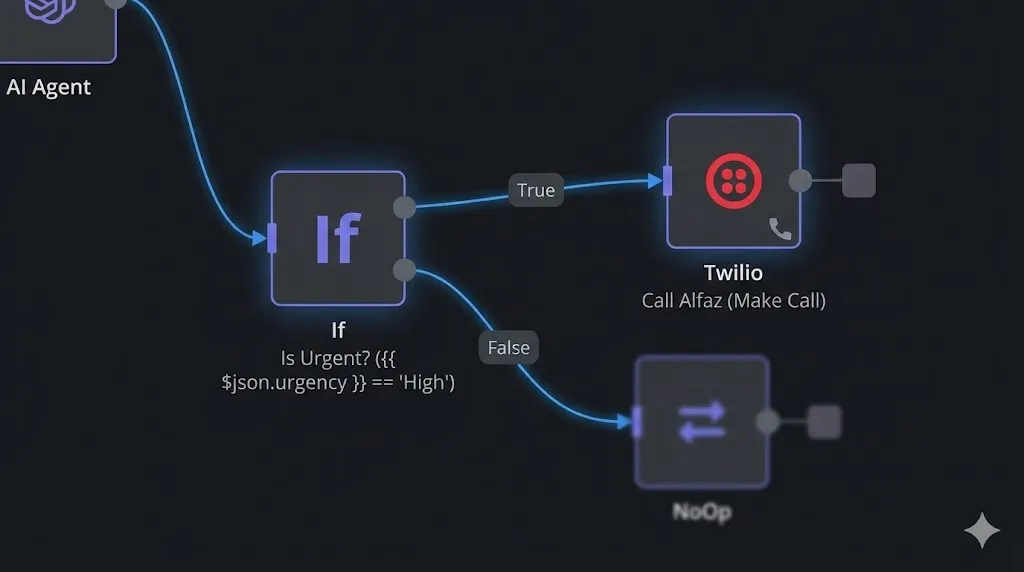
- Add an If node.
- Condition:
urgencyEqual toHigh.
- Condition:
- True Path (Urgent):
- Add a Twilio node.
- Resource:
Call. - Operation:
Make. - To:
+8801991210347(Your personal mobile). - From: Your Twilio Business Number.
- Twiml (The Message):XML
<Response> <Say voice="alice"> Alfaz, you have a new high-priority lead. Summary: {{ $json.summary }}. Action Item: {{ $json.action_item }}. </Say> </Response>
The Experience: You are at dinner. Your phone rings. It’s your AI. “Alfaz, you have a new high-priority lead. John needs a website by Friday.” You excuse yourself, call John back, and close the deal.
Why Build Instead of Buy? (Bland AI vs. n8n)
Many people ask: “Why not just use Bland AI or Air.ai?”
1. Cost:
- Bland AI: ~$0.20 per minute.
- n8n + Twilio: ~$0.01 per minute.
- Twilio Inbound: $0.0085/min.
- Whisper API: $0.006/min.
- Savings: 95%.
2. Control: With n8n, you own the data. You can save the transcript to Notion, send the lead to Salesforce, or trigger a Slack alert. With SaaS tools, your data is trapped in their dashboard.
Conclusion
You have now bridged the gap between the digital and physical worlds. Your n8n AI Receptionist interacts with the real telephone network, filtering noise and surfacing value.
You have built a system that Listens (Whisper), Thinks (GPT-4), and Speaks (Twilio).
What’s Next? We have covered almost every major modality: Text, Images, PDF, and Voice. But we haven’t touched Video. Tomorrow, on Day 28, we are going to build an Automated YouTube Shorts Generator. We will use n8n to script, visualize, and render a video automatically.
See you in the workflow editor.