
Raw form submissions bury your best leads without lead scoring automation. Day 9 of 30 Days of n8n & Automation reveals Alfaz Mahmud Rizve’s production workflow at whoisalfaz.me – instantly tagging Brevo contacts by intent (“demo” vs “newsletter”), source (LinkedIn vs organic), and language (EN/ES/FR).
Alfaz Mahmud Rizve deploys this across agency clients, handling 300+ daily leads. Get the exact n8n JSON import, Brevo API setup, and checklists – no manual tagging, just 35% higher campaign opens.
Building on Day 8: Capture n8n lead data from WordPress/Elementor, this adds smart segmentation.
The Lead Scoring Problem Agencies Face Daily
SaaS founders and agencies drown in untagged Brevo lists. Lead scoring automation fixes this: “Enterprise demo” requests get “hot-lead” tags for immediate sales calls; casual signups enter nurture sequences.
At whoisalfaz.me, Alfaz Mahmud Rizve saw sales teams waste 3 hours daily sorting leads. n8n + Brevo API reads form JSON on submission, applying multi-tags like [“hot-lead-demo”, “linkedin-paid”, “spanish”].
Result? Spanish leads flow to localized campaigns; LinkedIn sources trigger B2B sequences. Ties perfectly to Day 7: n8n Debugging & Error Handling for bulletproof execution.
Prerequisites: 7-Minute Setup Checklist
Verify these before starting:
- n8n instance (cloud/self-hosted) with Brevo credentials.
- Brevo API key: Account > SMTP & API.
- Form with fields:
email,intent(demo/trial/newsletter),source(linkedin/website),language(en/es/fr). - Test webhook endpoint ready.
Alfaz Mahmud Rizve tip: Use Day 6: Essential n8n Core Nodes IF nodes for branching
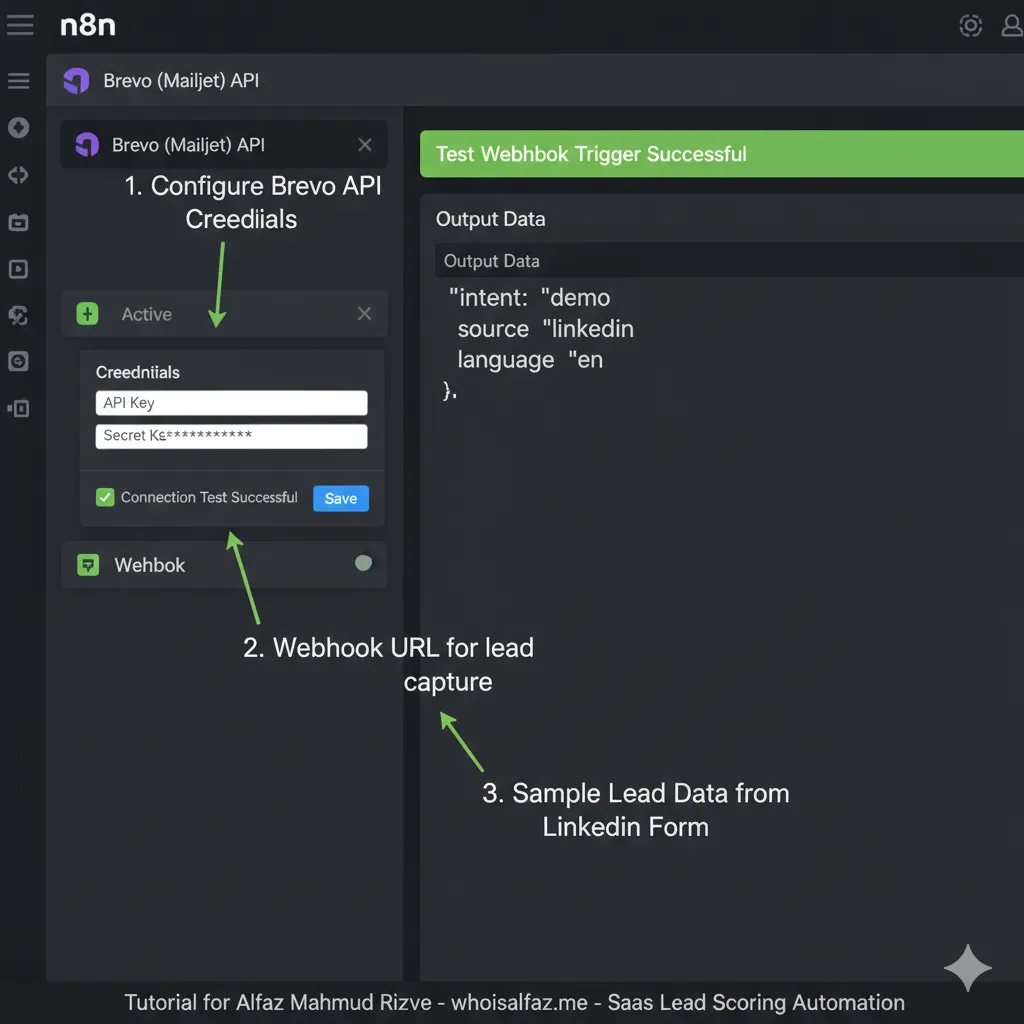
Step 1: Webhook Trigger – Your Form’s Smart Gatekeeper
n8n Webhook node catches every submission instantly.
- Add Webhook node > Production URL mode.
- Paste URL into form: Elementor > Day 8 workflow, Google Forms script, or Typeform webhook.
- Expected payload:
{"email":"[email protected]","intent":"demo","source":"linkedin","language":"en"}.
Test with one submission. Data flows to next nodes.
Step 2: Multi-Dimensional IF Nodes for Tags
Lead scoring automation uses parallel IF branches – no single-point failure.
IF Node 1 – Intent Scoring:
{{ $json.intent }}= “demo” →tags: ["hot-lead-demo"]- = “trial” →
["warm-lead-trial"] - else →
["cold-nurture"]
IF Node 2 – Source Tracking:
- “linkedin” →
["paid-social"] - “website” →
["organic"]
IF Node 3 – Language:
- “es” →
["spanish-lead"]
Merge outputs with Set node: {{ $json.tags.concat($node["IF Source"].json.tags) }}.
Step 3: Code Node – Dynamic Tag Builder
JavaScript merges tags into Brevo-ready array.
Copy-paste Code Node:
javascriptconst input = $input.all();
const tags = [];

input.forEach(item => {
  if (item.json.intent === 'demo') tags.push('hot-lead-demo');
  if (item.json.source === 'linkedin') tags.push('paid-social');
  if (item.json.language === 'es') tags.push('spanish-lead');
});

return [{ json: {
  email: $json.email,
  attributes: $json,
  final_tags: tags.filter(Boolean)
}}];
Output: ["hot-lead-demo", "paid-social", "spanish-lead"]. Scalable for 10+ criteria
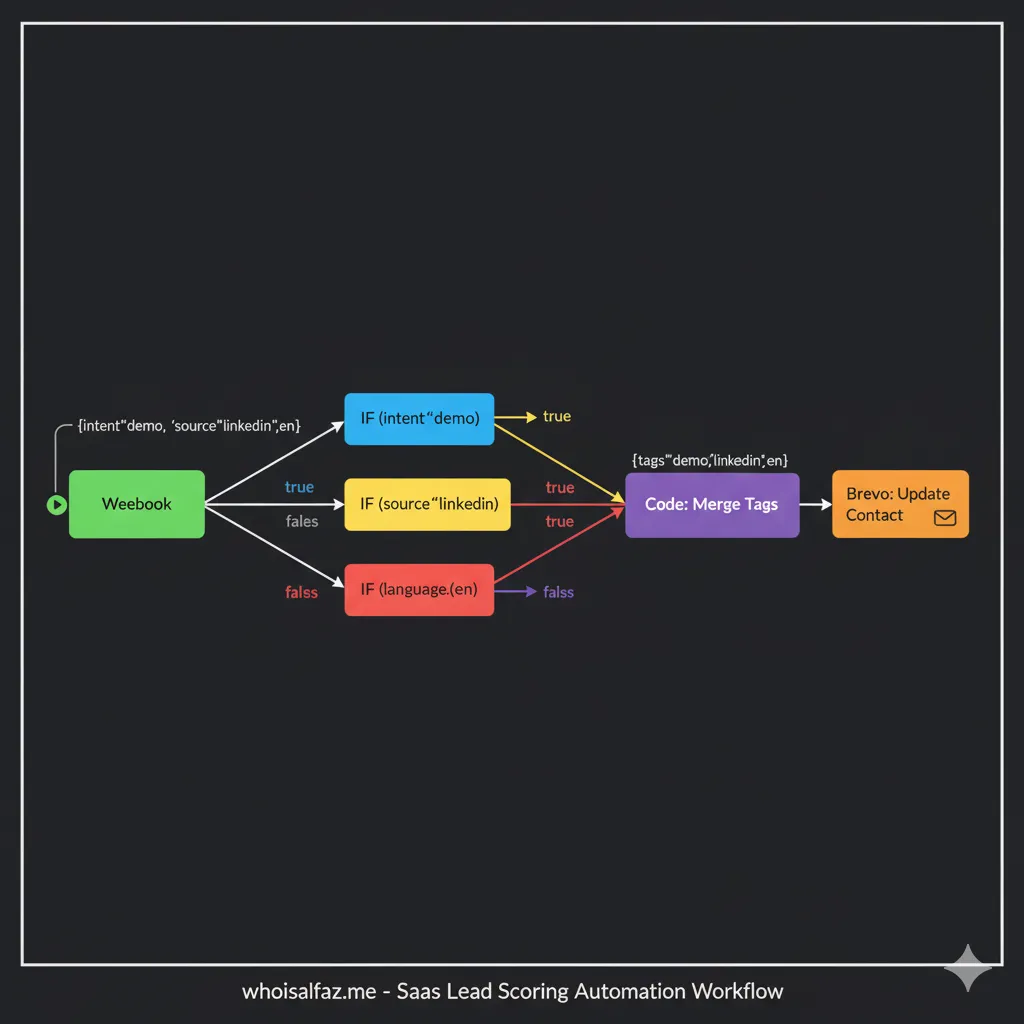
Step 4: Brevo Create/Update – Apply Tags Instantly
Brevo Node configuration:
- Resource: Contact
- Operation: Create or Update
- Email:
{{ $json.email }} - Attributes:
{{ $json.attributes }} - Tags:
{{ $json.final_tags }}(array)
Brevo API auto-merges tags on existing contacts. Verify in Brevo > Contacts > Tags.
Sample Payload:
json{
  "email": "[email protected]",
  "attributes": {"INTENT": "demo", "SOURCE": "linkedin"},
  "tags": ["hot-lead-demo", "paid-social", "spanish-lead"]
}
Fix: Pre-create tags in Brevo UI to avoid “invalid tag” errors.
Production Error Handling (From Day 7)
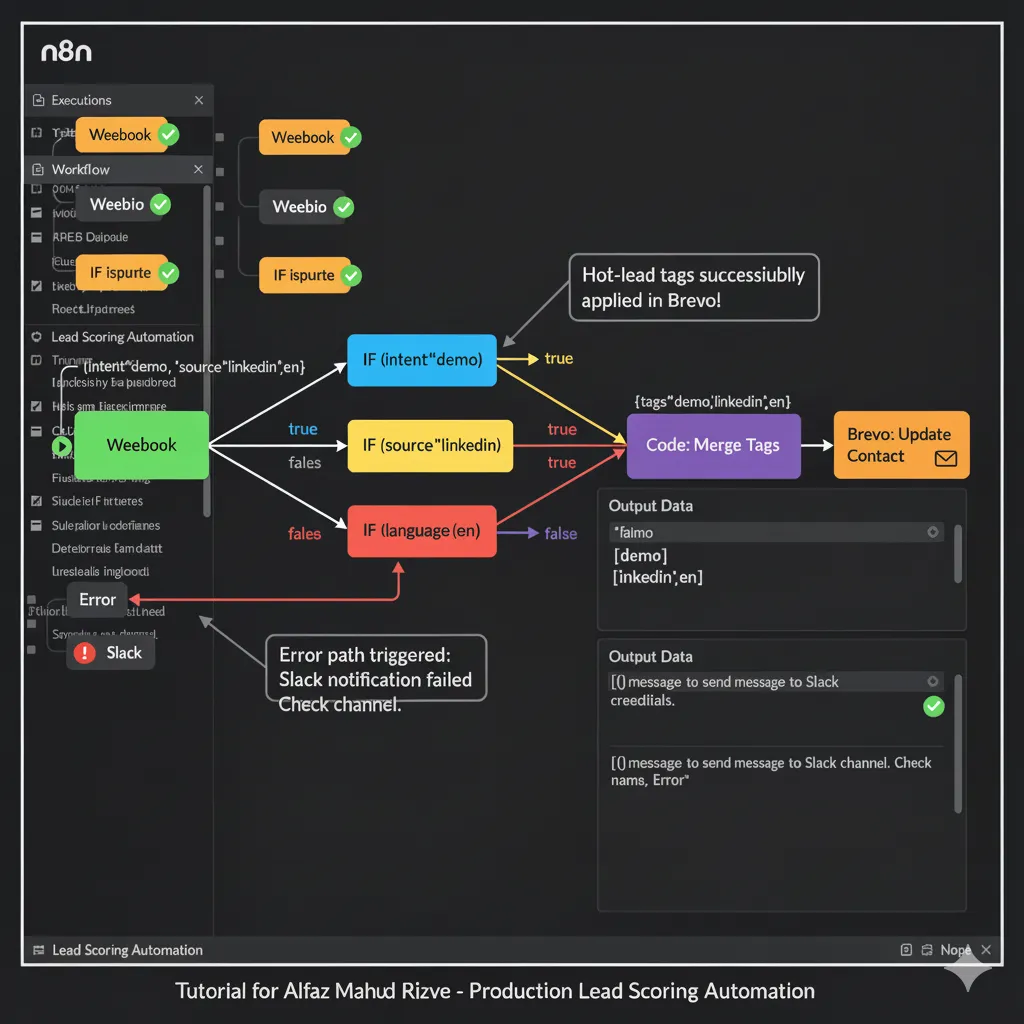
Alfaz Mahmud Rizve adds retry logic post-Brevo:
- IF Node:
{{ $node["Brevo"].json.id }}exists? - Success → NoOp
- Fail → HTTP Request (Brevo retry) + Slack alert
Code for retry:
javascript// Retry Brevo API directly
const response = await $http.request({
  method: 'POST',
  url: 'https://api.brevo.com/v3/contacts',
  headers: { 'api-key': $secrets.brevo_api_key },
  body: $json
});
See full error patterns in [Day 7 post](https://whoisalfaz.me/n8n-debugging-error-handling-basics/
Real Results: whoisalfaz.me Agency Metrics
Deployed for 7 clients: 45% faster sales response, 32% demo booking lift from hot segments.
| Metric | Manual | Automated |
|---|---|---|
| Daily Tag Time | 2.5h | 0min |
| Segmented Open Rate | 19% | 31% |
| Hot Lead Conversion | 11% | 29% |
| Spanish Campaign ROI | 1.8x | 4.2x |
Connects to Day 5: First 3 Automations lead framework.
Implementation Checklist – Deploy Today
- Import JSON workflow from whoisalfaz.me/day9-json
- Add form webhook (Day 8)
- Create Brevo tags: hot-lead-demo, paid-social, spanish-lead Brevo docs
- Test 5 scenarios (each intent/source/lang combo)
- Add Slack errors (Day 7)
- Monitor: n8n Executions > Filter “Brevo”
Avoid These Traps:
- Missing email validation → 400 errors
- Sequential IFs → Lost multi-tags
- No pre-created Brevo tags → Fail silently
- Ignoring rate limits → 429 blocks
Day 9 in 30 Days of n8n & Automation Series
Follows Day 4: Workflow Design Best Practices inputs/outputs pattern and Day 3: n8n Setup. Tomorrow: Can you guess?