Speed to lead is the single most important metric in paid advertising. The Harvard Business Review reports that companies that contact potential customers within an hour of receiving a query are nearly seven times as likely to qualify the lead as those that try just one hour later.
If you are manually downloading CSV files from Facebook Ads Manager at the end of the day, you are burning your ad budget. By the time you call, the lead has already forgotten who you are—or bought from a competitor who called them five minutes ago.
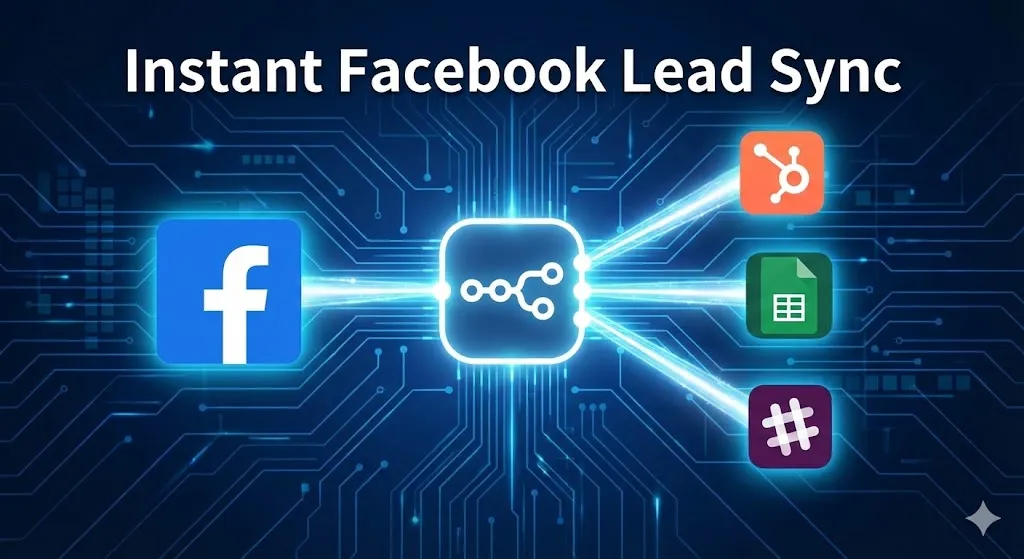
Facebook Lead Ads automation is not just an efficiency hack; it is a revenue requirement. But tools like Zapier often gate this feature behind “Premium” tiers or charge you per task, which penalizes you for scaling.
In this Day 13 guide of 30 Days of n8n & Automation, we will build a real-time pipeline that captures leads the second a form is submitted, formats the data, and pushes it directly into your CRM or Google Sheet—for free (using self-hosted n8n) or at a fraction of the cost.
Throughout this guide, examples come from live ad campaigns that Alfaz Mahmud Rizve manages for performance marketing agencies at whoisalfaz.me.
Why n8n Beats Zapier for Facebook Lead Ads
Most marketers start with Zapier. It’s easy, but it has two major flaws for scaling agencies:
- The “Success Tax”: If you generate 5,000 leads a month, Zapier’s task usage gets expensive quickly. You shouldn’t be punished for a successful campaign.
- Data Formatting: Zapier often struggles with complex data cleaning (like splitting full names or fixing phone number country codes) without adding extra “Formatter” steps that cost even more.
Using n8n for Facebook Lead Ads automation allows you to handle unlimited leads for a flat cost and gives you powerful JavaScript tools to clean dirty data before it ever hits your sales team’s dashboard.
At whoisalfaz.me, Alfaz Mahmud Rizve advises clients: “Own your pipeline. Do not rent it from a tool that charges you per handshake.”
Architecture: The “Instant Capture” Pattern
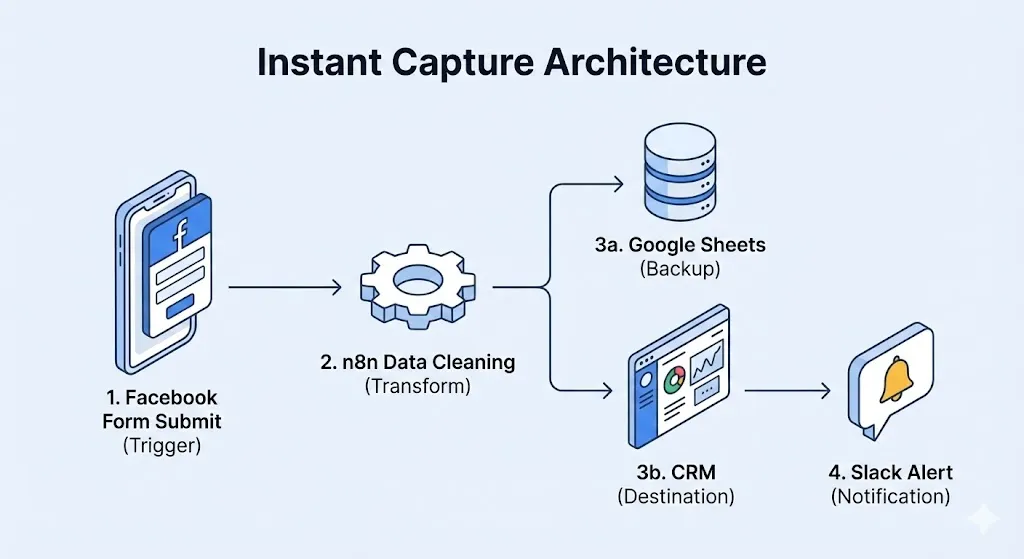
We are moving away from “polling” (checking every 15 minutes) to “instant triggers” (Webhooks).
The Workflow Logic:
- Trigger: A user submits a form on Facebook/Instagram. Meta immediately pushes a webhook to n8n.
- Transformation: We clean the messy data (Meta often sends raw field IDs). We format the phone number to be click-to-call ready.
- Destination: We create a row in Google Sheets (as a failsafe backup) and a contact in the CRM (HubSpot, Pipedrive, etc.).
- Notification: We alert the sales team via Slack/Discord with a “Call Now” button.
This ensures that the time between “Submit” and “Notification” is under 3 seconds.
Prerequisites: The Facebook Developer Setup
Unlike Zapier, n8n requires a secure handshake with Meta’s API.
- Meta for Developers: You need a Meta Developer App linked to your Business Manager.
- Permissions: Your app needs
leads_retrievalandpages_show_listpermissions. - The n8n Credential: n8n has a built-in OAuth2 credential flow. You must be an Admin of the Facebook Page you are connecting to authorize the app.
Tip: If you find the Facebook API setup daunting, Alfaz Mahmud Rizve offers specific consultation sessions to handle this initial configuration for agencies.
Step-by-Step: Building Your Facebook Lead Ads Automation
Let’s open the n8n editor and build this real-time bridge node by node.
Phase 1: The Trigger
Node 1: Facebook Lead Ads Trigger
- Node Type:
Facebook Lead Ads. - Event:
New Lead. - Credential: Connect your Facebook account (OAuth2).
- Page: Select the specific Facebook Page running ads.
- Form: Select “All Forms” (Recommended).
Testing: Use the Facebook Lead Ads Testing Tool (developers.facebook.com/tools/lead-ads-testing) to send a fake lead. If n8n captures it, you are live.
Phase 2: Data Cleaning (The Secret Sauce)
Facebook data is often messy. The phone number might come in as +1 (555) 123-4567. Your CRM hates this format; it wants 5551234567 for click-to-dial functionality.
![Visual infographic showing raw, messy data from Facebook (e.g., "Phone: [+1 (555) 123-4567]") on the left, passing through an n8n Set Node, and emerging as clean, formatted data (e.g., "Phone: 5551234567") on the right.Branded with whoisalfaz.me by Alfaz Mahmud Rizve](https://whoisalfaz.me/wp-content/uploads/2026/01/unnamed-16.webp)
Node 2: The Set Node (Formatting)
- Node Type:
Set. - Action: Create clean variables for downstream nodes.
- Name:
{{ $json.full_name }} - Email:
{{ $json.email }} - Phone: Use a simple regex expression to strip dashes, spaces, and plus signs.
- Expression:
{{ $json.phone_number.toString().replace(/\D/g, '') }}
- Expression:
- Ad Source:
{{ $json.ad_name }}(Crucial for tracking ROI).
Phase 3: The Sync
Node 3: Google Sheets (The Backup)
- Node Type:
Google Sheets. - Operation:
Append. - Map Fields: Map your cleaned Name, Email, Phone, and Ad Source.
- Why: CRMs can go down or have API errors. A Google Sheet is your “source of truth” backup. Alfaz Mahmud Rizve never builds a lead pipeline without a backup sheet.
Node 4: CRM Create (HubSpot/Pipedrive)
- Node Type:
HubSpot(or your tool of choice). - Resource:
Contact. - Operation:
Create. - Lead Status: Set to
New. - Lead Source: Hardcode as
Facebook Ads.
Phase 4: The Instant Alert
Node 5: Slack / Discord
- Node Type:
Slack. - Channel:
#sales-leads. - Message:🚨 New Hot Lead! Name: {{ $json.full_name }} Phone: {{ $json.phone }} Ad: {{ $json.ad_name }} [Click to Call](tel:{{ $json.phone }})
Real-World Use Case: Round-Robin Assignment
For larger agencies, simply dumping leads into a CRM isn’t enough. You need to assign them to sales reps fairly.
Alfaz Mahmud Rizve implements a “Round-Robin” logic at whoisalfaz.me using n8n:
- Storage: Keep a counter in a database or static variable (e.g.,
current_rep_index). - Logic: If index = 1, assign to Alice. If index = 2, assign to Bob. Reset index.
- Result: Leads are distributed perfectly evenly, preventing sales team conflicts and ensuring fast response times.
Common Mistakes with Facebook Lead Ads Automation
- Token Expiry: Facebook security tokens can expire every 60 days. If your automation suddenly stops, check your n8n Credentials. Reconnecting is usually required.
- Mapping “Raw” Data: Facebook sends form answers in an array called
field_data. If you change the order of questions in your Facebook Form, your n8n mapping might break if you mapped by “index” (Position 1) instead of “key” (Email). Always map by field ID. - Ignoring Duplicates: Users often click ads twice. Use an If node to check if the email already exists in your CRM before creating a contact to avoid errors.
Checklist: Go Live
- ✅ Test Tool: Sent a test lead via Facebook Developer Tools and saw it in n8n.
- ✅ Field Mapping: Verified that Name, Email, and Phone map correctly to the CRM.
- ✅ Phone Formatting: Ensured the phone number is clickable/dialable in the Slack alert.
- ✅ Error Handling: Added an error trigger to alert you if the sync fails.
- ✅ Notifications: Confirmed the Slack alert tags the right sales team members.
🚀 2026: The Year You Stop Being a Data Entry Clerk
It is January 1st, 2026. Look back at 2025. How many hours did you spend downloading CSVs? How many times did you copy-paste an email address from a spreadsheet into an email draft?
If you are reading this, you are likely an agency owner, a freelancer, or a growth marketer. You didn’t start your business to move data from Column A to Column B. You started it to build strategy, be creative, and generate revenue.
Manual data entry is the silent killer of agency growth.
When you handle leads manually:
- You lose speed: Every minute you delay, your lead gets colder.
- You lose focus: Context switching between “Strategy Mode” and “Admin Mode” destroys your cognitive momentum.
- You lose morale: Nobody wakes up excited to format phone numbers.
In 2026, the divide between “High-Performance Agencies” and “Struggling Agencies” will not be about who has the better ad creative—it will be about who has the better systems.
The high-performance agency has an automated backend. Their leads are synced instantly. Their follow-ups are automatic (like we built in Day 12). Their reporting updates itself. This frees up their brainpower to focus on what AI cannot do: building relationships and crafting killer offers.
My challenge to you for 2026: Adopt an “Automation First” mindset. Before you do any task twice, ask yourself: “Can n8n do this for me?”
If the answer is yes, build the workflow. Even if it takes you 2 hours to build and saves you 5 minutes a day, the math is on your side. In a year, that is 30 hours saved. But more importantly, it is 30 hours of mental clarity gained.
This series, 30 Days of n8n & Automation, is your blueprint. You don’t need a computer science degree. You just need the curiosity to connect the dots.
Let’s make 2026 the year your operations finally catch up to your ambition.