n8n Database Sync: PostgreSQL & MySQL Automation

This technical breakdown contains affiliate links. If you deploy this stack using my links, I earn a commission at no extra cost to you.
By Alfaz Mahmud Rizve | RevOps & Full Stack Automation Architect at whoisalfaz.me
TL;DR: You can automate GA4 client reporting by building a 6-phase n8n pipeline: authenticate via GCP OAuth, pull three core metrics, write them to Google Sheets using upsert logic (preventing duplicates), feed the data to GPT-4 for an executive summary, and deliver it to Slack using Block Kit formatting. The result: a self-healing reporting system that replaces 3-4 hours of manual work per client per month.
Welcome back to Day 20 of 30 Days of n8n & Automation.
In Day 19 we mastered the Speedrun Protocol to build workflows faster. In Day 18 we secured those workflows against data leaks.
Today we apply that speed and security to solve the single most tedious task in the agency world: Client Reporting.
If you run an agency or manage a SaaS product, you know the monthly reporting dread. You log into Google Analytics. You screenshot the traffic graph. You paste it into a Google Doc. You write three paragraphs interpreting the data. You repeat this for every client. It takes 3-4 hours per client. With 10 clients, that is a full work week wasted on copy-pasting.
We are going to replace that entire process with an Agency Command Center — an n8n pipeline that automates Google Analytics 4 data collection, AI-powered analysis, and Slack delivery.
The Philosophy: From Reporting to Intelligence
Most agencies sell "Reporting." Reporting is retrospective — a PDF that says "here is what happened." Clients delete these emails.
We are building Intelligence. Intelligence is automated, interpreted, and delivered to where clients actually work. By automating data collection, you free yourself to provide insight, which is the actual value clients pay for.
The Command Center Architecture:
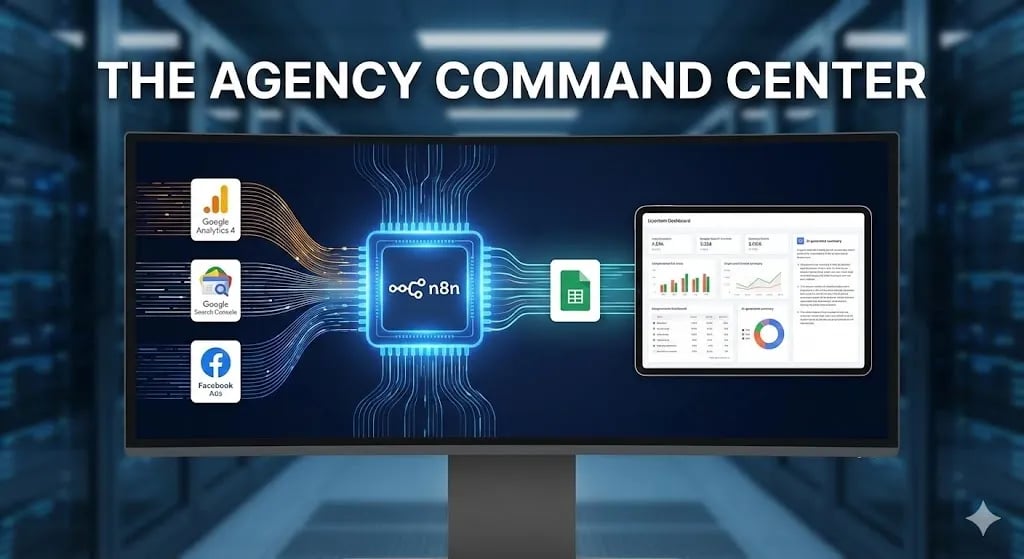 Click to expand
Phase 1: The GCP Authentication Handshake
90% of developers fail to automate GA4 because Google Cloud Platform authentication is designed for enterprise engineers, not marketers. Here is the streamlined protocol.
Step 1: Create a GCP Project
Navigate to console.cloud.google.com. Click "New Project." Name it something recognizable like n8n-agency-reporting. Select your billing account.
Step 2: Enable the Required APIs
GCP is a locked building — you explicitly unlock each door. Go to APIs & Services → Library and enable:
- Google Analytics Data API (this is the GA4 API, not Universal Analytics)
- Google Sheets API (for our storage layer)
Step 3: Configure the OAuth Consent Screen
Go to APIs & Services → OAuth Consent Screen. Select "External" user type. Fill in the app name, support email, and authorized domains. Under "Scopes," add analytics.readonly. Under "Test Users," add the email address you will authenticate with in n8n.
Step 4: Create OAuth2 Credentials
Go to APIs & Services → Credentials → Create Credentials → OAuth Client ID. Select "Web application." Set the authorized redirect URI to your n8n instance URL followed by /rest/oauth2-credential/callback. Download the JSON file containing your Client ID and Client Secret.
Critical: Store these credentials in n8n's built-in Credential Manager immediately. Never paste them into a node directly — we covered why in the Day 18 Privacy Protocol.
[!TIP] Infrastructure note: If your n8n instance needs a stable callback URL for OAuth, a dedicated server with a fixed IP is essential. Vultr's High Frequency Compute provides the static IP and low-latency infrastructure that makes OAuth callbacks reliable.
Phase 2: Defining the Golden Metrics
The mistake beginners make is pulling everything. Clients do not care about bounce rate segmented by device type in a specific city. We pull the Golden Trio — the three numbers that actually drive business decisions:
- Active Users — How many people visited this week vs. last week.
- Sessions by Source — Where is the traffic coming from (Organic, Paid, Referral, Direct).
- Conversions — How many goal completions occurred (form submissions, purchases, signups).
Configuring the GA4 Node
Add a Google Analytics 4 node in n8n. Select your OAuth credential. Set the Property ID (found in GA4 Admin → Property Settings). Configure the date range to pull the last 7 days: start date {{ $today.minus({days: 7}).toISODate() }} and end date {{ $today.minus({days: 1}).toISODate() }}.
Set your dimensions to date and sessionDefaultChannelGrouping. Set your metrics to activeUsers, sessions, and conversions.
Important: Always set the end date to yesterday. GA4 data is not real-time — pulling "today" returns incomplete numbers that will confuse your AI analyst downstream.
Phase 3: Self-Healing Storage with Upsert Logic
This is the difference between a script and a system. If you run your workflow twice by accident, a basic "Append" operation duplicates every row. Your dashboard shows double the traffic. Your client panics.
We use the Upsert (Update or Insert) pattern instead.
Google Sheets Configuration
Date, Channel, Active Users, Sessions, Conversions.Date + Channel. This is your composite unique key.The result: your Command Center is idempotent. You can re-run the last 30 days of history right now and it will not duplicate a single row. It simply heals any gaps in the data.
Phase 4: The AI Analyst — GPT-4 Integration
This is how you justify a premium retainer for this automation. Do not just send raw data. Interpret it.
Add an OpenAI node after your aggregation step. Use GPT-4o for its reasoning capability.
System Prompt:
You are a Senior Marketing Analyst. Review the GA4 traffic data below and write
a 3-sentence executive summary for the CEO. Rules:
1. Lead with the single most important change (up or down).
2. Identify the primary traffic source driving the change.
3. End with one specific, actionable recommendation.
Do not use jargon. Write for a non-technical executive.
Input: Pass the JSON output from the GA4 node as the user message.
Example Output:
"Traffic is up 12% week-over-week, driven primarily by a surge in LinkedIn referrals from your latest article. However, Organic Search dropped 5%, likely due to the holiday weekend reducing search volume. Recommendation: Increase LinkedIn posting frequency to capitalize on the momentum."
That is not a report. That is actionable intelligence. That is what clients pay for.
Phase 5: Automated Delivery via Slack
The final mile is delivery. Do not ask clients to log into a dashboard — they will not. Push the intelligence to where they already work.
Slack Block Kit Formatting
Use the Slack node with Block Kit to make the message look like a premium software notification:
The client sees a clean, professional notification every Monday at 8:05 AM. They never have to ask "how are the numbers looking?" again.
Troubleshooting the Three Common Failures
From my experience deploying this pipeline across multiple client accounts:
"403 Access Denied" — You did not add your email to the "Test Users" list in the GCP OAuth Consent Screen. Go to GCP → OAuth Consent Screen → Test Users → Add your email.
"Quota Exceeded" — The GA4 Data API has strict hourly rate limits. If you loop through 15+ client properties in sequence, you will hit it. Add a Wait node with a 5-second delay between each GA4 request.
"Empty Data Returned" — You are trying to pull today's data. GA4 processes data with a 24-48 hour lag. Always set your end date to {{ $today.minus({days: 1}) }}.
The Business Case: Selling the Command Center
Switch from Engineer to Agency Owner for a moment.
You do not sell "n8n automation." You sell "The Pulse" — a branded, autonomous intelligence system.
The pitch: "We currently spend 4 hours per month manually compiling your traffic data. I propose we deploy the Agency Command Center — it connects your GA4, processes the data through AI analysis, and delivers a personalized executive summary to your Slack every Monday. You will never need to ask how numbers are looking again. One-time setup: $1,000. Hosted on our private, encrypted infrastructure."
Because you are running this on the self-hosted Vultr infrastructure we built in earlier days and secured in Day 18, your marginal cost per client is near zero. That $1,000 setup fee is almost pure profit.
What's Next
We have now built a system that wakes up autonomously, pulls data from GA4, writes it to a self-healing database, generates an AI-powered executive summary, and delivers it to the client without a single manual step.
Tomorrow in Day 21, we move from reporting your own data to researching your competitors' data. We will build an autonomous personal branding pipeline with n8n that monitors, analyzes, and acts on social signals.
Follow the full series: 30 Days of n8n & Automation
About the Author
Alfaz Mahmud Rizve is a RevOps Engineer and Automation Architect helping SaaS founders and scaling agencies eliminate manual revenue bottlenecks with self-healing, autonomous infrastructure. Explore his work at whoisalfaz.me.
Deploy this Workflow
Skip building from scratch. Download the production-ready n8n template JSON and start running it in 5 minutes.
Core Deployment Stack
To build this exact architecture in production, you will need the core infrastructure. I strictly use and recommend the following enterprise-grade platforms.
n8n Cloud
The most powerful fair-code automation platform. Get 20% off your first year on any paid plan.
Vultr High-Performance Cloud
Deploy self-hosted vector databases & AI infrastructure worldwide. Get $300 in free credit.
Databox
Business analytics platform to build and share custom dashboards.
Complementary RevOps Toolchain
Brevo (formerly Sendinblue)
Enterprise-grade email API and marketing automation. Excellent SMTP for n8n.
Pinecone Vector Database
The vector database for building AI applications. Essential for RAG architectures.
Qdrant Cloud
Rust-native vector search engine for the next generation of AI. Fast, scalable, and memory-efficient.
In this Article
Ready to automate your agency?
Skip the manual grunt work. Let's build a custom system that runs your business on autopilot 24/7.